 Login
Login





















Quick Answers:
Q1. Who are mobile workers?
Mobile workers are employees who perform work in the field, on the road, at customer locations, across job sites, or away from a fixed workplace. They may include technicians, drivers, installers, inspectors, delivery teams, sales reps, and service crews.
Q2. What is mobile workforce management?
Mobile workforce management is the process of coordinating mobile workers in real time so jobs are assigned, routes are planned, updates are shared, customers are informed, and work is completed with proper documentation.
Q3. What is mobile workforce management software?
Mobile workforce management software is a digital platform that helps businesses schedule, dispatch, track, communicate with, and manage employees who work outside the office.
Q4. What features does mobile workforce software have?
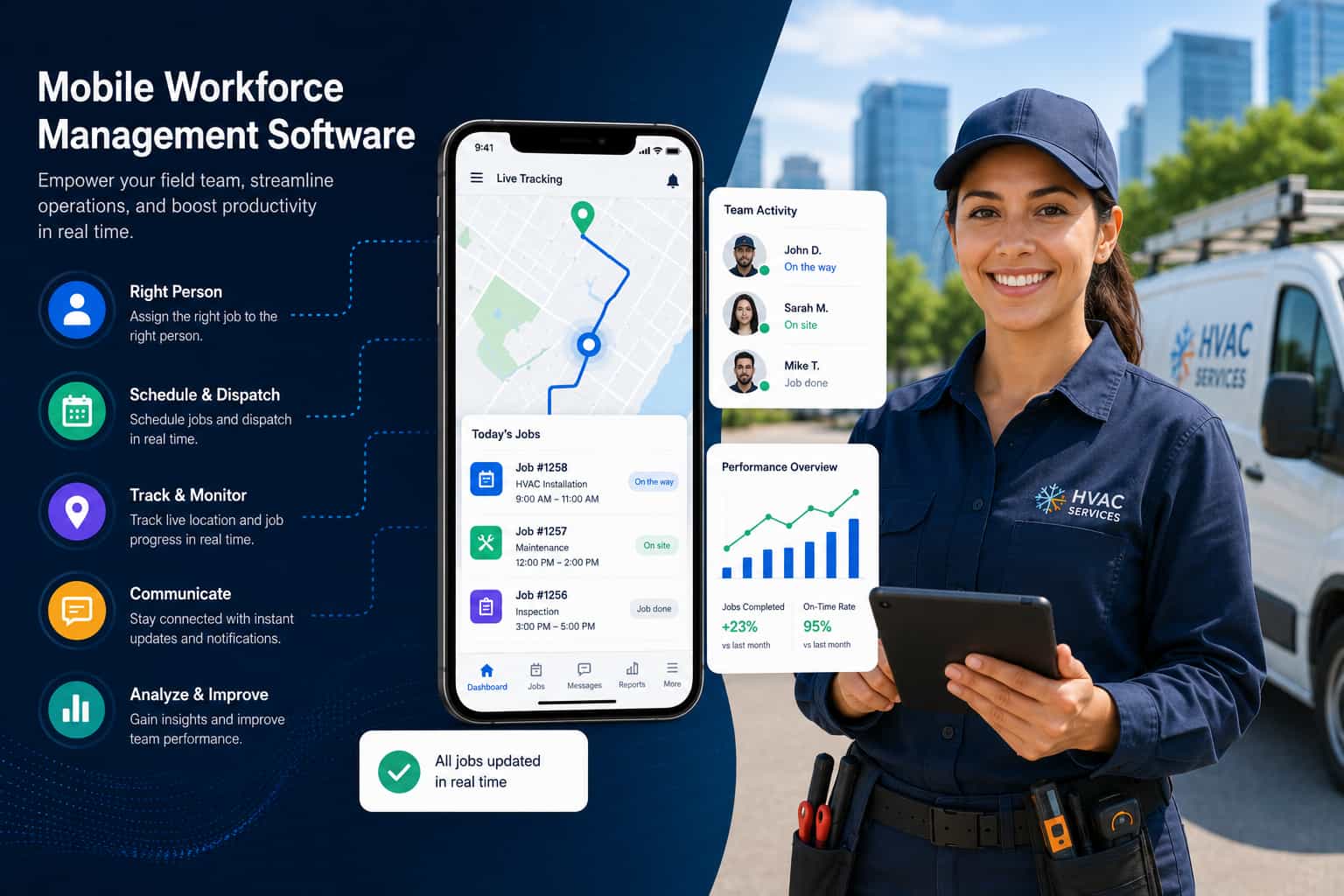
Mobile workforce software usually includes scheduling, dispatching, GPS tracking, mobile job updates, route optimization, digital forms, proof of work, customer notifications, and reporting.
For service businesses, mobile workforce management software helps connect the office, field teams, and customers in one workflow. In practical terms, it helps businesses:
Assign the right worker or crew to the right job
Dispatch work directly to a mobile app
Track field team location and job progress
Optimize routes and reduce travel delays
Capture photos, forms, signatures, notes, and proof of work
Send customers ETAs, reminders, delay alerts, and completion updates
Review field performance, job completion, and productivity data
Unlike basic workforce management software, which focuses mainly on schedules, attendance, labor planning, and payroll-related workflows, mobile workforce management focuses on real-time field execution.
In this guide, we will cover what mobile workforce management software is, how it works, its core features, key benefits, common use cases, best practices, and how to choose the right platform for your field teams.
What Is Mobile Workforce Management Software?
Mobile workforce management software is a system used to manage employees who work outside a central office. It helps businesses coordinate field schedules, job assignments, employee locations, mobile updates, customer communication, and completion records.
It is built for teams that move between customer locations, job sites, warehouses, routes, and service areas throughout the day. This includes technicians, installers, drivers, inspectors, delivery teams, moving crews, repair teams, maintenance teams, and other field employees.
In practical terms, mobile workforce management software gives office teams real-time visibility into field work. Instead of calling a worker to ask where they are or waiting until the end of the day for paperwork, managers can see job progress, location updates, notes, forms, photos, signatures, and completion details from one system.
For field teams, the software provides the information they need to complete work without constantly checking in with the office. Workers can access job details, customer information, route instructions, checklists, forms, and status updates from a mobile app.
For customers, it improves communication through appointment reminders, ETAs, delay alerts, arrival notifications, and completion updates.
At its core, mobile workforce management software helps businesses answer five operational questions:
Who is assigned to the job?
Where is the worker or crew right now?
What is the current job status?
What information does the field team need?
What should the customer be told next?
For service businesses, those answers are essential because field work changes throughout the day. Mobile workforce management software brings those moving parts into one connected workflow.
Interesting Stat:
According to Microsoft’s Work Trend Index Special Report, frontline workers make up 80% of the world’s workforce. That scale shows why businesses need better mobile tools to coordinate field teams, schedules, routes, communication, and job updates.
Is Mobile Workforce Management the Same as Field Service Management?
Mobile workforce management and field service management often overlap. For service businesses, field service management software may also function as mobile workforce management software when it includes tools for scheduling, dispatching, crew tracking, route planning, mobile job updates, customer communication, and proof of work.
The difference is mostly in emphasis. Mobile workforce management focuses on coordinating employees who work outside the office. Field service management focuses on managing service operations such as appointments, work orders, technicians, customers, and job completion.
In many service businesses, these workflows are part of the same system. For example, Arrivy’s field service management software supports mobile workforce management by helping teams manage field employees, routes, customer updates, forms, and job progress in real time.
How Mobile Workforce Management Software Works?
Mobile workforce management software supports the complete field workflow, from job creation to completion.
1. Jobs or Tasks Are Created
A job, appointment, service request, delivery, inspection, installation, or work order is created in the system. This may come from a CRM, website form, customer call, booking portal, or internal operations team.
The job record typically includes customer details, service type, location, notes, required equipment, appointment window, and any special instructions.
2. Teams Are Scheduled and Assigned
Dispatchers or managers assign the job to the right employee, technician, crew, or driver based on availability, skill set, location, workload, and capacity. Mobile workforce scheduling software helps prevent overbooking and makes it easier to adjust schedules when the day changes.
Read our guide to mobile workforce scheduling and the KPIs it improves.
3. Work Is Dispatched to Mobile Teams
Once the job is assigned, the worker or crew receives the details through a mobile workforce app. Field employees can view the job details, customer information, address, route, forms, tasks, and instructions without calling the office.
4. Managers Track Progress in Real Time
Office teams can monitor field activity as it happens. They can see job status, team location, travel progress, delays, and completion activity without depending on manual check-ins. This improves dispatch decisions and reduces guesswork.
5. Field Teams Capture Job Updates
Workers update statuses such as “on the way,” “arrived,” “in progress,” “completed,” or “delayed.” They can also upload photos, collect signatures, complete digital forms, add notes, and record time.
6. Customers Receive Updates
Customers can receive appointment reminders, ETAs, delay alerts, arrival notifications, and completion updates. This reduces inbound calls and improves trust during the service experience.
7. Managers Review Performance
After work is completed, managers can review attendance, travel time, job duration, crew productivity, completion rates, missed appointments delays, and customer communication. This turns daily field activity into useful operational data.
Key Features of Mobile Workforce Management Software
The best mobile workforce management software connects scheduling, dispatch, field execution, communication, and reporting. Key features include:
| Feature | Why it matters? |
|---|---|
| Job scheduling | Helps teams assign work based on time, availability, skills, and capacity. |
| Dispatching | Sends the right job to the right person or crew at the right time. |
| Mobile app | Gives field workers access to job details, service history, routes, and updates. |
| GPS tracking | Shows where mobile teams are during the workday. |
| Route optimization | Reduces travel time, fuel costs, idle time, and delays. |
| Task management | Keeps every job step clear for field employees. |
| Work order management | Connects job details, status, notes, and completion records. |
| Digital forms | Replaces paper forms, checklists, and manual documentation. |
| Photos and signatures | Captures proof of service or job completion. |
| Time tracking | Measures work time, travel time, idle time, and non-work time. |
| Customer communication | Sends ETAs, reminders, delay alerts, and completion updates. |
| Real-time reporting | Helps managers track performance, delays, and job outcomes. |
| Offline access | Allows field teams to continue working when connectivity is weak. |
| Integrations | Connects with CRM, accounting, payroll, calendar, ERP, storage, and communication systems. |
A strong mobile field service software platform does not treat these as separate tools. The value comes from connecting them into one workflow so teams can move from assignment to completion without scattered handoffs.
For a closer look at technician-focused tools, see our breakdown of the 5 best field service mobile apps for technicians in 2026.
Benefits of Mobile Workforce Management Software
Mobile workforce management software improves both operational efficiency and customer experience. The biggest benefits include:
Better field visibility: Managers can see where teams are, what they are working on, and whether jobs are on track.
Faster dispatching: Dispatchers can assign, reassign, or adjust jobs quickly when schedules change.
Improved productivity: Field teams spend less time calling the office, searching for job details, filling out paperwork, or driving inefficient routes.
Lower operating costs: Route optimization, reduced idle time, fewer missed appointments, and better schedule planning can reduce fuel, labor, and overtime costs.
Stronger accountability: Status updates, timestamps, GPS data, photos, forms, and signatures create a clearer record of field activity.
Better customer communication: Automated ETAs, reminders, and delay alerts keep customers informed without manual follow-up.
Fewer manual errors: Digital job records reduce the risk of lost paperwork, missed notes, duplicate entries, and incomplete forms.
Faster reporting: Managers can review job completion, crew performance, and service delays without waiting for end-of-day updates.
Improved scalability: As field teams grow, a centralized system makes it easier to manage more jobs, more crews, and more customer appointments.
Who Uses Mobile Workforce Management Software?
Mobile workforce management is used by any business that manages employees outside the office. Common users include:
Field service companies
Home service businesses
HVAC, plumbing, electrical, and maintenance teams
Moving and delivery companies
Installation crews
Telecom and utility service teams
Construction and contractor teams
Property maintenance teams
Medical equipment delivery teams
Inspection and compliance teams
Logistics and last-mile delivery operations
Sales and merchandising teams
For these businesses, workforce management for field teams is not just about scheduling labor. It is about coordinating people, vehicles, routes, job details, customer expectations, and proof of work across multiple locations.
Why Mobile Workforce Management Matters for Service Businesses?
Service businesses operate in a fast-moving environment. Crews may start the day at a warehouse, travel to several customer locations, pick up equipment, handle job changes, and deal with delays on the road. Dispatchers need live visibility into field activity so they can make better decisions. Customers expect accurate ETAs and proactive updates. Crews need job details without repeatedly calling the office. Managers need proof of work, not just a final status that says “completed.”
For such operations-heavy businesses, manual handoffs create cost. A missed update can delay the next job, a late arrival can trigger customer complaints, or a dispatcher without location visibility may assign the wrong crew. Over time, these small inefficiencies reduce capacity and profit margins.
Mobile workforce tracking software helps service businesses move from reactive management to proactive field coordination.
Common Problems Mobile Workforce Management Software Solves
| Problem | How Mobile Workforce Management Software Helps |
|---|---|
| Manual scheduling | Centralizes job calendars, crew availability, and assignments. |
| Poor field visibility | Shows live job status, location, and progress. |
| Missed updates | Sends real-time alerts between office and field teams. |
| Late arrivals | Connects routing, dispatch, and ETA communication. |
| Scattered communication | Reduces reliance on calls, texts, and disconnected apps. |
| Paper forms | Captures job data through digital forms and checklists. |
| Weak accountability | Tracks status, time, location, photos, and completion proof |
| Slow reporting | Turns field activity into performance data |
These problems are common in growing field operations. The goal is not just to digitize the old process but to also create a cleaner, faster, more visible workflow from assignment to completion.
Mobile Workforce Management Best Practices
To get the most value from mobile employee management software, businesses should follow a few practical best practices
Standardize job statuses: Use clear statuses such as scheduled, dispatched, on the way, arrived, in progress, delayed, completed, and canceled. This keeps office and field teams aligned.
Keep job details complete: Field teams should have customer information, service instructions, location details, forms, and notes before they arrive.
Use route planning before the day starts: Route optimization works best when dispatchers plan based on geography, job duration, time windows, and crew capacity.
Automate customer updates: Appointment reminders, ETAs, and delay notifications should not depend on manual calls every time.
Capture proof of work: Use photos, signatures, digital forms, timestamps, and notes to document what happened on site.
Train field teams on the mobile app: Adoption improves when workers understand how the app makes their day easier, not just how it helps management
Review performance regularly: Track delays, travel time, job duration, missed appointments, and completion rates to identify operational bottlenecks.
Integrate where possible: Connecting workforce management software with CRM, accounting, calendars, or storage tools reduces duplicate data entry.
How to Choose the Right Mobile Workforce Management Software?
When comparing mobile workforce management software, look beyond basic scheduling. The right system should support your full field operation.
Ask these questions:
Can dispatchers assign and update jobs quickly?
Does the mobile app work well for crews in the field?
Can managers track job progress and team location in real time?
Does the system support customer ETAs and automated updates?
Can workers capture photos, signatures, notes, and digital forms?
Does it support route optimization?
Can it integrate with your existing CRM, accounting, or service tools?
Is reporting clear enough to improve operational decisions?
Can the software scale as your team, routes, and job volume grow?
The best choice is usually the platform that reduces manual work for both office staff and field teams while improving the customer experience.
How Arrivy Supports Mobile Workforce Management
Arrivy helps service businesses manage mobile teams through a connected field operations workflow. Instead of relying on separate tools for scheduling, dispatch, crew tracking, route planning, forms, and customer communication, Arrivy brings these activities together.
With Arrivy, teams can schedule jobs, dispatch crews, optimize routes, track field activity, send customer notifications, collect job updates, capture digital forms, confirm completion, and sync data with back office systems. This helps dispatchers stay informed, field teams stay organized, and customers stay updated throughout the service journey.
For businesses that depend on mobile crews, technicians, drivers, installers, or field service teams, Arrivy provides the visibility and coordination needed to manage daily operations more efficiently.
If your mobile workforce is organized into shared crews, our guide to crew management tools for field teams compares platforms for scheduling, dispatch, location visibility, routing, and job execution.