 Login
Login






















Quick Answer:
What Is Field Service Management Software?
Field service management (FSM) software helps businesses coordinate and track work performed outside the office. It centralizes scheduling, dispatching, work orders, field communication, customer updates, and job documentation in one system.
Businesses use FSM software to manage mobile crews more efficiently, reduce manual coordination, and improve visibility across field operations.
Every job you book creates multiple manual tasks. At 50 jobs a week, that is hundreds of hours a month spent on admin instead of work.
Most of that time goes into phone calls, spreadsheets, texts, and disconnected apps. Every handoff is another chance for something to get missed, delayed, or lost.
Field service management software fixes that.
Everything lives in one place. Dispatchers see crew availability. Crews get job details on mobile. Customers receive updates without having to call your office. Managers track progress without chasing the field.
This guide covers how FSM software works, which features matter most, how it compares to CRM and ERP, what it costs, and what to look for when choosing a platform.
Recommended Reads
•The Best Field Service Management Software for Small Businesses (2026 Guide)
•How to Choose the Right Field Management Software in 2026
•Features To Look For in a Field Service Management Software
What Is Field Service Management Software?
Field service management software is a digital platform for managing work performed outside the office. It helps businesses create work orders, schedule jobs, dispatch crews, track field activity, collect job documentation, update customers, and feed completed job data into reporting and billing.
It is built for businesses that send crews to customer locations, job sites, commercial properties, or remote assets. Think HVAC companies, solar installers, moving companies, roofers, plumbers, electricians, and construction teams.
Without FSM software, these operations run on phone calls, paper forms, spreadsheets, and disconnected apps. Information sits in separate places. Jobs get missed. Customers wait for updates. Managers make decisions without a clear picture of what is happening in the field.
How Does Field Service Management Software Work?
FSM software connects every step of a job, from the first service request to final billing, in a centralized operation. Here is how a typical job moves through the system.
A customer submits a service request, requests a quote, or books through a website, CRM, phone call, or self-scheduling form.
The system creates a work order with customer details, job location, service type, notes, and required resources.
A dispatcher assigns the job based on crew availability, skills, location, and time windows.
The assigned crew receives job details, customer notes, forms, and location data on a mobile app.
The crew updates job status in real time as work moves from scheduled to en route to started to completed.
The crew captures photos, notes, digital forms, signatures, and proof of work from the job site.
Customers receive automated updates at key stages, from appointment confirmation to job completion.
Completed job data flows into reports, invoices, payroll, or connected CRM and accounting systems.
Common Field Service Challenges FSM Solves
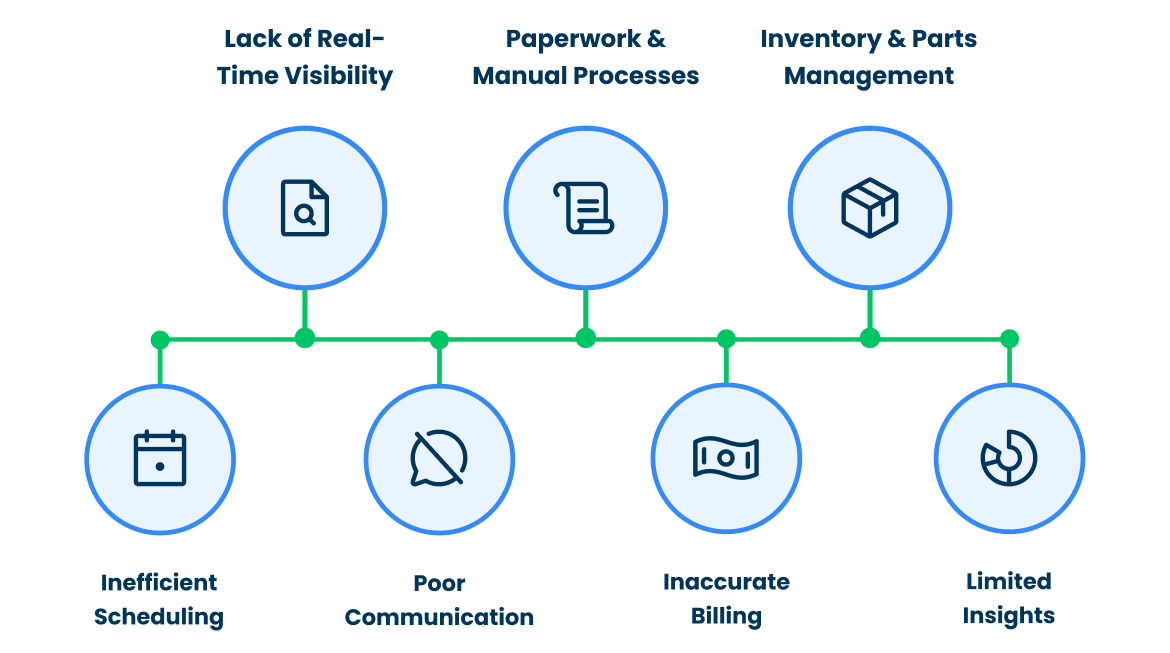
Field service teams lose time when daily operations depend on manual updates, disconnected tools, and scattered job records. These problems affect every part of the operation.
| Challenge | Without FSM Software |
|---|---|
| Manual scheduling | Jobs get double-booked, delayed, or assigned to the wrong crew |
| Poor dispatch communication | Dispatchers rely on repeated calls and texts to track job progress |
| No field visibility | Managers do not know which jobs are scheduled, delayed, or completed |
| Late paperwork | Forms, signatures, and photos reach the office late or go missing |
| Inefficient routing | Crews spend more time driving between jobs than completing them |
| Missing job details | Crews arrive without customer notes, service history, or task instructions |
| Weak customer updates | Customers call the office for ETAs, status updates, and appointment changes |
| Delayed invoicing | Billing waits for timesheets, completion notes, or proof of work |
These problems compound as your team grows. Adding more crews, locations, and service requests makes manual coordination harder to control.
Why You Need FSM Software
You need FSM software if:
- You manage more than one crew or service location
- Jobs move through calls, texts, or spreadsheets instead of a clear system
- Customers regularly call your office for ETAs or job status
- Crews arrive at jobs without complete details or documentation
- Field paperwork reaches the office late or goes missing
- Invoices wait on missing time logs, completion notes, or proof of work
- Managers have no real-time view of what is happening in the field
Key Features of Field Service Management Software
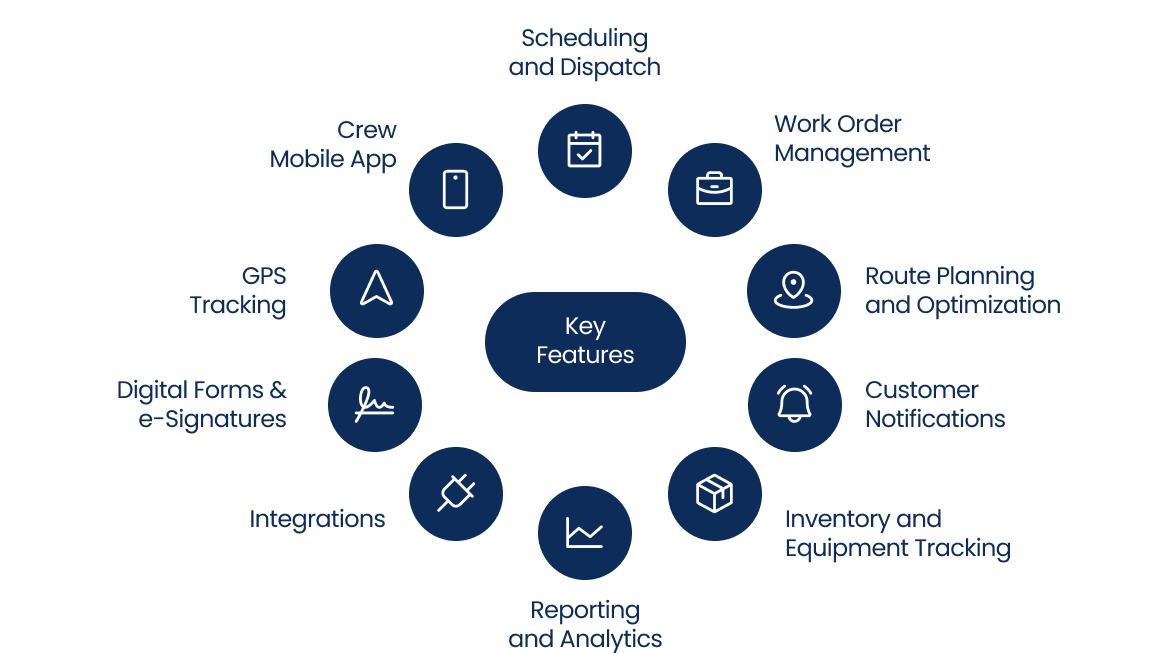
The right FSM platform covers the full service workflow, from the moment a job is created to the moment it is closed. These are the features that matter most.
| Feature | Significance for Field Teams |
|---|---|
| Scheduling and dispatch | Assigns jobs based on crew availability, skills, location, and time windows |
| Work order management | Stores job details, service type, customer notes, location, and required resources in one record |
| Crew mobile app | Gives crews access to job details, forms, photos, customer notes, and status updates from the field |
| Route planning and optimization | Plans job sequences based on location, traffic, and service windows to reduce drive time |
| GPS tracking | Tracks crew location and job progress in real time |
| Digital forms and e-signatures | Captures checklists, photos, notes, signatures, and proof of work on site |
| Customer notifications | Sends appointment reminders, ETA updates, status alerts, and completion messages automatically |
| Inventory and equipment tracking | Tracks parts, tools, vehicles, and job-day resources to avoid delays |
| Integrations | Connects field data with CRM, ERP, accounting, payroll, and reporting systems |
| Reporting and analytics | Tracks job completion rate, response time, travel time, and crew productivity |
Integrations Aren’t Optional Anymore
According to the Global Growth Insights survey, 95% of growing businesses say integration between their software systems is essential for scaling.
These features work best when connected. Scheduling without field updates creates blind spots. A mobile app without work orders leaves crews short on context. Reporting without clean field data gives managers an incomplete picture.
Benefits of Using FSM Software

FSM software changes how work moves across your operation. The impact shows up in scheduling accuracy, crew output, customer experience, and business growth.
Better Crew Productivity
When the crew receives complete job details, customer notes, forms, and location data before arrival, they spend less time calling the office and more time completing work. According to McKinsey research, smart scheduling increases field worker productivity by 20 to 30 percent. That gain comes directly from better information flow and smarter job assignment.
Fewer Scheduling Errors
Dispatchers assign jobs from one system with crew availability, skills, location, and time windows in view. Double-booking, missed appointments, and last-minute reassignments drop when your team works from a single source of truth.
Faster Invoicing
Completed job data flows directly into billing workflows. Your team stops waiting for paper timesheets, handwritten notes, or missing proof of work before sending an invoice.
Cleaner Job Records
The crew captures photos, notes, forms, signatures, and timestamps from the job site. These records support billing accuracy, compliance requirements, and dispute resolution.
Stronger Customer Communication
Customers receive appointment confirmations, ETA updates, and job completion messages automatically. Inbound calls for job status drop. Service transparency goes up.
A Platform for Growth
Service businesses are investing in a field service management system because manual coordination does not scale. A connected field operation gives your business the structure to take on more crews, locations, and service volume without adding proportional admin overhead.
Who Uses FSM Software?
Any business that sends crews, technicians, drivers, installers, or contractors to work outside the office uses FSM software. The common need is field visibility: a clear view of who is doing what, where, and when.
| Industry | How FSM Software Helps |
|---|---|
| HVAC | Schedules service calls, tracks technicians, and manages recurring maintenance visits |
| Solar | Coordinates site surveys, installations, inspections, and customer updates across project stages |
| Roofing | Manages crew schedules, job documentation, photos, and project status updates |
| Moving and logistics | Plans routes, assigns crews, tracks job progress, and keeps customers informed during moves |
| Construction | Coordinates contractors, jobsite tasks, equipment, and field documentation |
| Plumbing | Assigns urgent jobs, tracks crew location, and stores service history |
| Electrical services | Manages inspections, repairs, safety records, and proof of work |
| Cleaning and janitorial | Organizes recurring jobs, staff schedules, checklists, and completion records |
| Landscaping | Manages recurring service routes, crew schedules, equipment, and seasonal work orders |
| Utilities and telecom | Tracks field crews, asset service records, emergency repairs, and compliance documentation |
If your business books jobs, sends people to complete them, and needs a record of what happened, FSM software fits your operation.
How Arrivy Handles Field Service Operations?
Arrivy is a field service management platform built for businesses managing scheduling, dispatch, field execution, customer communication, and reporting across high-volume operations. It connects office teams, field crews, and customers in one workflow so jobs move with better visibility, fewer delays, and less manual coordination.
| Arrivy Features | Key Capabilities |
|---|---|
| Dynamic scheduling and dispatch | Assigns jobs using crew availability, skills, location, service areas, and time windows |
| Route optimization | Reduces drive time and improves schedule efficiency across multi-stop operations |
| Work order management | Centralizes service details, customer information, forms, notes, and task activity in one record |
| Mobile field operations | Gives crews access to schedules, updates, documentation, and customer context from the field |
| Offline digital forms | Let’s crews complete forms, capture signatures, and collect proof of work without connectivity |
| Live ETA tracking and customer updates | Gives customers real-time visibility into technician arrival and job progress without requiring an app |
| Self-scheduling workflows | Let’s customers book appointments based on real-time availability and scheduling rules |
| Workflow automation | Automates reminders, notifications, status updates, and operational follow-ups |
| API-first integrations | Connects field operations with CRM, ERP, accounting, payroll, storage, and other business systems |
| Crew timesheets and reporting | Tracks work hours, travel time, productivity, and operational performance metrics |
| Audit-ready job history | Maintains a complete timeline of status changes, timestamps, notes, photos, and proof of work for accountability and compliance |
Arrivy fits businesses where field operations depend on timing, coordination, customer communication, and accurate job tracking. Solar installers, roofing companies, moving providers, contractors, logistics teams, HVAC businesses, and service organizations use it to manage work from booking to completion with better operational control.
Conclusion
When scheduling, dispatch, field updates, and customer communication sit in separate tools, your team spends more time managing gaps than completing jobs.
Field service management software puts these workflows in a unified system. Crews get the right details before arrival. Customers stay informed. Managers see field performance without chasing updates.
If your team has outgrown manual coordination, a field service management platform gives you a cleaner path from service request to completed work.