





















Growth should be good news for a field service business.
More jobs. More customers. More technicians. More revenue.
But for many service companies, growth exposes every weak point in the operation as it changes the nature of the business. The same informal processes that worked for a smaller team often stop working once job volume increases, routes expand, and more people need to stay aligned. At that point, success depends less on individual effort and more on the systems behind the work.
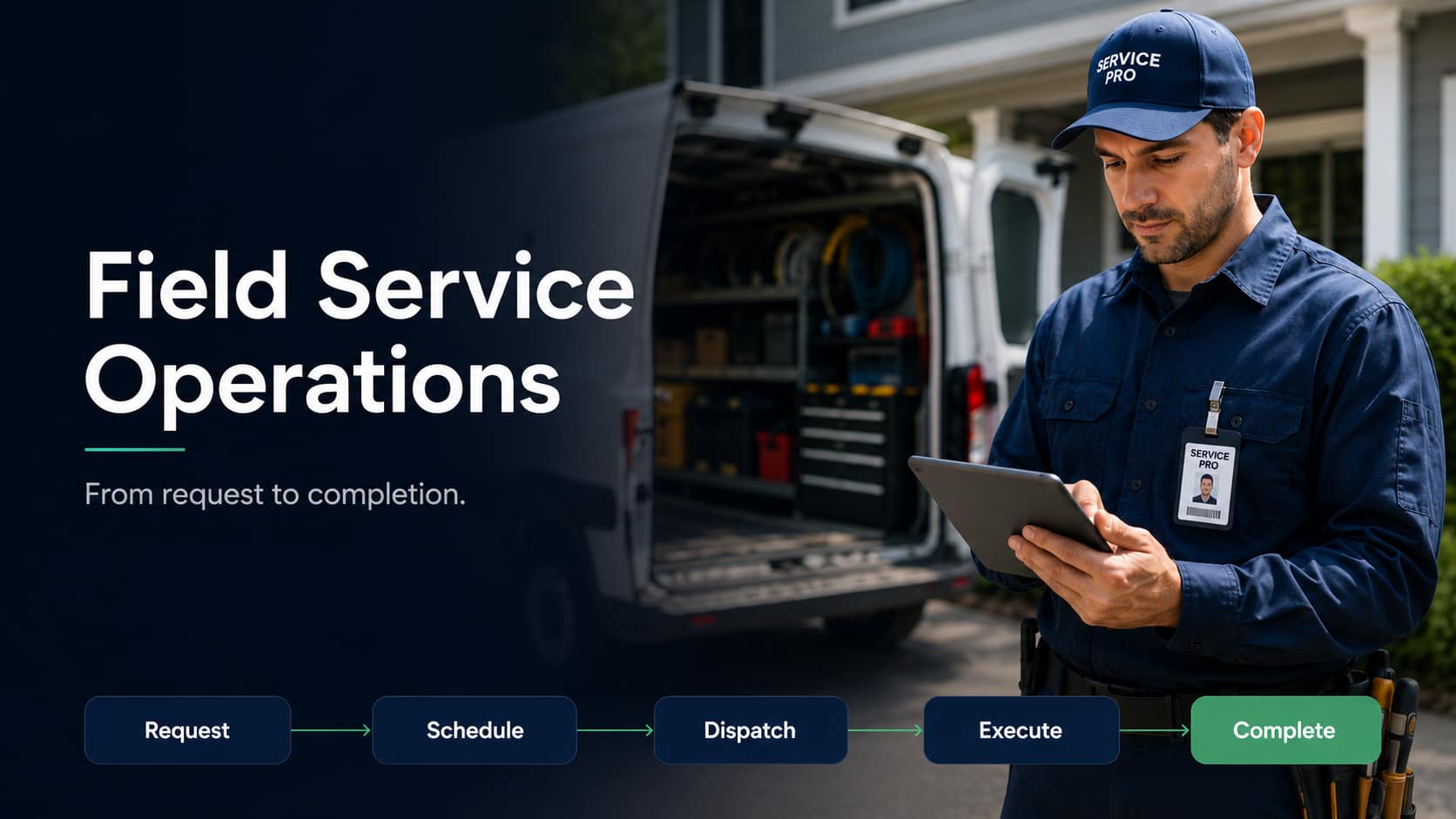
That is the real job of field service operations: creating a repeatable system that moves work from request to completion without losing visibility, control, or customer trust.
This guide explains how field service operations work, where growing teams usually break down, and how to build a workflow that helps your business complete more jobs with less manual coordination.
Quick Answer:
What Are Field Service Operations?
Field service operations are the processes used to manage service work performed outside the office. They include customer request intake, scheduling, dispatch, route planning, work order management, technician communication, customer updates, field documentation, reporting, and follow-up.
In simple terms, field service operations are the system that keeps the office, dispatchers, technicians, customers, and managers aligned throughout the full service lifecycle.
A strong operation helps service businesses answer five critical questions every day:
When those questions are answered clearly, field teams move faster, customers stay informed, and managers gain better control over daily performance.
Why Field Service Operations Matter More as You Grow?
Small teams can often survive on phone calls, spreadsheets, and personal relationships. Because at such a small scale, the dispatcher may know every technician’s strengths, or the office may remember which customer needs special instructions, or a manager may be able to keep the whole day’s schedule in their head.
But that breaks down as the business grows.
| !
Without a System Technicians lose time waiting for information. Dispatchers spend the day fixing schedule changes. Customers get vague or late updates. Work orders close slowly because photos, forms, or signatures are missing. |
✓
With a System Every added technician, route, service area, and customer is absorbed by the workflow instead of adding more coordination work for the office. |
Efficient field service operations protect the business from operational drag. They help you:
Complete more jobs with the same team
Reduce missed appointments and unnecessary return visits
Improve technician productivity
Keep customers informed without constant manual calls
Reduce paperwork and administrative workload
Give managers clearer visibility into daily performance
Scale without depending on heroic effort from the office team
The goal is not simply to be “organized.” The goal is to make service delivery predictable, measurable, and repeatable.
The Field Service Workflow: From Request to Completion
A healthy field service operation connects every stage of the job lifecycle. The exact workflow may vary by industry, but most service businesses follow the same basic pattern.
1. Service Request Intake
Customer name and contact information
Service location
Type of service needed
Urgency or priority level
Preferred appointment window
Photos, notes, or supporting details
Required technician skill
Required tools, parts, or equipment
Customer history or previous work
Follow-up or recurring service needs
The goal is to prevent vague jobs from entering the schedule. A dispatcher should know exactly what the customer needs, and a technician should arrive on-site with the context required to complete the work.
2. Job Review and Prioritization
Before a job is scheduled, the office or service coordinator should review the request to see if it’s urgent, requires a licensed technician or special equipment or if this customer had the same issue before, and if there is enough information to send someone to the site.
This step is often skipped in busy operations, but it matters so much because poor review leads to wrong assignments, missing parts, repeat visits, and longer completion times.
A simple dashboard with visible incoming jobs helps teams separate emergencies from routine work and make better decisions about technician assignment and scheduling.
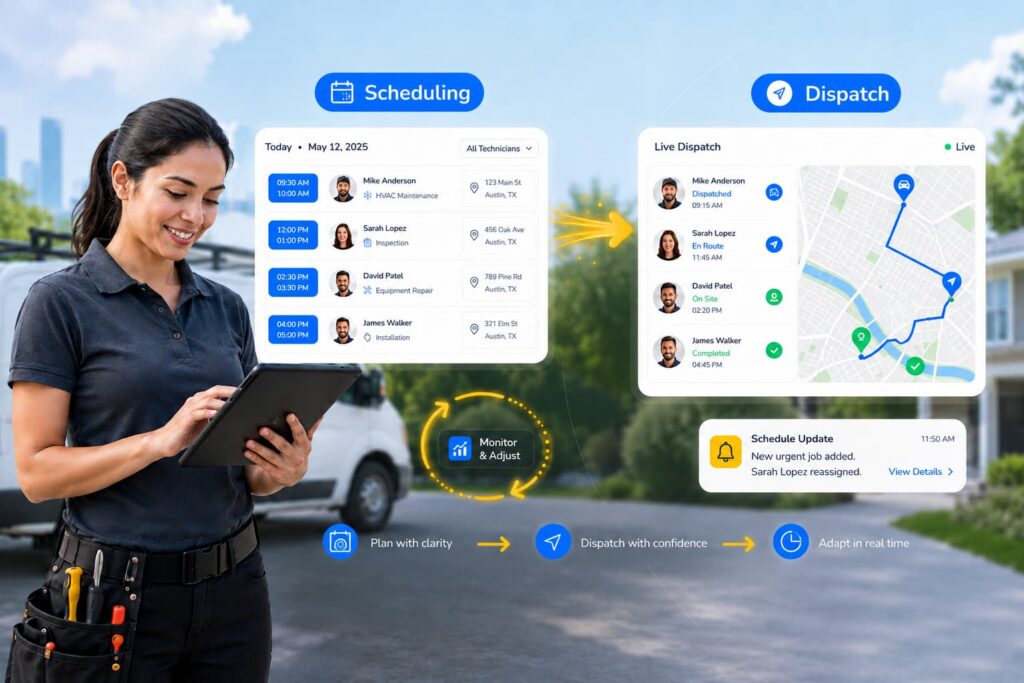
3. Scheduling and Dispatch
Scheduling determines when the job should happen. Dispatch determines who should complete it.
This is where many field service operations either gain or lose efficiency.
Good scheduling and dispatch decisions account for:
Technician availability
Technician skill level
Job duration
Customer location
Service area
Travel time
Priority level
Existing appointments
Emergency requests
Crew or equipment requirements
The mistake many businesses make is assigning work to the first available technician. That may solve the immediate scheduling problem, but it can create routing inefficiency, missed time windows, overloaded technicians, or poor first-time fix rates.
A better dispatch process matches the job to the right person, at the right time, with the right information.
4. Route Planning and Optimization
Route planning is not just about giving technicians directions. It is part of capacity management.
If technicians spend too much of the day driving, the business loses productive hours. Poor routing can also lead to late arrivals, rushed work, overtime, and fewer completed jobs per day.
Effective route planning considers:
Job location
Appointment windows
Travel time
Technician starting point
Service territory
Job priority
Schedule changes
Emergency requests
For teams covering large service areas, route optimization can become one of the fastest ways to increase daily capacity without adding headcount.
5. Work Order Management
The work order is the operational record of the job. It should tell the technician what needs to be done, where to go, who the customer is, what information is required, and how the job should be documented.
A complete work order may include:
Customer details
Job location
Service description
Technician or crew assignment
Scheduled date and time
Priority level
Required tools or parts
Job notes
Photos or attachments
Digital forms or checklists
Customer signature requirements
Completion notes
Billing or follow-up details
When work orders are incomplete or disconnected from the schedule, technicians have no option than to call the office or make decisions with limited context. That slows the job down and increases the risk of errors.
6. Mobile Technician Execution
Once the technician is in the field, they should be able to access their schedule, job details, customer notes, route information, digital forms, and communication tools from a mobile device. They should also be able to update job statuses, upload photos, complete forms, collect signatures, and notify the office when work is complete. This reduces unnecessary calls between the field and the office. It also gives dispatchers and managers a clearer view of job progress and technician productivity.
7. Customer Communication
Customer communication is one of the most visible parts of field service operations. A technician may do excellent work, but if the customer receives no reminder, no ETA, no delay notice, and no completion update, the experience can still feel disorganized.
A strong customer communication workflow may include:
Appointment confirmations
Reminder messages
Technician on-the-way notifications
Estimated arrival times
Delay alerts
Job status updates
Completion messages
Follow-up requests
Feedback collection
Good communication reduces inbound calls, builds trust, and helps customers feel in control of the appointment. For many service businesses, this is also one of the easiest ways to improve customer satisfaction without changing the technical service itself.
8. Digital Forms and Documentation
Field service work requires proof. That proof may include inspection forms, safety checklists, before-and-after photos, compliance records, customer approvals, signatures, completion notes, or recommended follow-up work.
When documentation is handled on paper, it is easy for records to be delayed, lost, incomplete, or difficult to search later.
Digital documentation helps technicians capture information in the field and submit it immediately. This gives the office faster access to job records and helps managers maintain cleaner service history. It also supports billing, quality control, compliance, customer disputes, and future service planning.
9. Work Order Closeout
A job is not truly finished when the technician leaves the site. The work order still needs to be reviewed, completed, closed, and, in many cases, passed to billing or follow-up scheduling.
This is another common bottleneck. If photos, signatures, notes, or forms are missing, the office has to chase the technician after the fact. That delays invoicing, reporting, and customer follow-up. A strong closeout process makes completion requirements clear before the technician arrives on-site.
10. Reporting and Continuous Improvement
Reporting turns daily field activity into operational insight. Without reporting, managers may know the team is busy, but they may not know where the business is losing time or margin.
Useful field service metrics include:
First-time fix rate
On-time arrival
Technician utilization
Average response time
Work order completion time
Customer satisfaction
Repeat visits
Revenue per technician
Job volume by service area
Route efficiency
The value is not in tracking every possible metric but in identifying patterns. If first-time fix rate is low and repeat visits are high, the issue may be parts readiness, technician training, or incomplete job notes.
Common Challenges in Field Service Operations
As field service businesses grow, operational challenges become more visible. The same issues that were manageable with a small team can create serious delays at scale.
1. Scheduling Conflicts
Scheduling conflicts happen when jobs are double-booked, assigned without enough travel time, or scheduled without checking technician availability.
The cause is often manual scheduling, incomplete visibility, or last-minute changes that are not updated across the team.
The best solution is to use a centralized scheduling process where dispatchers can see technician availability, job duration, location, and priority before assigning work.
2. Technician Utilization Problems
Technician utilization measures how effectively technician time is used. Low utilization may happen when technicians spend too much time driving, waiting for information, completing paperwork, or handling poorly planned jobs. High utilization can also become a problem if technicians are overloaded and service quality declines.
Improving utilization requires better scheduling, route planning, workload balancing, and access to accurate job details before technicians arrive on-site.
3. Poor Communication
Communication gaps can happen between the office, dispatchers, technicians, and customers. A dispatcher may update the schedule, but the technician may not see the change quickly, or the customer may not be notified.
The best solution is to create a standard communication workflow with real-time updates, automated customer notifications, and clear technician status reporting.
4. Manual Processes
Manual processes are common in growing service businesses. Teams may rely on spreadsheets, paper forms, phone calls, handwritten notes, and separate tools to manage daily work.
Duplicate data entry
Lost paperwork
Slow updates
Incomplete job records
Delayed billing
Limited visibility
Higher administrative workload
Digitizing key workflows, such as scheduling, work orders, forms, and reporting, helps reduce errors and improve speed.
5. Disconnected Systems
Disconnected systems create operational blind spots. For example, scheduling may happen in one tool, customer details may live in another, forms may be handled on paper, and reporting may require manual spreadsheet updates.
When systems are disconnected, teams spend more time transferring information between tools. This increases the risk of errors and makes it harder to see the full status of field operations.
A more connected field operations software setup helps teams manage scheduling, dispatch, work orders, communication, documentation, and reporting in one workflow.
6. Lack of Operational Visibility
Managers need to know what is happening in the field. They need to see which jobs are scheduled, complete, or delayed, which technicians are en route, and where follow-up is needed.
Without visibility, managers often discover problems after they have already affected the customer. Operational visibility helps businesses respond faster, improve accountability, and make better decisions throughout the day.
How Field Service Operations Should be Adapted by Industry?
Every field service business needs strong scheduling, dispatching, communication, documentation, and reporting. But the focus changes depending on the type of work being managed.
HVAC: HVAC teams often manage installations, emergency repairs, and planned maintenance in the same week, sometimes on the same day. To keep work moving, technicians need quick access to service history, equipment details, maintenance records, parts information, and customer notes before they arrive on-site.
Plumbing: Plumbing schedules can change quickly. A routine repair may turn into a larger job, and emergency calls can interrupt a planned route. Strong plumbing operations depend on flexible dispatching, easy job reassignment, clear parts tracking, and timely customer updates when arrival windows shift.
Electrical: Electrical contractors often manage a wide mix of work, from troubleshooting and service calls to installs, upgrades, and longer project-based jobs. To stay in control, teams need clear scopes, labor tracking, permit details, documentation, and field updates connected to each job. This helps protect margins and prevents important details from getting lost once work begins in the field.
Refrigeration: For refrigeration teams, downtime can quickly become expensive for the customer. A delayed repair may affect inventory, revenue, or day-to-day operations. That makes fast, informed service essential. Dispatchers need visibility into technician availability, location, service agreements, asset history, and job urgency so they can send the right technician with the right context.
Fire Safety and Compliance: Fire safety, inspection, and compliance work depends on accurate records. The job is not fully complete until the required forms, checklists, photos, signatures, and timestamps are captured correctly. Standardized digital forms and service records help technicians complete documentation in the field and make it easier for the business to retrieve proof of service later.
General Contractors and Installation Teams: General contractors and installation teams often coordinate multiple people, timelines, materials, approvals, and follow-up tasks. The workflow needs to connect scheduling, crew assignments, job requirements, change notes, completion photos, and customer sign-off so nothing gets lost between planning, field execution, and closeout. The main lesson is simple. Field service operations should not look exactly the same in every business. The best systems are built around the work your team does most often, the delays that cost you the most, and the moments where better visibility can prevent small issues from becoming bigger ones.
Best Practices for Improving Field Service Operations
Improving field service operations does not mean adding more complexity. It means making the workflow easier to follow, easier to measure, and easier to repeat.
1. Standardize the Workflow by Service Type:
Every major service type should have a defined workflow. An installation may require different intake details, forms, equipment, signatures, and follow-up steps than a repair, inspection, or maintenance visit.
Standardized workflows reduce confusion and help teams deliver a consistent customer experience. The more repeatable the workflow, the less the business depends on individual memory.
2. Improve Request Intake Before Improving Dispatch:
Many dispatch problems start before dispatch. If the request is vague, the dispatcher has limited information, the technician may be assigned incorrectly, and then the job may take longer or require a repeat visit.
Before optimizing the schedule, improve the quality of job intake. A better request creates a better schedule.
3. Use Digital Scheduling and Dispatch:
Digital scheduling helps dispatchers manage technician availability, job duration, service area, priority level, and customer location more efficiently. It also makes it easier to adjust when jobs are delayed, canceled, reassigned, or added at the last minute.
4. Optimize Routes as Part of Capacity Planning:
Route optimization should be part of daily field service planning. By grouping nearby jobs, accounting for travel time, and adjusting for appointment windows, businesses can reduce unnecessary driving and help technicians complete more productive work each day.
5. Give Technicians Complete Job Context:
Technicians should not need to call the office for basic job information. Before arriving on-site, they should have access to:
Customer details
Job notes
Service history
Photos
Forms
Checklists
Required parts or equipment
Customer instructions
Completion requirements
Better context improves productivity, reduces confusion, and supports a higher first-time fix rate.
6. Automate Customer Updates at Key Moments:
Customer communication should not depend entirely on manual calls. A strong customer communication workflow includes:
Appointment confirmations
Reminder messages
Technician on-the-way notifications
Estimated arrival times
Delay alerts
Job completion messages
Follow-up messages
Feedback requests
These updates reduce inbound calls and help customers feel informed throughout the service process.
7. Digitize Field Documentation:
Paper forms slow down the operation. They can be lost, submitted late, entered manually, or filed in ways that are difficult to search later.
Digital forms allow technicians to capture job details, inspection results, photos, signatures, and completion notes from the field. This improves documentation quality and helps office teams close work orders faster.
8. Track the Metrics That Reveal Bottlenecks:
Field service teams do not need endless dashboards. They need metrics that explain where the operation is slowing down.
Start with:
First-time fix rate
On-time arrival
Technician utilization
Average response time
Work order completion time
Customer satisfaction
Repeat visits
Revenue per technician
Review these metrics regularly and connect each one to a specific operational decision.
9. Train Technicians on the Process, Not Just the Service:
Technicians need to know how to perform the work, but they also need to know how to support the operation.
That includes:
Updating job statuses
Completing digital forms
Capturing photos
Collecting signatures
Documenting follow-up needs
Submitting completion notes
Communicating delays
Closing out jobs correctly
Operational consistency is part of service quality.
10. Review the Workflow Before Adding More People:
When the team feels overloaded, the first instinct is often to hire more technicians or more office staff. Sometimes that is necessary. But if the workflow is broken, adding more people can also add more complexity.
Before adding headcount, ask:
Are jobs entering the system clearly?
Are schedules accurate?
Are routes efficient?
Are technicians prepared?
Are customers receiving updates?
Is documentation complete?
Can managers see job status?
Are KPIs reviewed regularly?
A better workflow can often unlock capacity that the business already has.
Key Metrics Every Field Service Business Should Track
The right KPIs help managers spot bottlenecks, improve productivity, and make better operational decisions.
| Metric | What It Measures |
|---|---|
| First-Time Fix Rate | How often jobs are completed without a return visit. |
| On-Time Arrival | Whether technicians arrive within the promised appointment window. |
| Technician Utilization | How effectively technician time is being used. |
| Average Response Time | How quickly new service requests are reviewed and acted on. |
| Work Order Completion Time | How long it takes to complete and close jobs. |
| Customer Satisfaction | The quality of the customer experience. |
| Repeat Visits | How often technicians need to return for the same issue. |
| Revenue per Technician | How much revenue each technician generates over a given period. |
How Field Operations Software Helps Businesses Scale
Field operations software helps by bringing the core workflow into one place. Instead of chasing updates across different systems, office teams, dispatchers, technicians, and managers can work from the same information.
Arrivy supports scalable field service operations by helping teams manage:
| ✓
Scheduling & Dispatch Assign jobs based on availability, location, timing, and job requirements. |
✓
Route Planning Reduce unnecessary travel time and protect technician capacity. |
✓
Work Orders Keep details, notes, forms, photos, and completion updates connected. |
✓
Digital Forms Capture checklists, inspections, signatures, and photos from the field. |
| ✓
Customer Notifications Keep customers updated without constant manual calls. |
✓
Mobile Workforce Give field teams access to schedules and job details on the move. |
✓
Reporting & Analytics See job progress, technician activity, and bottlenecks. |
✓
Field Sales Operations Connect estimates, proposals, and service delivery in one workflow. |
The goal is not simply to digitize tasks. It is to reduce coordination friction across the full service lifecycle, so teams can complete more work with better visibility, fewer delays, and less manual effort.
Ready to scale your field service operations?