 Login
Login



















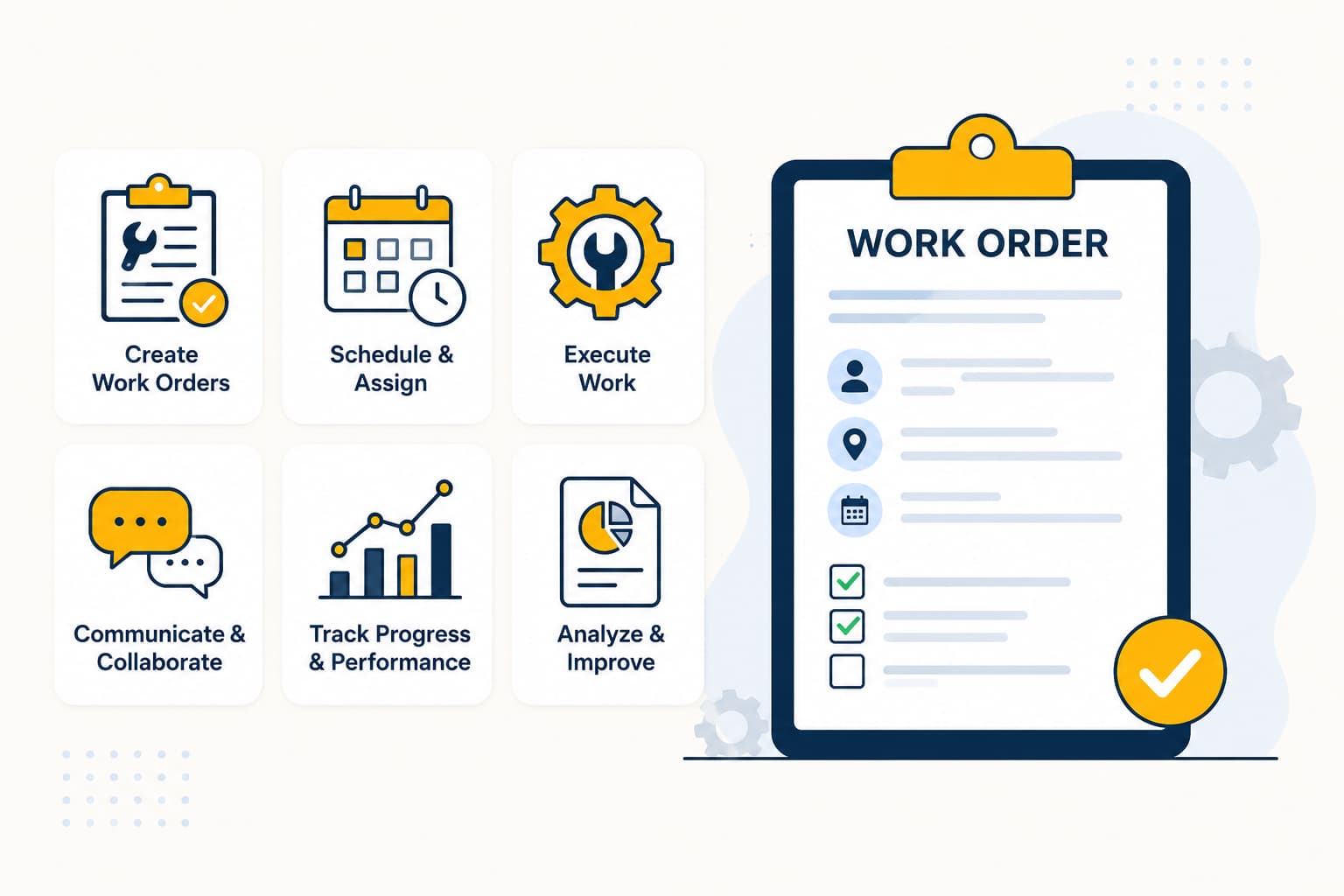


Many service businesses struggle to manage work orders efficiently. Work requests often come through phone calls, emails, spreadsheets, paper forms, and disconnected tools. As service operations grow, managing work across multiple systems leads to missed details, delayed assignments, limited visibility, and inconsistent customer communication.
Work order management provides a structured way to organize, assign, track, and complete service work from a single workflow.
This guide explains what work order management is, how the process works, why it matters, the different types of work orders, essential software features, and best practices to help service teams improve efficiency and deliver better customer experiences.
Quick Answer:
Work order management is the process of creating, assigning, scheduling, tracking, completing, and reviewing work orders throughout their lifecycle. It helps businesses manage service jobs, maintenance tasks, repairs, inspections, and installations while improving organization, accountability, documentation, customer communication, and operational visibility.
In this guide, you’ll learn:
- What work order management is and why it matters
- How the work order management process works
- The different types of work orders
- What information a work order contains
- The differences between manual and digital work order management
- What work order management software does
- Key work order software features and benefits
- Work order management best practices
- How to choose the right work order management software
- How Arrivy helps businesses manage work orders more efficiently
Recommended Reads
•Best Mobile Workforce Management Software in 2026
•What is Mobile Workforce Management Software: Complete Guide
•What Is Route Planning and Optimization Software? Benefits, Features & Best Practices
What Is Work Order Management?
Work order management is a structured approach to planning, assigning, tracking, and completing service work efficiently. It enables teams to manage service jobs, maintenance tasks, repairs, inspections, and installations through a standardized workflow that improves coordination, visibility, and consistency across service operations.
A structured work order process helps teams coordinate work, manage workloads, maintain visibility into job progress, keep service records organized, and deliver a more consistent customer experience.
Effective work order management helps teams:
Organize service requests and digital work orders in one place
Assign work faster based on availability and skills
Improve technician scheduling and dispatching
Improve accountability across teams
Capture photos, forms, signatures, and service documentation
Keep customers informed throughout the service lifecycle
Generate reports for operational planning and performance tracking
For service businesses and field service teams, work order management is more than task tracking. It provides a standardized operational framework that helps teams manage every stage of service delivery consistently. By bringing people, processes, and job information together in a single workflow, businesses can improve collaboration, maintain accurate service records, and scale operations more efficiently.
What Is a Work Order?
A work order is a document that authorizes and details a specific job that needs to be completed. It provides technicians, crews, and operations teams with the information required to perform the work and record the outcome.
Work orders are used for a wide range of activities, including service calls, repairs, inspections, maintenance tasks, installations, and customer requests. They serve as a central source of information for everyone involved in the job.
A typical work order includes the following details:
| Work Order Element | Purpose |
|---|---|
| Work Order ID | Unique reference number for tracking |
| Customer Information | Name and contact details of the customer |
| Job Location | Address or site where work will be performed |
| Assigned Technician or Crew | Personnel responsible for completing the work |
| Priority Level | Indicates the urgency of the task |
| Due Date | Target completion date |
| Job Instructions | Description of the work to be performed |
| Parts and Materials | Required equipment, tools, or inventory |
| Status | Current stage of the work order |
| Completion Notes | Details recorded after the work is finished |
For example, an HVAC service company might create a work order for an air conditioning repair request submitted by a customer. The work order would include the customer’s address, technician assignment, service instructions, required parts, priority level, completion notes, technician labor hours, customer signature, and the final work status once the repair is completed. Many organizations also record labor hours against work orders and use technician timesheets to support payroll, reporting, and invoicing.
What Is the Difference Between a Work Request and a Work Order?
A work request is the initial request for a service, repair, maintenance task, or inspection. After it is reviewed and approved, it is typically converted into a work order, which authorizes, assigns, and tracks the work through completion.
| Work Request | Work Order |
|---|---|
| Reports a service need or issue | Authorizes and tracks the work |
| Submitted by a customer or employee | Created after review or approval |
| Starts the service process | Guides the work through completion |
| Describes the requested service | Includes assignments, scheduling, instructions, status, and completion details |
Most service organizations begin with a work request and convert it into a work order once the job is approved. The work order then becomes the central document used to schedule, execute, track, and document the work.
Types of Work Orders
Different work orders serve different purposes. Businesses use work orders depending on the nature of the task, urgency, and operational requirements.
The most common types of work orders include:
| Work Order Type | Purpose | Example |
|---|---|---|
| Corrective Work Orders | Address issues that have already occurred and require a fix. | Repairing a broken HVAC unit. |
| Preventive Work Orders | Support routine maintenance to reduce equipment failures and downtime. | Performing scheduled equipment inspections. |
| Emergency Work Orders | Handle urgent issues that require immediate attention. | Responding to a power outage or water leak. |
| Inspection Work Orders | Verify the condition, safety, or compliance of assets and equipment. | Conducting a safety inspection at a customer site. |
| Installation Work Orders | Manage the setup of new equipment, systems, or products. | Installing a solar energy system. |
| Recurring Work Orders | Automate jobs that occur on a regular schedule. | Monthly maintenance visits for commercial equipment. |
| Internal Work Orders | Support operational needs within the organization. | Repairing equipment used by employees. |
| Customer Service Work Orders | Fulfill service requests submitted by customers. | Scheduling an appliance repair appointment. |
Many organizations use a combination of these work order types. For example, a field service company may handle customer service work orders daily while also managing recurring maintenance visits, emergency repairs, and installation projects.
Why Is Work Order Management Important?
A consistent work order process helps teams manage increasing service demand while maintaining operational control and service quality.
Key benefits of work order management include:
Centralize Information: Store customer details, job information, and service records in a single system.
Assign Jobs Faster: Match work with the right technicians based on skills, location, availability, and route efficiency.
Reduce Errors and Rework: Standardized work orders help ensure teams receive complete job requirements.
Improve Operational Visibility: Monitor active, pending, and completed work orders in real time.
Increase Operational Efficiency: Reduce delays by giving teams the information they need to perform their work.
Improve Customer Communication: Provide accurate updates and set clear expectations throughout the service process.
Strengthen Accountability: Maintain a clear record of work ownership, status updates, and completion history.
Measure Performance: Track response times, completion rates, and technician productivity using work order data.
Performance metrics help teams identify operational inefficiencies and improve workforce utilization. The U.S. Bureau of Labor Statistics (BLS) recognizes productivity measurement as an important indicator of operational performance and efficiency.
Support Accurate Billing: Maintain detailed records of labor, materials, and services delivered.
What Is the Work Order Management Process?
Although every organization has its own workflow, most work order management processes follow the same core lifecycle, from the initial service request through work completion and performance review.
The Work Order Lifecycle
A typical work order moves through the following stages before it is completed and closed.
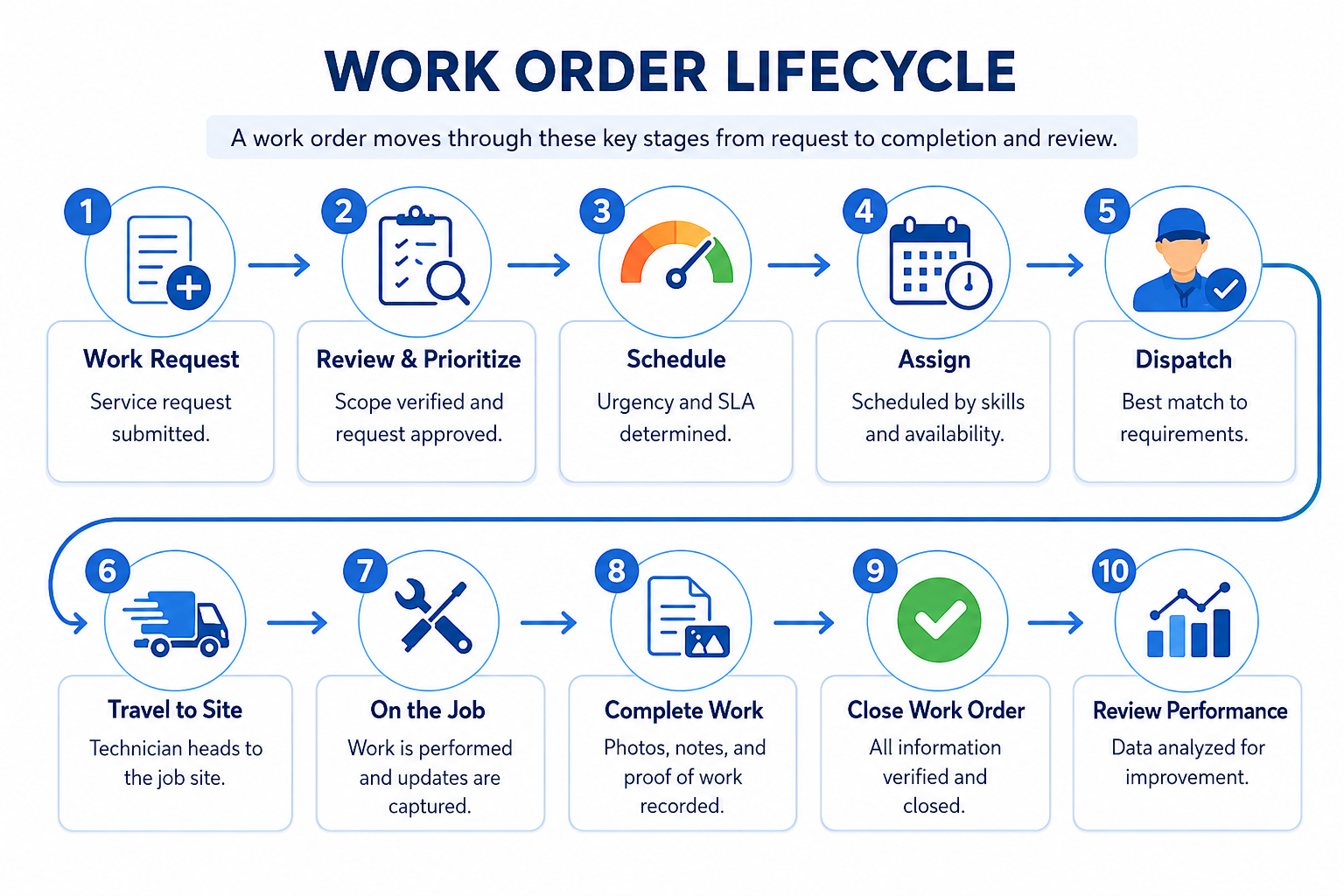
1. A Work Request Is Created:
The process begins when a customer, employee, property manager, or another stakeholder submits a request for service, maintenance, repair, inspection, or installation work.
2. The Work Order Is Reviewed:
Operations teams review the request to verify the scope of work, identify any required resources, and determine whether the request should proceed.
3. Priority Is Assigned:
The work order is prioritized based on urgency, service level agreements (SLAs), customer commitments, business impact, or safety requirements.
4. Work Is Scheduled:
The job is scheduled according to technician availability, required skills, customer availability, and operational priorities.
5. A Technician or Crew Is Assigned:
The work order is assigned to the technician or crew best suited to complete the job based on qualifications, workload, and location.
6. Work Is Dispatched:
Dispatchers send the work order to the assigned technician, along with job details, customer information, service instructions, and any required documentation.
7. The Job Is Completed:
The technician performs the required work at the customer site while following the assigned instructions and documenting completed tasks.
8. Documentation Is Captured:
After the work is completed, technicians record service notes, labor hours, completed forms, photos, customer signatures, parts used, and other job details to create a complete service record.
9. The Work Order Is Closed:
Once all required information has been verified, the work order is marked as complete and becomes part of the organization’s service history.
10. Performance Is Reviewed:
Managers analyze completed work orders to monitor response times, technician productivity, completion rates, and other key performance metrics that support continuous operational improvement.
Manual vs Digital Work Order Management
Digital work order management replaces paper-based and disconnected processes with centralized software that improves visibility, coordination, and recordkeeping.
The table below highlights some of the key differences.
| Area | Manual Work Order Management | Digital Work Order Management |
|---|---|---|
| Creation | Paper forms, emails, or phone calls | Digital work orders created in a centralized system |
| Assignment | Manual follow-ups and coordination | Work orders assigned within the platform |
| Tracking | Status updates shared through calls and messages | Real-time work order status updates |
| Documentation | Notes stored across multiple locations | Forms, photos, signatures, and records attached to each work order |
| Customer Updates | Manual communication | Automated notifications and status updates |
| Reporting | Information stored in separate systems | Centralized access for office and field teams |
| Scalability | More difficult to manage as work volume grows | Supports growing teams and higher job volumes |
As work volume increases, digital work order management provides greater visibility, consistency, and operational control than manual processes.
Ready to move beyond manual work order tracking?
See how Arrivy can help you!
What Is Work Order Management Software?
Work order management software is a digital platform that helps businesses create, assign, schedule, track, and complete work orders from a centralized system.
It replaces paper forms, spreadsheets, emails, and other manual processes with a structured workflow for managing work orders from request to completion. Teams can manage service requests, assignments, job updates, and service records from a single platform.
Organizations use work order management software to manage service requests, work orders, field activities, and service records more efficiently. Platforms such as Arrivy combine work order management, scheduling, dispatching, field documentation, and customer communication in a single operational workflow.
Key Features of Work Order Management Software
Work order management software includes features that help businesses create, assign, track, and complete work more efficiently. Key features include:
Work Order Creation: Create and organize work orders from a centralized system.
Scheduling and Dispatching: Coordinate job assignments and daily workloads efficiently.
Technician Assignment: Match work with the right technician or crew.
Mobile Access: Give field teams access to work orders from any location.
Real-Time Status Tracking: Monitor job progress as work is completed.
Digital Forms and Documentation: Capture service records in a structured format.
Photos and Attachments: Attach supporting job documentation to each work order.
Customer Communication: Keep customers informed with status updates and notifications.
Recurring Work Orders: Automate work that occurs on a regular schedule.
Priority Management: Organize work based on urgency and business impact.
Reporting and Analytics: Measure operational performance using work order data.
CRM and Accounting Integrations: Connect work orders with existing business systems.
Offline Access: Allow field teams to continue working without internet access.
Benefits of Work Order Management Software
Work order management software offers several operational benefits, including:
Reduces Administrative Work
Automated workflows reduce the time spent creating, updating, and managing work orders.
Improves Team Visibility
Managers can monitor active, pending, and completed work from a centralized system.
Speeds Up Dispatching
Work can be assigned and routed more efficiently to support faster response times.
Supports Field Teams
Technicians can access the information they need to complete jobs accurately and efficiently.
Reduces Missed or Incomplete Work
Standardized processes help ensure required information is captured before work orders are closed.
Improves Record Keeping
Digital records create a reliable history of completed work for future reference and compliance.
Keeps Customers Informed
Consistent updates help improve customer satisfaction and reduce uncertainty around job progress.
Strengthens Reporting and Accountability
Work order data supports performance tracking, planning, and operational decision-making.
Supports Faster Invoicing
Accurate work records help generate invoices more quickly and accurately.
Work Order Management KPIs
Key performance indicators (KPIs) help businesses measure the performance of their work order management process.
| KPI | Purpose |
|---|---|
| Work Order Completion Rate | Measures the percentage of work orders completed successfully. |
| Average Response Time | Tracks how quickly teams respond to service requests. |
| Mean Time to Completion (MTTC) | Measures the average time required to complete a work order. |
| First-Time Fix Rate | Measures how often issues are resolved on the first visit. |
| Backlog Volume | Tracks the number of pending work orders. |
| Technician Productivity | Measures work orders completed per technician or crew. |
| On-Time Completion Rate | Measures how often work orders are completed by the due date. |
| Customer Satisfaction (CSAT) | Measures customer satisfaction after service completion. |
Monitoring these KPIs helps businesses improve operational efficiency, technician performance, resource planning, and customer service.
Work Order Management Best Practices
Following work order management best practices helps improve accuracy, efficiency, and operational consistency.
Standardize Work Order Fields
Use consistent fields for customer information, job details, priorities, due dates, and service requirements. Consistent data collection practices align with recommendations from the National Institute of Standards and Technology (NIST), which emphasizes standardized data for improving quality and operational consistency.
Set Clear Priority Levels
Define priority categories such as low, medium, high, and emergency. Clear priorities help teams focus on the most important work first.
Assign Work Based on Skills and Availability
Match jobs with technicians who have the right experience, certifications, and availability. This helps improve service quality and reduce repeat visits.
Connect Work Orders to Schedules
Keep work orders aligned with technician schedules and service commitments. This helps prevent conflicts and improve resource planning.
Give Field Teams Mobile Access
Provide technicians with access to job information, service history, and required documentation while working in the field.
Capture Photos, Forms, and Signatures
Collect supporting information during the job instead of after completion. This creates more accurate records and reduces missing documentation.
Documentation also supports compliance and operational accountability. The Occupational Safety and Health Administration (OSHA) emphasizes recordkeeping as an important practice for identifying workplace hazards and supporting worker safety.
Track Status Changes Consistently
Use clearly defined statuses for every stage of work. Consistent status updates help teams understand job progress and current workload.
Review Performance Regularly
Monitor metrics such as response times, completion rates, backlog volume, and technician productivity. Regular reviews help identify process improvements and operational trends.
Preventive work orders help organizations maintain equipment and reduce unexpected service disruptions. The U.S. Department of Energy’s Federal Energy Management Program (FEMP) provides operations and maintenance guidance that emphasizes equipment reliability, maintenance planning, and long-term asset performance.
How to Choose the Right Work Order Management Software
Use the following checklist to evaluate work order management software:
Easy for office staff, managers, dispatchers, and technicians to learn and use
Scheduling and dispatch tools for coordinating workloads and assigning jobs efficiently
Mobile access for field teams to manage work orders on site
Real-time visibility into job progress, technician activity, and operational performance
Digital documentation for storing service records, forms, photos, and signatures
Customer communication tools for appointment updates and job notifications
Reporting and analytics for monitoring performance and identifying trends
Integrations with CRM, accounting, ERP, and other business systems
Scalability to support business growth and increasing job volumes
Training, onboarding, and ongoing customer support
Before selecting a solution, identify your operational challenges and prioritize the capabilities that will have the greatest impact on your business.
Why Arrivy Is a Strong Work Order Management Solution
Arrivy centralizes work order management, scheduling, dispatching, and field communication in a single operational workflow.
Arrivy helps teams manage work orders from request to completion through a connected operational workflow. Teams can manage scheduling, dispatching, field updates, documentation, customer communication, and reporting from a single platform. Organizations that create estimates before work begins can also connect approved quotes to operational workflows, reducing manual handoffs between sales and service teams.
With Arrivy, businesses can:
Create and manage work orders from a centralized workspace
Coordinate scheduling, dispatching, and technician assignments through a centralized dispatch dashboard.
Provide field teams with the information they need to complete jobs efficiently
Capture photos, forms, signatures, and service records in the field
Keep customers informed with automated updates and notifications
Track job progress and operational performance in real time
Maintain accurate records for reporting, compliance, and invoicing
By connecting work order management with scheduling, field execution, customer communication, and documentation, Arrivy helps service businesses improve operational efficiency, increase visibility across active jobs, and maintain greater control over daily operations.
Final Takeaway
Work order management gives businesses a structured way to manage jobs from request to completion. It improves coordination, reduces errors, supports accountability, and helps teams maintain accurate records throughout the job lifecycle.
As service operations grow, manual methods often become difficult to manage. Work order management software provides a more efficient way to manage work by bringing job information, team coordination, documentation, and operational data into a single system.
For teams that need to manage work orders alongside scheduling, dispatching, customer communication, and field operations, Arrivy provides a connected platform that supports the entire process from request to completion.
Ready to improve your work order management process?