 Login
Login




















Every HVAC service appointment requires coordination between dispatchers, technicians, customers, and office staff.
Schedules change throughout the day. Emergency repairs need immediate attention. Maintenance visits must stay on track. Technicians need access to work orders and customer information while working in the field.
As appointment volume increases, HVAC businesses need better visibility into schedules, field operations, job progress, and customer communication.
HVAC field service management software integrates scheduling, dispatch, technician activity, work orders, customer updates, and field documentation into a single system. Choosing the right platform requires you to look beyond a list of features and evaluate how well the software supports your service workflows, field teams, and existing systems.
This guide explains what field service management software for HVAC does, when your business needs it, which features to evaluate, and what questions to ask before choosing a platform.
HVAC Field Service Management Software at a Glance
HVAC field service management software helps businesses coordinate service work across dispatchers, technicians, office staff, and customers. Here is what you need to know before evaluating a platform.
| Question | Quick Answer |
|---|---|
| What does HVAC FSM software manage? | Scheduling, dispatch, work orders, technician activity, customer communication, field documentation, recurring service, and reporting. |
| Who needs HVAC FSM software? | HVAC businesses managing multiple technicians, changing schedules, growing appointment volumes, recurring service work, or scattered job information. |
| When should you consider FSM software? | When manual coordination, disconnected systems, and limited field visibility start taking time away from service delivery and customer support. |
| What should you look for? | Mobile access, work order management, customer communication, integrations, reporting, scalability, and support for your daily service workflows. |
| How should you compare platforms? | Evaluate each platform based on your service model, operational needs, existing systems, team adoption, and growth plans. |
What Is HVAC Field Service Management Software?
HVAC field service management software is a centralized platform that helps HVAC businesses coordinate scheduling, dispatching, work orders, technician activity, customer communication, and field documentation.
Dispatchers use the system to schedule appointments, assign technicians, and monitor job progress. Field teams access work orders, customer information, service history, and job updates through a mobile application while working on site.
Many HVAC businesses use HVAC scheduling software, HVAC dispatch software, and other HVAC contractor software solutions to manage daily operations more efficiently. Modern HVAC service management software combines these capabilities within a single platform, giving office staff and field technicians access to the same information throughout the service process.
As service volume grows, HVAC field service software helps maintain visibility across appointments, technicians, and customer interactions without relying on disconnected tools.
What Does HVAC FSM Software Help Manage?
HVAC field service management software supports the day-to-day workflows required to schedule, dispatch, complete, and document service work.
| Operational Area | How HVAC FSM Software Supports It |
|---|---|
| Scheduling | Assigns appointments based on availability, service area, and workload. |
| Dispatching | Routes technicians and updates schedules as priorities change. |
| Work Orders | Creates, assigns, and tracks jobs throughout the service lifecycle. |
| Technician Management | Tracks technician status, availability, and completed work. |
| Customer Communication | Sends appointment confirmations, reminders, ETAs, and service updates. |
| Service History | Stores previous visits, equipment information, and customer records. |
| Field Documentation | Captures photos, forms, notes, and customer signatures. |
| Maintenance Agreements | Tracks recurring service visits and preventive maintenance schedules. |
| Invoicing | Transfers completed job information for billing and payment processing. |
Many HVAC businesses start with separate tools for scheduling, dispatch, and work orders. A unified platform reduces handoffs between these tools, helping office teams and technicians work from the same job information throughout the service lifecycle.
Signs Your HVAC Business Has Outgrown Manual Field Service Management
Manual processes often work for smaller HVAC businesses. As your team grows, scheduling, dispatch, communication, and documentation become harder to manage. The following signs indicate it may be time to evaluate field service management software.
➮ Dispatchers Spend Too Much Time Adjusting Schedules
Emergency repairs, job delays, cancellations, and technician availability change schedules throughout the day.
If dispatchers rely on spreadsheets, calendars, phone calls, and messages to manage these changes, each adjustment requires more manual work. A schedule change might also require separate updates for technicians, customers, and office staff.
➮ Technicians Rely on the Office for Job Information
Technicians need customer details, work orders, service instructions, and previous job information before arriving on site.
Frequent calls and messages between technicians and office staff often indicate poor access to job information. These interruptions take time from both teams and make service delivery harder to coordinate.
➮ Your Team Has Limited Visibility Into Field Activity
Service managers and dispatchers need to know which technicians are available, traveling, working, delayed, or finished with a job.
Without a centralized view of field activity, office teams spend more time requesting updates. Limited visibility also makes assigning urgent work and responding to schedule changes more difficult.
➮ Service Records Are Scattered Across Different Systems:
Job information often moves between emails, spreadsheets, paper forms, messaging apps, and other systems.
Scattered records make service history and completed job information harder to find. Office staff might also spend extra time collecting notes, photos, forms, and signatures after technicians finish their work.
➮ Recurring Maintenance Becomes Harder to Coordinate:
Preventive maintenance and repeat service visits require consistent scheduling and record management.
As the number of customers and service agreements grows, manual tracking increases the risk of missed appointments and incomplete service records. Your team needs clear visibility into upcoming visits and completed work.
➮ Customers Do Not Receive Consistent Service Updates:
Customers expect information about appointment times, technician arrivals, delays, and job progress.
If office staff send every update manually, higher service volume creates more administrative work. Missed or delayed updates also affect the customer experience and leave customers uncertain about their appointments.
➮ Completed Job Information Takes Too Long to Reach the Office:
The work does not end when a technician leaves the job site.
Office teams still need service notes, photos, forms, signatures, and other records for review, reporting, and billing processes. When technicians submit this information through separate channels, completing administrative work takes longer.
➮ Your Current Systems Struggle as Service Volume Grows
Adding technicians and appointments increases the amount of information moving between your office, field teams, and customers.
If each new technician or service area creates more spreadsheets, phone calls, manual updates, and administrative work, your current processes become harder to scale.
These challenges affect response times, service consistency, and operational efficiency. Workforce coordination and consistent service delivery remain key priorities across the HVAC industry, as highlighted by Air Conditioning Contractors of America (ACCA).
HVAC field service management software connects scheduling, technician activity, work orders, customer communication, and field documentation within one system. The right time to evaluate a platform is when managing daily operations starts requiring more manual coordination than your existing processes support.
Benefits of HVAC Field Service Management Software
HVAC field service management software connects the people, information, and processes involved in service delivery. Dispatchers gain visibility into field activity. Technicians receive the information needed to complete jobs. Administrative work becomes easier because service information stays connected throughout the workflow.
Here are the main benefits for HVAC operations.
🔹Respond Faster to Emergency Service Requests:
Emergency calls often require dispatchers to adjust existing schedules and assign available technicians.
Field service management software gives dispatchers visibility into technician availability, active jobs, and upcoming appointments. With this information in one place, teams respond to urgent requests without coordinating changes across separate calendars, spreadsheets, and communication channels.
🔹Improve Visibility Across Technicians and Jobs:
Service managers need a clear view of work in progress throughout the day.
A centralized system shows job statuses, technician activity, schedule changes, and completed work. Office teams spend less time contacting technicians for updates and gain a clearer view of service operations.
🔹Keep Field Documentation Connected to Each Job:
HVAC service visits produce notes, photos, digital forms, signatures, and other records.
Field service management software keeps this information connected to the relevant job. Technicians submit documentation from the field, while office teams access completed records for review, reporting, and billing processes.
🔹Reduce Manual Customer Follow-Ups:
Appointment confirmations, reminders, arrival updates, and schedule changes require regular communication with customers.
Automated customer updates reduce the number of calls and messages handled by office staff. Customers receive service information throughout the appointment without requiring a manual update at each stage.
🔹Connect Office and Field Teams:
Disconnected systems make it harder to share information among dispatchers, technicians, and office staff.
A centralized platform gives teams access to the same job information throughout the service lifecycle. Schedule changes reach field teams. Technician updates become available to the office. Completed service records stay connected to the job.
🔹Support Higher Service Volumes:
More appointments and technicians increase the amount of information moving through your business.
Field service management software helps standardize scheduling, job tracking, customer communication, and field documentation as service volume grows. Your team manages more work without a corresponding increase in manual coordination and administrative tasks.
Research from McKinsey & Company highlights how digital tools, better information, and connected service processes help businesses improve field productivity and increase service capacity without adding the same level of field resources.
How Arrivy Supports an HVAC Service Call from Dispatch to Completion
Consider an emergency AC repair request that arrives while technicians are already handling scheduled jobs. The dispatcher needs to review field activity, assign the work, update the technician, inform the customer, and track the job through completion.
Here is how an HVAC team manages this workflow with Arrivy.
Review the Schedule and Assign the Job: The dispatcher reviews technician schedules, current assignments, and field activity before assigning the emergency request. After selecting a technician, the dispatcher adds the job to the schedule. If priorities change during the day, the team adjusts assignments while maintaining visibility into other scheduled work and route efficiency.
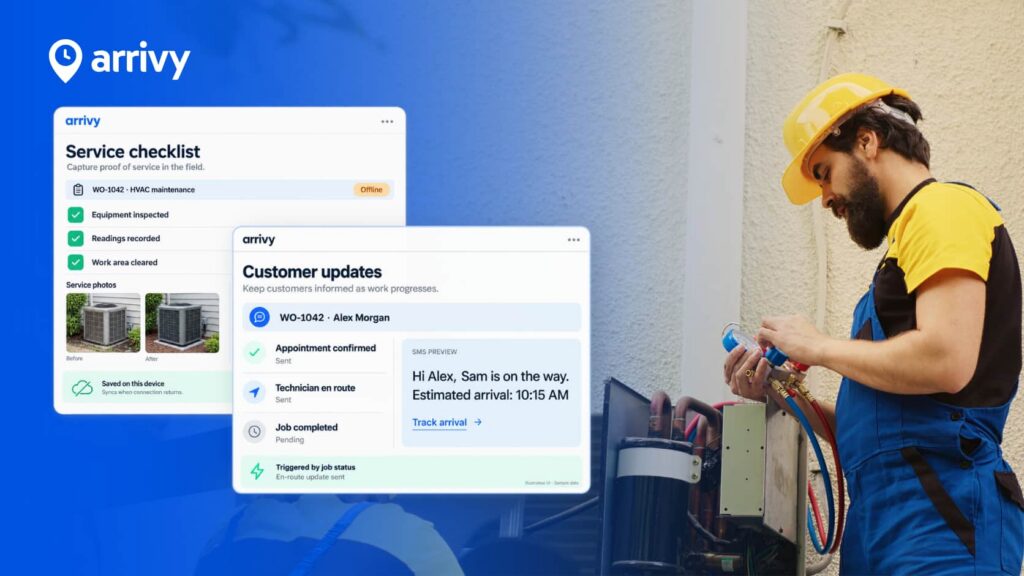
Give the Technician Access to Job Information: The assigned technician receives the work order and job details through the Arrivy mobile app. Before arriving on site, the technician reviews the customer information, service instructions, and other available job details. Office staff do not need to send information through separate calls, messages, or paper records.
Track and Document Work in the Field: The technician updates the job status as work progresses. From the job site, the technician adds service notes, captures photos, completes digital forms, and collects customer signatures. Arrivy keeps these updates connected to the work order, giving office teams access to field information as the job moves toward completion.
Keep the Customer Updated: The customer receives appointment updates, ETAs, and service notifications throughout the visit. Automated communication reduces the need for office staff to send manual updates. If the schedule changes, the customer stays informed about the service appointment.
Complete the Job and Share Service Records: After completing the repair, the technician submits the required job information from the field. Service notes, photos, forms, and signatures stay connected to the job record for office review, reporting, and billing processes.
Arrivy integrates with more than 50 business tools, helping HVAC businesses connect field service activity with their CRM, accounting, and other operational systems.
How HVAC Software Requirements Differ by Business Type
HVAC businesses manage different service models, customers, and field operations. The software features you prioritize should match the work your team handles each day.
Use the following comparison to identify the capabilities your business needs
| HVAC Business Type | Operational Priorities | Software Capabilities to Evaluate |
|---|---|---|
| Residential HVAC Services | High appointment volume, seasonal demand, emergency repairs, and customer communication. | Scheduling, dispatch, technician visibility, automated customer updates, and mobile access. |
| Commercial HVAC Contractors | Multiple job sites, recurring service agreements, documentation, and coordination across stakeholders. | Work order management, field documentation, recurring service workflows, integrations, and operational visibility. |
| Preventive Maintenance Operations | Recurring inspections, planned service visits, and consistent service records. | Recurring scheduling, service history, digital forms, job documentation, and reporting. |
| Multi-Crew Service Operations | Technician coordination, changing workloads, and visibility across service areas. | Centralized dispatch, technician tracking, job status updates, route planning, and crew management. |
| Emergency Service and Repair Teams | Urgent service requests, schedule changes, technician availability, and customer updates. | Real-time dispatch visibility, job reassignment, mobile updates, technician tracking, and automated customer communication. |
Your service model should guide your software evaluation. A residential HVAC company managing a high volume of daily appointments will have different priorities from a commercial contractor managing recurring service work across multiple sites.
Preventive maintenance also requires consistent scheduling and service records to support equipment performance over time, an area addressed in guidance from ASHRAE.
Before comparing platforms, identify the workflows that create the most coordination work for your team. Then evaluate how well each system supports those requirements.
What to Look for in HVAC Field Service Management Software
The right HVAC field service management software should support your service model, team, and existing workflows, not just offer a long list of features. Use the following criteria to evaluate how well each platform supports work from scheduling through job completion.
1. Scheduling, Dispatch, and Technician Visibility
HVAC schedules change throughout the day. Emergency repairs arrive. Jobs run longer than expected. Technicians call out or finish work early.
Your software should give dispatchers a clear view of technician schedules, availability, assigned work, and job progress.
Look for features such as:
A centralized dispatch view
Technician availability and workload visibility
Job assignment and reassignment
Real-time job status updates
Support for last-minute schedule changes
Visibility across active and upcoming jobs
Pay attention to how much manual work each schedule change requires. Dispatchers should have the information needed to adjust assignments without relying on separate calendars, spreadsheets, or repeated phone calls.
2. Mobile Access for HVAC Technicians
Technicians need job information before they arrive on site and throughout the service visit.
A mobile field service app should give your technicians access to work orders, customer details, job instructions, and service information from the field. Technicians should also be able to update job progress without calling the office.
When comparing mobile capabilities, check whether technicians can:
View assigned work orders
Access customer and job information
Receive schedule updates
Update job status
Add service notes
Capture photos
Complete digital forms
Collect customer signatures
Mobile access keeps information moving between your field and office teams. Before choosing a platform, review the mobile workflow from the technician’s perspective. Too many steps or a difficult interface will slow adoption.
3. Work Order and Service Information Management
HVAC work orders pass through several people during the service lifecycle. Dispatchers assign the job. Technicians complete the work. Office teams review documentation and prepare records for billing.
Your software should keep this information connected to the work order.
Evaluate how the platform handles:
Work order creation and assignment
Job status tracking
Customer and service information
Technician notes and updates
Photos and field documentation
Completed service records
Look at how easily office staff and technicians find the information they need. A centralized work order record keeps service information organized throughout the job lifecycle.
4. Customer Communication
Customers expect clear information about upcoming service visits.
Manual calls and messages take time, especially when your team manages a high volume of appointments. Schedule changes and delayed arrivals add more work for dispatchers and office staff.
Look for software with customer communication features such as:
Appointment confirmations
Service reminders
Technician arrival information
Estimated arrival times
Job status updates
Completion notifications
Review which updates the system sends automatically and which require manual action. The goal is to keep customers informed without adding more administrative work for your team.
5. Recurring Service and Field Documentation
Many HVAC businesses manage preventive maintenance visits, inspections, and other repeat service work.
Your field service software should help your team organize recurring appointments and maintain consistent records across service visits.
You should also review how the platform handles documentation from the field.
| Feature | What to Evaluate |
|---|---|
| Recurring Service | How the system manages repeat appointments and upcoming work. |
| Digital Forms | Whether technicians complete the required forms from the field. |
| Photos | How job site images stay connected to service records. |
| Service Notes | Whether office teams receive technician updates without manual follow-up. |
| Customer Signatures | How the platform captures and stores proof of completed work. |
| Completed Records | How easily office teams can review job information after service completion. |
Consistent documentation becomes more important as service volume and technician headcount increase. Review the full process from appointment scheduling through record completion.
6. Integrations With Existing Business Systems
Your field service software needs to work with the systems your business already uses.
Before choosing a platform, list your current CRM, accounting, payment, customer management, and operational tools. Then review how the field service platform exchanges information with each system.
Ask these questions:
Which integrations are available?
How does information move between systems?
Will your team need to enter the same data more than once?
What happens to job information after technicians complete their work?
Will the integration support your current workflows?
Poor integration creates duplicate data entry and scattered records. Review integration requirements before implementation instead of treating them as a later consideration.
7. Reporting and Operational Visibility
HVAC managers need visibility into work across the office and field.
The right reporting features depend on your operations. Start by identifying the questions your team needs the software to answer.
For example:
Which jobs are active?
Which technicians are available?
Where are service delays occurring?
Which appointments are complete?
Is required field documentation missing?
How much work does each team or service area manage?
Review the information available to dispatchers, service managers, and other decision-makers. Reports should help your team identify operational issues without requiring hours of manual data collection.
8. Scalability, Implementation, and Team Adoption
Software needs often change as an HVAC business adds technicians, serves more customers, and expands into new service areas.
Before choosing a platform, evaluate whether the system supports your current operations and expected growth.
Consider:
Technician and user capacity
Appointment volume
Multiple crews and service areas
Workflow configuration
Integration requirements
Mobile usability
Training needs
Implementation process
Ongoing support
Your team also needs to use the software consistently. Review the experience for dispatchers, technicians, and office staff who will work with the system each day.
A platform with more features is not always the right choice. Focus on how well the software supports your service workflows, connects your field and office teams, and fits the way your HVAC business operates.
Questions to Ask Before Choosing HVAC Field Service Software
Before choosing a platform, ask these questions during product demos and vendor evaluations.
✅ How quickly can dispatchers assign and reassign work?
✅ What information can technicians access and submit from the field?
✅ How does the platform manage recurring service work?
✅ Which customer updates are automated?
✅ Does the software integrate with your existing CRM, accounting, and other business systems?
✅ Which operational metrics and job information can managers track?
✅ Will the platform support more technicians, appointments, and service areas as your business grows?
✅ What setup, training, and ongoing support does the vendor provide?
Use the answers to compare platforms against your daily workflows, existing systems, and future growth plans. The right software should solve your current operational challenges while supporting long-term expansion.
Conclusion
Choosing HVAC field service management software starts with understanding your operations. Review how your team manages schedules, technicians, work orders, customer communication, field documentation, and service records.
Compare platforms based on the workflows your team needs to improve, the systems you already use, and the requirements your business will face as service volume grows. The right software should reduce manual coordination, improve visibility across field operations, and support your team throughout the service lifecycle.
Ready to simplify your HVAC field operations with one connected platform?
Book a demo