

Quick Answers:
Field service management software helps businesses improve scheduling, dispatching, technician productivity, route planning, customer communication, work order management, digital documentation, reporting, and overall service profitability. Its biggest value is connecting the office, field teams, and customers in one real-time workflow.
Recommended Reads
•The Best Field Service Management Software for Small Businesses (2026 Guide)
•5 Best Field Service Mobile Apps for Technicians in 2026
•What Is Field Service Management Software? A Complete Guide
Field service teams lose time and margin when scheduling, dispatching, technician updates, customer communication, documentation, and invoicing happen in separate tools. A missed update can delay a job or a poor route can reduce the number of jobs a technician completes in a day. Field service management software solves these problems.
The benefits of field service management software go beyond replacing spreadsheets or manual job tracking. A modern FSM platform helps businesses manage the complete service lifecycle, from booking and work order creation to crew assignment, real-time job updates, digital documentation, invoicing, and reporting.
This is why adoption is growing. Global Market Insights estimates that the field service management market will grow from USD 6.21 billion in 2026 to USD 23.61 billion by 2035.
What Is Field Service Management Software?
Field service management software, often called FSM software, is a digital platform that helps businesses manage work performed outside the office. This includes installations, repairs, deliveries, inspections, maintenance, estimates, and other on-site services.
A field service management system typically helps teams manage:
- Job scheduling
- Crew and technician dispatch
- Route planning
- Work orders
- Customer communication
- Mobile field updates
- Digital forms
- Photos, notes, and signatures
- Quotes and invoices
- Reporting and performance tracking
In simple terms, FSM software connects the office, the field, and the customer in one workflow.
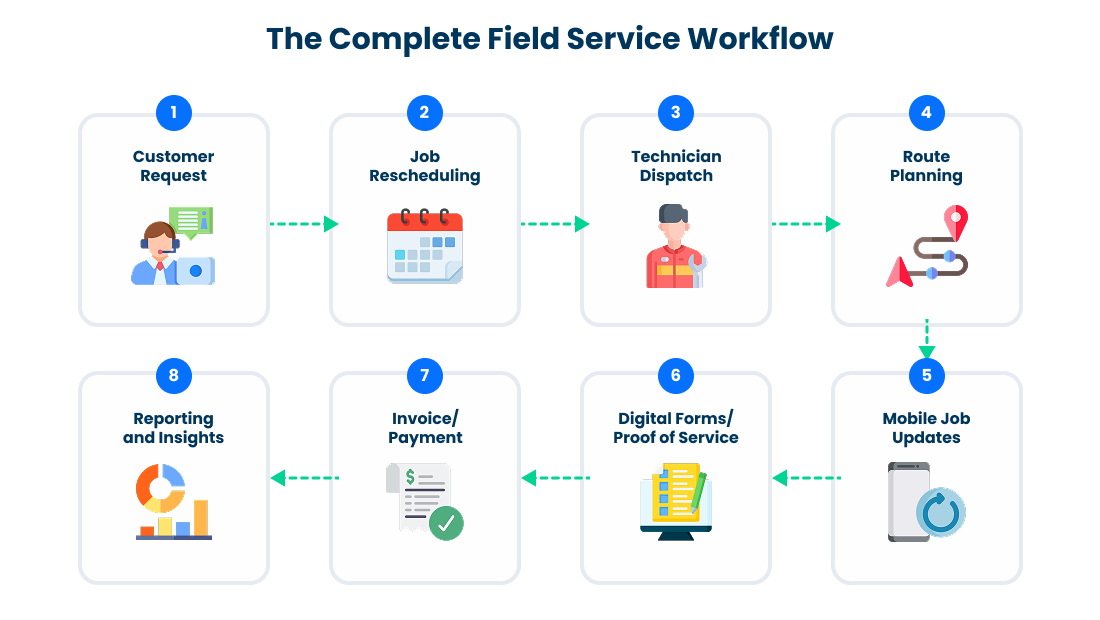
For example, when a customer books a service, the system can help the dispatcher assign the right technician based on availability, location, skill set, and job requirements. The technician receives the job details on a mobile device. The customer receives appointment updates. The manager can monitor progress in real time. Once the job is complete, the team can capture proof of service, close the work order, and move faster toward invoicing.
Field Service Management Software Benefits at a Glance
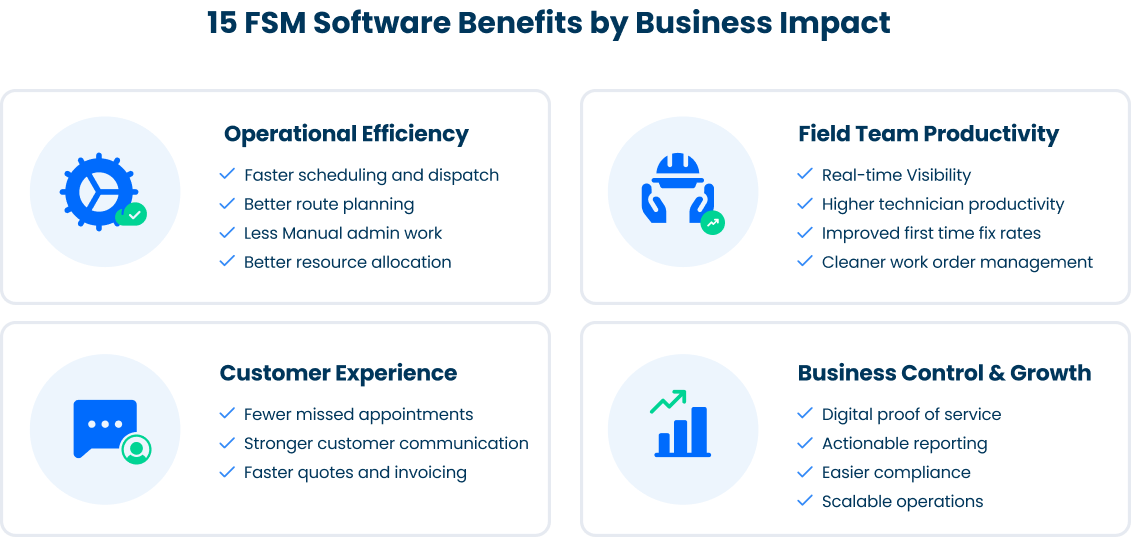
| Benefit | Business Impact |
|---|---|
| Faster scheduling and dispatch | Fewer delays and better crew utilization |
| Real-time field visibility | Faster decisions when jobs change during the day |
| Better route planning | Lower travel time, fuel cost, and non-billable hours |
| Higher technician productivity | More completed work per available hour |
| Improved first-time fix rates | Fewer repeat visits and better service quality |
| Fewer missed appointments | Less customer frustration and fewer scheduling conflicts |
| Stronger customer communication | Fewer inbound calls and better customer experience |
| Cleaner work order management | More accurate job records and fewer missed details |
| Less manual admin work | More time for dispatchers and managers to focus on operations |
| Digital forms and proof of service | Better documentation, compliance, and dispute resolution |
| Faster quotes, invoicing, and payments | Improved cash flow and shorter billing cycles |
| Better resource and crew allocation | More efficient use of technicians, crews, and equipment |
| Actionable reporting | Better decisions on staffing, training, and scheduling |
| Easier compliance | Audit-ready records with timestamps, signatures, and job history |
| Scalable operations | Easier growth across teams, locations, and service lines |
Now, let’s discuss the benefits in detail.
Start a free trial to experience these benefits firsthand.
15 Benefits of Field Service Management Software
Faster Scheduling and Dispatch
Field service management software helps dispatchers schedule jobs faster by centralizing technician availability, locations, skills, job details, and assignments. Teams can reduce scheduling conflicts, respond quickly to changes, and manage urgent requests more easily. This is especially useful for businesses handling multiple daily jobs, recurring appointments, emergency calls, or multi-person crews.
Real-Time Visibility Into Field Operations
FSM software gives managers real-time visibility into scheduled jobs, assigned crews, job progress, delays, completed tasks, and nearby technicians. Instead of relying on phone calls or manual updates, operations teams can quickly respond to cancellations, urgent requests, unavailable technicians, or jobs running longer than expected.
Better Route Planning and Lower Travel Waste
Travel time can increase fuel costs, reduce technician availability, and limit daily job capacity. FSM software helps teams plan smarter routes based on job locations, appointment windows, crew availability, and travel time. Better routing reduces unnecessary driving and allows technicians to spend more time completing jobs instead of traveling between sites.
Higher Technician Productivity
Technicians work more efficiently when they have the right information before arriving on-site. FSM software gives field teams mobile access to schedules, work orders, customer notes, service history, forms, photos, and instructions. This reduces back-and-forth communication with the office and helps technicians complete jobs with fewer interruptions.
Improved First-Time Fix Rates
FSM software improves first-time fix rates by helping businesses assign the right technician to each job based on skills, location, and job requirements. It also gives technicians access to customer details, service history, notes, forms, and documentation, making them better prepared to complete the work successfully on the first visit.
Fewer Scheduling Errors and Missed Appointments
Missed appointments and scheduling mistakes can lead to unhappy customers, wasted technician time, and lost revenue. FSM software reduces these issues by keeping schedules, assignments, and customer communication connected. Dispatchers can avoid double-booking, update job details quickly, and send automated notifications to reduce confusion and no-shows.
Stronger Customer Communication
Customers expect clear updates about appointment times, technician arrival, delays, completed work, and next steps. FSM software improves communication through appointment confirmations, status updates, arrival alerts, and post-job messages. This keeps customers informed without needing to call the office and helps build trust in the service experience.
Cleaner Work Order Management
FSM software keeps work orders digital, organized, and accessible. Teams can standardize job instructions, track job status, capture service notes, attach photos, record approvals, and close jobs faster. This reduces missed details and manual errors while creating a more reliable workflow from job creation to completion.
Less Manual Administrative Work
Manual admin tasks slow down dispatchers, managers, and office staff. FSM software automates repetitive work such as scheduling, dispatch updates, customer notifications, digital forms, job tracking, and reporting. This allows office teams to spend less time on paperwork and more time supporting customers, solving issues, and improving operations.
Digital Forms and Proof of Service
Digital forms make field documentation easier to collect, store, and review. Technicians can capture checklists, inspection results, photos, signatures, safety confirmations, time logs, completion notes, and proof of service. This creates a reliable record of on-site work and helps with audits, disputes, compliance, and quality control.
Track checklists, photos, signatures, and proof of service directly inside every job record.
Explore Digital Forms
Faster Quotes, Invoicing, and Payments
FSM software helps speed up the quote-to-cash process by connecting job completion details with invoicing workflows. Once technicians submit work orders and required information, office teams can review the data and move toward billing faster. This reduces delays, improves cash flow, and helps businesses get paid sooner.
Better Resource and Crew Allocation
Not every technician or crew is right for every job. FSM software helps managers assign work based on skills, location, equipment, certifications, workload, job type, and service priority. Better resource allocation reduces delays, improves job outcomes, and helps teams use their field workforce more effectively.
Actionable Reporting and Performance Insights
FSM software gives managers access to important performance metrics such as job completion rates, technician productivity, travel time, on-time arrivals, customer ratings, first-time fix rates, job duration, revenue by job type, and missed appointments. These insights help leaders make better decisions about staffing, training, scheduling, territories, and customer experience.
Easier Compliance and Audit-Ready Records
FSM software helps field service businesses collect and store documentation in a consistent digital format. Checklists, timestamps, signatures, job histories, and role-based access make it easier to prove that work was completed properly. This is especially valuable for industries involving safety, inspections, customer approvals, insurance, or regulated processes.
Scalable Operations Across Teams and Locations
Manual processes often become harder to manage as a business grows. FSM software gives teams a scalable system for standardizing workflows, managing permissions, coordinating jobs, and tracking performance across crews, locations, and service lines. This allows the business to grow without relying on more spreadsheets, calls, and manual supervision.
What to Look For in Field Service Management Software?
The right FSM platform should support your full operational workflow, not just one part of it.
Look for software with:
Scheduling and dispatch tools
Drag-and-drop calendar management
Crew and technician assignment
Route planning and optimization
Mobile access for field teams
Work order management
Customer notifications
Live tracking and job status updates
Digital forms, photos, and signatures
Quotes, invoices, and payment support
Reporting and analytics
CRM, accounting, and calendar integrations
Role-based permissions
Configurable workflows
Strong onboarding and support
A good FSM system should adapt to how your team works instead of forcing your team into a rigid process.
Use Arrivy to manage scheduling, routing, job tracking, customer communication, digital forms, and reports in one system.
See All Our Features at a Glance
How Arrivy Helps Field Service Teams Work Smarter?
Arrivy helps field service businesses connect scheduling, dispatch, route planning, work orders, customer communication, digital forms, reporting, and integrations in one operational platform. Its FSM solution is designed to help teams plan, dispatch, execute, and track field work while keeping office teams, crews, and customers aligned.
Arrivy also supports configurable workflows, service types, schedules, territories, permissions, and business rules, so teams can shape the platform around their operational process. It offers 50+ native integrations, mobile field access, digital forms, customer experience tools, and audit-ready workflows for compliance-driven teams.
For growing field service teams, that means fewer disconnected tools, fewer manual updates, and better control from the first customer request to the completed job.