Login
Login





















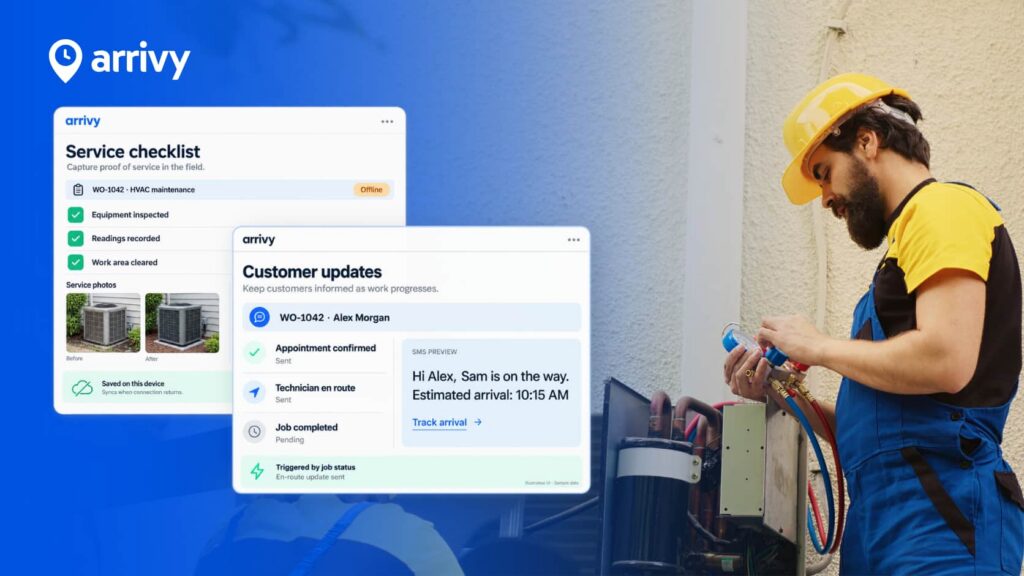
Field service management software helps businesses coordinate work that happens outside the office by scheduling field teams, dispatching jobs, managing work orders, capturing field data, keeping customers informed, and turning completed work into accurate records and invoices.
For businesses evaluating field service management software UK, however, choosing the right platform involves more than comparing scheduling tools and mobile apps. The software needs to fit the way your office teams and mobile workforce operate, connect with the systems you already use, support your customer experience, and continue working when conditions in the field are less than ideal.
That is what this guide is designed to help you assess.
We will look at what field service software actually needs to do, what makes a platform suitable for UK businesses, which features matter most, how to think about cost and ROI, and how to test an FSM platform properly before making a decision.
By the end, you should have a practical framework for choosing software based on how well it fits your real operation rather than how impressive its feature list looks.
What Is Field Service Management Software?
Field service management software, often shortened to FSM software, is a system for managing work carried out by employees, technicians, engineers, installers, contractors, or other mobile teams away from a central office.
A typical field service management system can help a business:
The purpose is not simply to replace paper job sheets with digital ones.
Good field service software connects the people coordinating the work, the people completing it, the customer receiving the service, and the systems that need the information afterwards.
If you want a deeper introduction to the category, read Arrivy’s guide to what field service management software is.
What Makes Field Service Management Software “UK-Ready”?
Many field service platforms can schedule jobs and record completed work. That does not automatically make them the right field service software for a UK business.
The better question is whether the system fits the wider environment your company operates in.
That means looking beyond the core product and considering accounting workflows, data protection, compliance, mobile working, implementation, and support.
Accounting and invoicing workflows
A completed job usually isn’t the end of the process. In many businesses, the information collected in the field still needs to reach finance before the work can be invoiced and paid.
If your finance team uses systems such as Xero, Sage, or QuickBooks, find out exactly how information moves between your field service platform and your accounting software.
Arrivy, for example, integrates with Xero to help connect field operations with invoicing workflows.
The important point is that an integration should remove work from your team. An integration that still requires constant re-keying, checking, or reconciliation may not solve the problem you bought it for.
UK GDPR and customer data
Field service businesses often hold more customer information than they realise.
Depending on the nature of the work, that information may include:
Your field service platform therefore becomes part of your wider data-protection environment.
Before choosing a system, understand how the vendor approaches areas such as access controls, data processing, retention, security, data transfers, and UK GDPR requirements.
Industry-specific workflows and compliance
Not every field service business works in the same way.
A facilities-management contractor may have very different requirements from a plumbing company, HVAC operation, or home-service provider. Some organisations need specific forms, inspection processes, asset records, certificates, approvals, or audit trails.
That is why a vague question such as “does your software support compliance?” is not useful.
A better question is:
“Can you show us how this specific process would work in your system?”
Bring one of your real forms, job types, or approval workflows into the demo.
If the vendor can model it naturally, that is meaningful. If the process requires several workarounds, that matters too.
Mobile and offline working
Mobile workers spend time in basements, plant rooms, rural locations, construction sites, large commercial buildings, or other environments where signal is unreliable. So, your field teams may not have perfect connectivity to keep working.
That makes offline capability an important consideration when evaluating a field service management app.
Ask:
Offline functionality can look like a minor feature during procurement. But it becomes much more important when someone is trying to complete a job at a customer site without a reliable connection.
Implementation and support
Functionality is only one part of the buying decision. You should also understand what happens after you sign the contract.
Ask about:
A powerful system creates little value if the business struggles to implement or adopt it.
Once these UK-specific considerations are clear, the next question becomes more fundamental: do you actually need a dedicated FSM platform in the first place?
Do You Actually Need Field Service Management Software?
Not every service business needs a full field service management platform.
A small operation handling a modest number of predictable jobs may be able to work effectively with a calendar, accounting software, and a simple job-management process.
Signs you may be ready for FSM software
You may benefit from a dedicated platform if:
The real trigger is often the coordination cost.
When too much effort is required to keep the office, field team, customer, and back-office systems aligned, a dedicated field service platform can start creating meaningful value.
And the best way to judge that value is to look at the complete workflow the software needs to support.
The Field Service Workflow Your Software Should Connect
One of the biggest mistakes businesses make when evaluating software is comparing individual features without looking at how the entire job moves through the organisation.
A typical field service workflow might look like this:
Each stage depends on information created earlier in the process.
Weak systems may handle individual stages well but leave your team moving information manually between them. Whereas strong systems connect the stages so information follows the job naturally.
1. Customer request and booking
Every workflow starts with accurate information.
Depending on the business, that may include:
Poor information at the beginning of the process creates problems later in scheduling, field execution, customer communication, and invoicing.
2. Scheduling
Once the job exists, someone needs to decide who should complete it and when.
That may involve questions such as:
Good field service scheduling software should help your team answer those questions quickly and make changes without rebuilding the day manually.
3. Dispatch
Once a job is assigned, the person completing it should receive the information required to do the work.
That may include:
Field workers should not need to call the office simply to understand why they are going to a site.
4. Customer communication
The next part of the workflow is often overlooked.
Customers want to know what is happening.
Booking confirmations, appointment reminders, arrival updates, and delay notifications can reduce uncertainty while also reducing the volume of inbound customer calls reaching the office.
Good field service management therefore involves managing the customer experience as well as the workforce.
5. Work in the field
This is where the mobile experience becomes critical.
A well-designed field service management app should make it easy for technicians, engineers, installers, contractors, and other mobile workers to:
The experience should be quick and intuitive. If basic updates require too many taps or complicated navigation, users are more likely to avoid the system or create their own workarounds.
6. Job completion
Once the work is finished, the office should have the completed job record containing the information needed to understand the work performed.
Depending on your operation, that might include:
A reliable digital job history also makes it much easier to respond to future customer queries or repeat visits.
7. Invoicing and reporting
The workflow does not end when the mobile worker leaves the site. Completed information may still need to reach:
The more automatically that information can move through the business, the less re-keying and administrative effort your team needs to absorb.
This end-to-end view also makes it easier to evaluate individual features because you can judge each one based on how it supports the overall workflow.
10 Field Service Software Features That Actually Matter
Field service software feature lists can become very long very quickly. The goal is to identify the capabilities that have the greatest effect on your operation.
Here are ten areas worth examining closely.
Booking and quoting
For many service businesses, the field service workflow begins before a job is ever scheduled.
Look for software that makes it easy to turn customer interest into confirmed work. That may include letting customers book available appointment slots online, capturing the right information at the point of booking, creating professional quotes, and collecting customer approval without unnecessary back-and-forth.
When evaluating booking and quoting capabilities, ask:
The goal is to reduce friction between customer request, approval, booking, and execution, so your team spends less time copying information between systems or chasing customers manually.
Scheduling and dispatch
Scheduling sits at the heart of most field operations.
Look for software that makes it easy to:
Most importantly, test what happens when the original schedule changes.
A usable mobile app
Your field workforce may interact with the software more frequently than anyone else. So, their experience matters.
A good mobile app should make important information easy to find and common actions easy to complete without unnecessary navigation.
If possible, involve actual field users in your software evaluation rather than judging the mobile experience entirely from the office.
Offline capability
If your teams regularly work in areas with unreliable connectivity, test offline working rather than accepting a yes-or-no answer from the vendor.
Put the device into airplane mode and ask them to complete a realistic job.
That single exercise can reveal much more than a feature description.
Want to test how Arrivy supports teams in the field, including offline workflows?
See it in a live demo.
Digital forms, photos, and signatures
Field evidence is essential for documenting what happened on site. Your software should make it easy to collect the information your company needs while the work is being completed, even offline.
Where appropriate, forms should also be adaptable to your workflow instead of forcing every type of job into the same structure.
Customer notifications and ETA visibility
Customer communication should be part of the operational workflow rather than a separate task for office staff.
Depending on your business, useful capabilities may include:
The goal is to give customers useful visibility without creating more administrative work.
Route planning
Assigning work is only part of field scheduling. Your team also needs to travel efficiently between jobs.
Route planning can help reduce unnecessary mileage, make schedules more realistic, and increase the amount of productive time available during the working day.
Job and work-order management
Every job should have one reliable record.
Your team should be able to understand:
When that information is scattered across emails, messages, paper, and separate systems, mistakes become much more likely.
Reporting and operational visibility
Useful reporting should help answer practical questions.
For example:
For a deeper look at what to track and how to use operational data effectively, read our complete guide to field service reports.
Integrations and APIs
Your FSM platform will probably not operate in isolation. Before buying, map the systems it needs to exchange information with.
These may include:
Then establish exactly what information moves between the integrations and what still requires manual work.
Once you understand the functionality you need, the next question is what that functionality is actually worth paying for.
How Much Does Field Service Management Software Cost in the UK?
There is no single useful price for field service management software in the UK.
Costs vary based on the number of users, the type of operation, the functionality required, the level of configuration involved, and the vendor’s pricing model.
As a point of reference, Arrivy’s Standard plan starts at $25 per user per month, with monthly, annual, and custom pricing options available. If you want to see how the platform fits your operation before committing, you can also start a 14-day free trial with no credit card required.
The key is to compare total cost, not just the advertised subscription price.
Costs may include:
Two products with similar monthly licence prices can therefore have very different costs once the complete implementation is considered.
Compare total cost with operational impact
A cheaper platform can become expensive if it creates additional administration.
A more expensive system may deliver greater value if it significantly reduces:
That leads naturally to the most useful financial question of all: what return could the software generate?
How to Calculate the ROI of Field Service Management Software?
You do not need a complicated financial model to estimate the potential value of FSM software.
Start with the operational numbers you already have.
Establish your current baseline
Look at measures such as:
Then look for realistic areas of improvement.
For example, imagine ten field workers each recover only 30 minutes per day through better scheduling and less administration. That gives the business five additional hours of productive field time every working day. Across a year,
And ROI does not have to come from labour savings alone. Arrivy customers have reported measurable operational gains, including 30% less time spent on operations, 5× more customer reviews, 50% fewer missed opportunities, and up to $50,000 recovered annually from operational losses. These results show that the impact can come from several areas at once, including efficiency, customer experience, and missed revenue opportunities.
Your own results will depend on your workflows and starting point, so use your current operating metrics as the baseline. Look at where your business loses the most time or revenue today, then estimate what better scheduling, communication, and workflow automation could realistically be worth.
Once you know where the value should come from, you are in a much stronger position to test whether a vendor can actually deliver it.
The 30-Minute Field Service Software Test
Feature lists tell you what software claims to do.
A realistic workflow test tells you how well it actually does it.
For that reason, every shortlisted vendor should be asked to complete the same real-world scenario during the demo.
Ideally, use a job that closely resembles work your business handles every day.
Ask every vendor to complete these tasks
1. Create a customer and a new job.
2. Schedule the job for a member/crew of the field team.
3. Show what information appears on the mobile device.
4. Move the job because the original schedule has changed.
5. Show how the customer is notified.
6. Open the job from the mobile app.
7. Put the device into offline mode.
8. Complete a form.
9. Take and attach a photograph.
10. Capture a signature or other proof of completion.
11. Bring the device back online.
12. Show how the completed information reaches the office.
13. Move the job into the invoicing or next-step workflow.
14. Find the complete job history afterwards.
For each step, give the platform one of four ratings.
Easy
The workflow feels natural and requires little explanation.
Possible but awkward
The functionality exists, but the process feels unnecessarily complicated.
Requires a workaround
The software was not really designed for the workflow.
Not supported
The platform cannot meet the requirement.
This type of test is useful because it exposes the gap between a feature existing and a feature actually working well for your business.
It also gives you a consistent basis for comparing vendors.
Put Arrivy through the same test. Bring one of your real workflows and see how the platform handles it.
Book a demo
Common Mistakes When Choosing Field Service Management Software
Even with a clear evaluation framework, a few common mistakes can lead businesses towards the wrong platform.
| Mistake | What to Do Instead |
|---|---|
| Choosing the system with the longest feature list | Focus on how well the platform supports your most important workflows. |
| Ignoring the mobile user experience | Involve technicians, engineers, installers, contractors, or other mobile users in the evaluation. |
| Testing only the easy path | Test delays, reassignments, poor connectivity, incomplete information, repeat visits, and appointment changes. |
| Forgetting implementation | Clarify who will configure the system, migrate data, train users, and manage rollout. |
| Underestimating integration work | Test the actual flow of information your business needs, not just whether an integration exists. |
| Buying only for today’s operation | Check whether the platform can support future teams, services, locations, workflows, and integrations. |
| Excluding field teams from the decision | Use feedback from the people doing the work to uncover practical issues that may not appear in a sales demo. |
Avoiding these mistakes will help you narrow the shortlist and choose a platform that fits how your business actually operates.
Why Consider Arrivy for Field Service Management?
Arrivy is designed to help businesses connect office operations, field teams, and customers throughout the service workflow.
Instead of treating scheduling, mobile work, customer communication, and field data as isolated tasks, Arrivy helps bring those activities into a more connected process.
Depending on your requirements, Arrivy can support capabilities such as:
Put Arrivy through the 30-minute test
Show us how a job moves through your business today, from booking and scheduling to completion. Then see how that same workflow could operate in Arrivy.