Login
Login






















AI Summary
Many field service businesses already have software for sales, accounting, and file storage before they start looking for a field service management platform.
A solar company, for example, may use HubSpot to manage leads and customers, QuickBooks Online for accounting, and Google Drive for installation photos, inspection documents, and other job files. Replacing those systems would add cost and disruption without necessarily solving the operational problem.
What the company needs is a field service platform that can work between them.
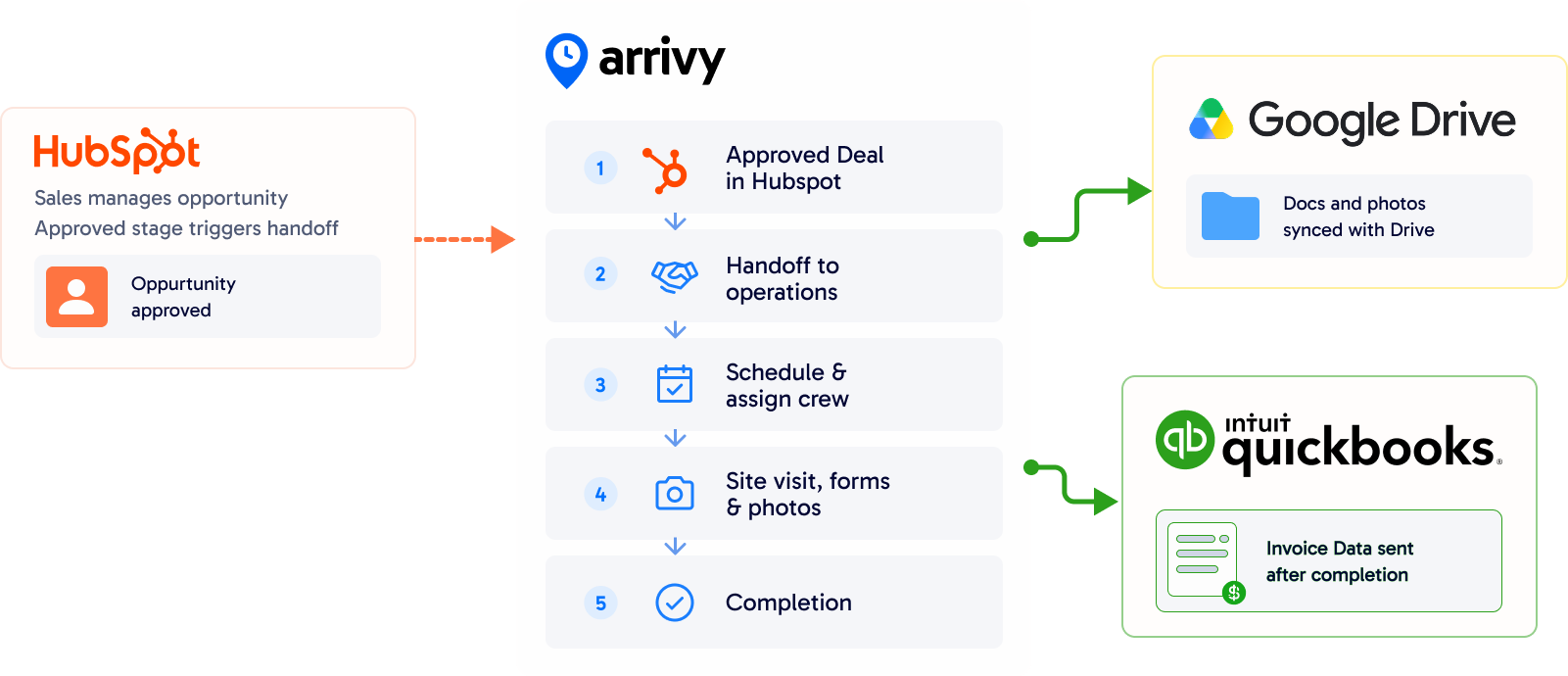
When a job is ready in HubSpot, the operations team should be able to move it into scheduling and dispatch without entering the same information again. After technicians complete the work, job documentation should reach Google Drive, while the billing information needed by accounting should reach QuickBooks Online.
This guide compares Arrivy, Jobber, Housecall Pro, and Workiz specifically around that workflow.
What should an FSM do with HubSpot, QuickBooks, and Google Drive?
Consider a common HVAC workflow.
- A salesperson closes a replacement job in HubSpot. The operations team now needs the customer details and job information so the installation can be scheduled.
- The crew completes the installation and takes photos in the field. Those photos need to be stored with the rest of the job documentation.
- Once the work is complete, accounting needs an invoice in QuickBooks.
- At the same time, the sales or customer-service team may need HubSpot updated so they can see where the job stands.
A suitable field service platform should therefore help with four things:
- Move the job from HubSpot into field operations.
- Manage scheduling and field work.
- Send job photos and documents to Google Drive.
- Pass billing information to QuickBooks Online.
If the business also wants job information sent back to HubSpot, the direction of the integration becomes important. That is the workflow used for the comparison below.
HubSpot + QuickBooks Online + Google Drive: quick comparison
| Platform | HubSpot | QuickBooks Online | Google Drive | Starting Price | Free Trial | |||
|---|---|---|---|---|---|---|---|---|
|
Arrivy |
Direct integration with task creation, updates, and supported two-way workflows |
|
|
|
14 days |
|||
|
Jobber |
Available through Zapier
|
Direct integration
|
Available through Zapier
|
$29/month billed annually
|
14 days |
|||
|
Housecall Pro |
Available through Zapier |
Direct integration
|
Available through Zapier
|
$59/month billed annually
|
14 days |
|||
|
Workiz |
Available through Zapier
|
Direct integration
|
Available through Zapier
|
Request pricing
|
7 days |
All four products can play a role in this software stack. The main difference is how much of the HubSpot-to-field-to-accounting workflow can be handled directly inside the FSM.
4 Best Field Service Platforms for HubSpot, QuickBooks Online, and Google Drive
1
Arrivy - Best for Connecting HubSpot With Field Operations
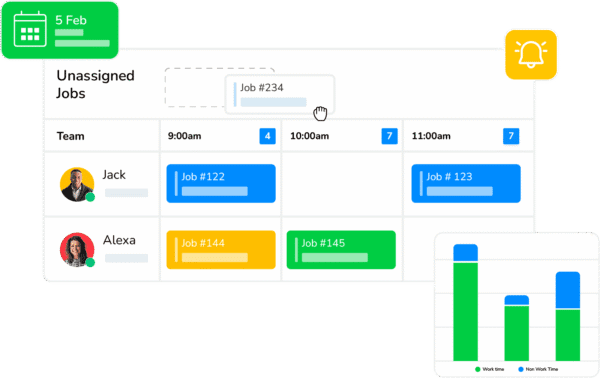
Arrivy is a field operations platform for service businesses that want to keep their existing CRM, accounting system, and file storage rather than move everything into one application.
Arrivy has direct integrations with HubSpot, QuickBooks, and Google Drive. HubSpot can pass customer and job information into Arrivy for scheduling and field execution. Completed work can trigger invoice creation in QuickBooks Online/Desktop, while photos and documents collected through Arrivy Digital Forms can be sent to Google Drive.
The HubSpot integration also supports information moving back from Arrivy. Depending on the setup, Arrivy activity can create or update HubSpot Deals, Tickets, and Contacts.
Why we included it: Arrivy is the closest match to the specific requirement in this comparison. A business can continue using HubSpot for sales, Arrivy for field operations, QuickBooks Online for accounting, and Google Drive for job documentation without using Zapier to connect those three core workflows.
Arrivy is a field operations platform for service businesses that want to keep their existing CRM, accounting system, and file storage rather than move everything into one application.
Arrivy has direct integrations with HubSpot, QuickBooks, and Google Drive. HubSpot can pass customer and job information into Arrivy for scheduling and field execution. Completed work can trigger invoice creation in QuickBooks Online/Desktop, while photos and documents collected through Arrivy Digital Forms can be sent to Google Drive.
The HubSpot integration also supports information moving back from Arrivy. Depending on the setup, Arrivy activity can create or update HubSpot Deals, Tickets, and Contacts.
Why we included it: Arrivy is the closest match to the specific requirement in this comparison. A business can continue using HubSpot for sales, Arrivy for field operations, QuickBooks Online for accounting, and Google Drive for job documentation without using Zapier to connect those three core workflows.
Key Features:
Pros:
-
All three applications have direct Arrivy integrations.
-
HubSpot can remain the sales CRM while Arrivy handles scheduling and field execution.
-
Supported HubSpot workflows operate in both directions rather than stopping after the initial sales handoff.
-
QuickBooks invoice generation can be tied to operational events such as task completion.
-
Field photos and completed documents can be filed into Google Drive without downloading them manually after each job.
-
Useful for businesses that already have an established software stack and do not want to replace it.
Cons:
-
More operational functionality than very small teams needing only basic scheduling and invoicing may require.
-
Highly customized CRM or multi-system workflows may require additional configuration support.
Pricing:
- Standard: $25 per full-access user/month; 3-user minimum.
- Premium: $50 per full-access user/month; 3-user minimum.
- Enterprise: Custom pricing.
- Trial: 14 days, no credit card required.
Best for:
Field service businesses that already use HubSpot as their CRM and want to connect the sales-to-operations handoff with scheduling, field documentation, QuickBooks invoicing, and Google Drive storage.
2
Jobber - Best for Small Service Businesses Comfortable With Zapier

Jobber is field service management software for home and commercial service businesses, covering scheduling, jobs, quotes, invoicing, payments, routing, and customer management.
QuickBooks Online is integrated directly with Jobber, allowing supported accounting information to move from Jobber into QuickBooks as part of the day-to-day workflow.
HubSpot and Google Drive can be connected through Zapier, including workflows that move contacts, deals, and job-related information between systems.
Why we included it: Jobber is a credible option for smaller field service businesses already using QuickBooks Online. It can also participate in a HubSpot and Google Drive stack, but more of that connection sits in Zapier than it does with Arrivy.
Jobber is field service management software for home and commercial service businesses, covering scheduling, jobs, quotes, invoicing, payments, routing, and customer management.
QuickBooks Online is integrated directly with Jobber, allowing supported accounting information to move from Jobber into QuickBooks as part of the day-to-day workflow.
HubSpot and Google Drive can be connected through Zapier, including workflows that move contacts, deals, and job-related information between systems.
Why we included it: Jobber is a credible option for smaller field service businesses already using QuickBooks Online. It can also participate in a HubSpot and Google Drive stack, but more of that connection sits in Zapier than it does with Arrivy.
Key Features:
Pros:
-
Strong fit for smaller home-service businesses.
-
Straightforward scheduling, quoting, invoicing, and customer-management workflow
-
Zapier provides several ways to connect HubSpot with Jobber.
Cons:
-
QuickBooks sync is one-way from Jobber to QuickBooks.
-
Payment status changes in QuickBooks do not automatically sync back to Jobber.
-
HubSpot and Google Drive connections require Zapier for this workflow.
-
Some users report occasional QuickBooks mapping or sync issues.
-
Each QuickBooks account can connect to only one Jobber account at a time.
Pricing:
- Core: $49/month with no commitment, or $29/month billed annually for one user.
- Connect: $139/month with no commitment, or $99/month billed annually for one user.
- Grow: $199/month with no commitment, or $149/month billed annually for one user.
- Plus: Pricing starts at $499/month with no commitment for five users; lower rates are available with annual commitments.
- Trial: Free trial available.
QuickBooks Online sync is listed from the Connect plan upward.
Best for:
Small and growing service businesses that like Jobber’s day-to-day job-management workflow, use QuickBooks Online, and are comfortable relying on Zapier for HubSpot and Google Drive connections.
3
Housecall Pro - Best for Home-Service Teams Prioritizing QuickBooks and Payments
Housecall Pro is built for home-service businesses such as HVAC, plumbing, electrical, and landscaping, with tools for scheduling, dispatch, estimates, invoicing, payments, and customer communication.
It connects directly with QuickBooks Online, where invoices, payments, customer information, and Price Book items can sync based on configured events.
HubSpot and Google Drive can be connected through Zapier, including workflows that move customer or job information between systems.
Why we included it: Housecall Pro offers a substantial QuickBooks workflow. It is less direct when HubSpot and Google Drive also need to form part of the same process.
Housecall Pro is built for home-service businesses such as HVAC, plumbing, electrical, and landscaping, with tools for scheduling, dispatch, estimates, invoicing, payments, and customer communication.
It connects directly with QuickBooks Online, where invoices, payments, customer information, and Price Book items can sync based on configured events.
HubSpot and Google Drive can be connected through Zapier, including workflows that move customer or job information between systems.
Why we included it: Housecall Pro offers a substantial QuickBooks workflow. It is less direct when HubSpot and Google Drive also need to form part of the same process.
Key Features:
Pros:
-
Built specifically around common home-service workflows.
-
Direct QuickBooks Online connection supports invoices, payments, and customer information.
-
Businesses can control when job information is sent to QuickBooks.
-
Strong scheduling, payment, and invoicing functionality.
-
Zapier provides several practical HubSpot automation options.
Cons:
-
QuickBooks sync is primarily one-way from Housecall Pro to QuickBooks.
-
Invoice edits do not automatically update QuickBooks after the first sync.
-
Deleted or cancelled invoices must also be handled separately in QuickBooks.
-
HubSpot and Google Drive require Zapier for this workflow.
-
Some users report reconciliation issues with more complex payment scenarios.
Pricing:
- Basic: Starts at $59/month when billed annually.
- Essentials: Pricing varies based on the selected team configuration; QuickBooks Online sync is included.
- Max: Higher-tier plan with features such as Pipeline, route optimization, Open API access, and dedicated onboarding.
- Trial: 14 days, no credit card required.
Best for:
HVAC and other home-service businesses that prioritize Housecall Pro’s scheduling, payments, and QuickBooks workflow and are comfortable using Zapier for HubSpot and Google Drive.
4
Workiz - Best for Service Businesses With a QuickBooks-Centred Workflow
Workiz is field service management software for scheduling, jobs, estimates, invoices, payments, client management, reporting, and automation.
It offers a direct QuickBooks Online integration, with supported accounting data syncing automatically based on the records and timing a business chooses.
HubSpot and Google Drive can be connected through Zapier, including workflows such as sending Workiz leads to HubSpot or creating jobs from connected app activity.
Why we included it: Workiz provides a solid service-management platform and direct QuickBooks support, so it can fit businesses that already use QuickBooks but do not require HubSpot and Drive to connect directly to their FSM.
Workiz is field service management software for scheduling, jobs, estimates, invoices, payments, client management, reporting, and automation.
It offers a direct QuickBooks Online integration, with supported accounting data syncing automatically based on the records and timing a business chooses.
HubSpot and Google Drive can be connected through Zapier, including workflows such as sending Workiz leads to HubSpot or creating jobs from connected app activity.
Why we included it: Workiz provides a solid service-management platform and direct QuickBooks support, so it can fit businesses that already use QuickBooks but do not require HubSpot and Drive to connect directly to their FSM.
Key Features:
Pros:
-
Direct QuickBooks Online integration.
-
Businesses can control which financial records are sent to QuickBooks and when.
-
Scheduling, jobs, invoicing, payments, and customer management sit in the same platform.
Cons:
-
Invoices sync from Workiz to QuickBooks, not both ways.
-
QuickBooks-to-Workiz payment sync is limited to supported offline payments
-
Estimates do not sync to QuickBooks Online.
-
Automatic invoice sync at creation requires Workiz Pay.
-
HubSpot and Google Drive require Zapier for this workflow.
-
Some users report occasional QuickBooks sync problems.
Pricing:
No public pricing available.
Best for:
Service businesses that want Workiz for their main field workflow, depend heavily on QuickBooks Online, and are comfortable connecting HubSpot and Google Drive through Zapier.
What the workflow could look like for a solar company
Take a solar installer using HubSpot, QuickBooks Online, and Google Drive. A salesperson manages the opportunity in HubSpot and moves it to the company’s approved stage once the customer is ready to proceed.
The project is then handed to operations, where the installation can be scheduled and the appropriate crew assigned. During the site visit and installation, the field team records progress, completes required forms, and captures photos of the work.
Those documents can then be moved into the company’s Google Drive structure through the platform’s availablle integration workflow. Once the project reaches the required completion stage, invoice information can be passed to QuickBooks Online.
If HubSpot remains part of the post-sale process, relevant project updates can also be reflected there so sales and customer-facing teams can follow progress without relying on manual updates.
This is the kind of workflow worth testing during a product evaluation. The important question is not only whether a platform connects with HubSpot, QuickBooks, and Google Drive, but whether those connections support the way your solar projects actually move from sale to installation and completion.
Why Arrivy Deserves a Closer Look
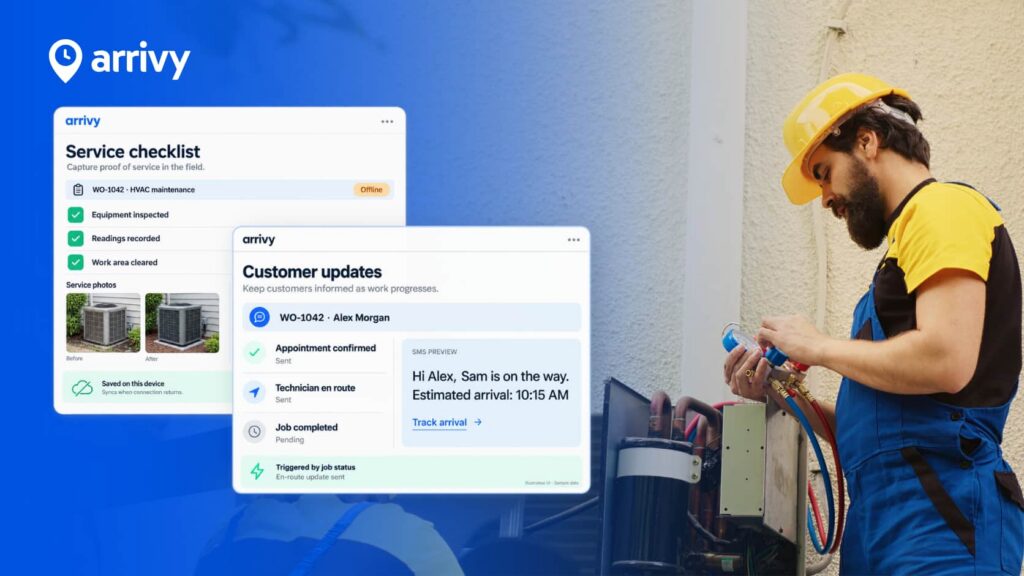
Arrivy offers more than the three integrations covered in this comparison. It also includes scheduling and dispatch, route optimization, crew management, digital forms, offline mobile use, customer updates, live tracking, and reporting.
Its wider ecosystem includes 50+ integrations across CRM, accounting, payments, document management, fleet, and communication tools, including Salesforce, Xero, Square, CompanyCam, Samsara, Motive, Pipedrive, Intercom, and Google Calendar.
Public feedback is also positive. Reviewers frequently mention responsive support, flexibility, and help with integration requirements.
Arrivy also offers a 14-day free trial, along with free business tools and templates for invoices, estimates, work orders, contracts, inspection checklists, and service-cost calculations.
For businesses comparing more than just integrations, this combination of field-service functionality, broader connectivity, support, and free resources gives Arrivy a stronger overall case.