Login
Login























Moving a family from one house to another is stressful, sure. But moving an entire company with offices in three different cities is when things get really messy.
Downtime costs real money.
When a business relocates, especially across multiple locations, there’s a lot at stake. Downtime costs real money. You’ve got crews in different cities who all need to be on the same page. The client is calling every two hours asking for updates. And if just one truck shows up late or one crew doesn’t know what they’re supposed to be doing, you’re looking at delays that can cost thousands.
Most moving companies try to handle all this with spreadsheets, phone calls, and a lot of stress. But there’s a better way. Commercial moving software is built specifically for these kinds of complicated jobs where you need everyone coordinated, clients updated, and nothing overlooked.
If you handle commercial moves (or want to), this guide will walk you through how the right moving software can save you from the mess.
Recommended Reads
The Complexity of Commercial and Multi-Location Moves
Commercial moves are completely different from residential ones. When you move a family, you’re dealing with one location, one timeline, and a straightforward list of items. But corporate relocations involve multiple departments, sensitive equipment, and often several offices moving at once. Commercial moves make up about 41% of the moving industry, and these jobs require way more planning and coordination.
A single corporate move might mean:
Coordinating IT teams to disconnect servers and equipment
Handling specialized machinery that needs expert care
Moving multiple offices at the same time without stopping business operations
Coordinating moves across different cities or even countries
And unlike homeowners who can take a few days to settle in, businesses need to be up and running immediately.
Challenges movers face
The problems pile up fast when you’re managing commercial relocations:
- • Multiple locations happening at once: You might need to move a company’s main office in San Francisco while also relocating their Austin and Chicago locations, all in the same week, each with different needs and local crews.
- • Complex equipment tracking: Commercial moves include 26% computers and office equipment, plus 7% trade show materials. These items need special handling and detailed documentation that regular moves don’t require.
- • Too many people to coordinate: You’re talking to the facilities manager, IT director, department heads, building management, and often a corporate relocation coordinator. Without a central system, when you’re relaying information through phone calls and emails, someone always gets left out of the loop.
- • Jobs depend on each other: One department can’t move until IT disconnects their servers. The executive suite moves last because they’re managing everything until the final day. These connections mean one delay creates a domino effect.
The cost of mistakes
This is where mistakes really hurt, and the numbers tell a pretty stark story.
According to an ITIC 2021 survey, 91% of organizations said just one hour of IT downtime costs over $300,000. For businesses undergoing relocation, this downtime incurs thousands of dollars in lost revenue and productivity.
For your moving company, problems show up differently but still hurt. Scheduling conflicts mean crews sitting around getting paid but not working. Miscommunication leads to missing equipment and extra trips that eat your profit. When you can’t see what’s happening in real-time, small problems turn into big disasters.
The commercial moving market is heading toward $85 billion by 2033. With that kind of money at stake, your reputation matters. One messed-up corporate move can cost you that client, their referrals, and future contracts.
What Is Commercial Moving Software?
The basics
Commercial moving software is a platform built specifically to handle the complexity of business relocations, especially those with multiple locations, large inventories, and teams working at different sites simultaneously.
Everything, including job scheduling, crew assignments, inventory tracking, client communication, and real-time updates, lives in one place. Instead of managing phone calls, spreadsheets, paper forms, and texts, everyone accesses one system based on their role.
Think of it as mission control. Your dispatcher sees the big picture of all active jobs. Field crews see their specific tasks and update status in real-time. Clients get tracking links and automatic updates. And managers pull reports to see what’s working and what’s not.
How it’s different from regular moving software
Basic moving software might handle job creation and scheduling, but it struggles when you’re coordinating multiple crews across different locations with connected timelines.
Multiple sites under one job where a single client has several moves happening at once, each with different crews and requirements, all linked together.
Tasks that depend on each other so you can map out which tasks must finish before others start.
Different access for different people so your IT equipment specialist sees different info than your furniture crew, and the client gets visibility without seeing your internal operations.
Detailed inventory management that goes beyond “boxes and furniture” to handle serialized equipment, condition reports with photos, and tracking who handled what and when.
Who needs it
Three types of businesses benefit most:
Commercial moving companies handling office relocations and multi-location projects.
If you want to move beyond residential work or compete for bigger corporate contracts, you need the tools that make these jobs manageable.
Relocation service providers who coordinate moves as part of employee relocation packages.
You need tight integration with corporate systems and clear communication across HR, employees, and your field teams.
Enterprise logistics teams within large companies that manage their own internal moves.
When you’re constantly reshuffling offices, opening branches, or consolidating locations, this software prevents chaos.
Overall, if timing is critical, multiple people need updates, and mistakes are expensive, basic tools won’t work.
Key Features That Simplify Multi-Location Moves
Centralized scheduling and resource management
When you’re managing three offices moving simultaneously, you need to see all your resources and timelines in one place.
Commercial moving software gives you a dispatch dashboard showing all active jobs, available crews, trucks, equipment, and schedule conflicts at a glance. You can drag and drop job assignments, spot problems before they happen, and adjust schedules when clients change things last minute.
This kind of system cuts scheduling conflicts by 40%. That means fewer crews showing up to the wrong place, less wasted drive time, and better use of your people and equipment.

Crew management and task assignment
On a commercial move, not everyone does the same work. You’ve got general movers, IT equipment specialists, furniture installers, and team leads. Each person has different skills and responsibilities.
Good software lets you assign tasks based on who can actually do them. Your IT specialist handles servers. Your experienced lead does client walkthroughs and sign-offs. And your general crew packs and loads. Everyone knows exactly what they’re responsible for, which reduces confusion and helps you maintain quality.
Live tracking
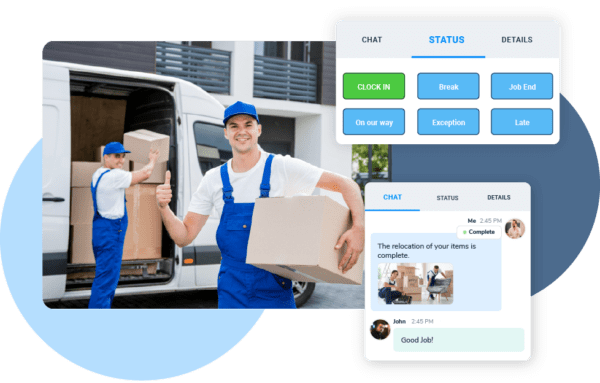
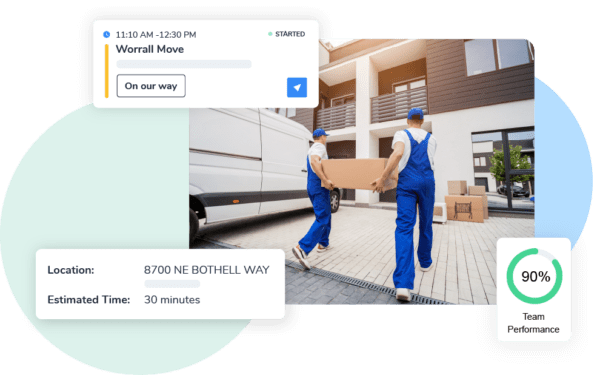
Transparency matters in commercial moves, where clients worry about business disruptions and need to coordinate their own teams. Live tracking shows your dispatch team where every crew is and what stage of the job they’re at. Not just their GPS location, but whether they’ve finished loading, whether they’re driving to the destination, whether they’ve started unloading.
Clients get tracking links so they can check progress themselves. Instead of calling your office every hour asking “where are my servers?”, they see estimated arrival times and updates. This cuts down dramatically on status calls.
Digital forms and checklists
Paper forms are a problem in commercial moves. They get lost, you can’t read the handwriting, only one person can look at them at a time, and you don’t know if they’ve been completed until the crew gets back to the office.
Digital forms fix all of this. Your crew uses their phone or tablet to complete checklists, fill out condition reports, and document inventory while they’re on-site. They can attach photos of equipment condition, collect digital signatures for approvals, and submit everything instantly.
This cuts data entry errors by 37% and improves accuracy by 88%. That means fewer disputes about damaged items and better documentation if you need to file or defend against a claim.
Communication in one place
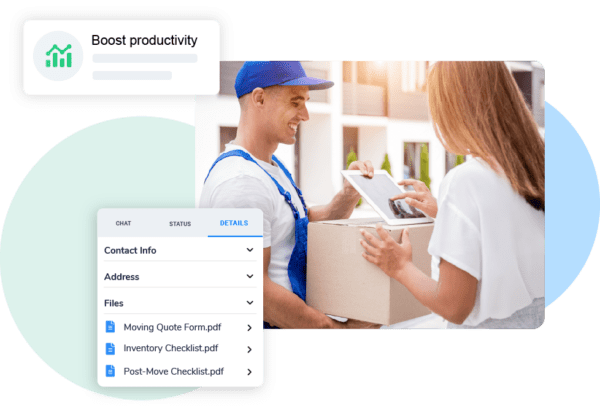
When clients email your sales rep, who texts the dispatcher, who then calls the crew lead, information gets lost.
An integrated communication system creates one place for everything. All messages, updates, and documents attach to the job. Your office can send updates that everyone sees. Crew leads ask questions that get answered. This prevents the “I never got that message” problem and creates a record of all job discussions.
Reporting and insights
After the move, you need to know what actually happened. Did you make money on the job? Which crew was most efficient? Where did delays happen? How did your actual costs compare to what you estimated?
Good reporting features show you job profitability, crew productivity, on-time performance, and customer satisfaction. You can see which types of jobs make the most money, which crews need more training, and where your process breaks down.
Arrivy’s platform offers all these features, built specifically for complex, multi-site moves. Everything you need lives in one integrated system.
How Commercial Moving Software Works: Step-by-Step
Let’s walk through how the software transforms a complex move into organized operations.
Step 1 – Planning and CRM integration
When your sales team wins a multi-location corporate contract, the client details flow automatically from your CRM into your moving software (Arrivy). The system creates a main job with sub-jobs for each location. All contact info, special requirements, access codes, and equipment notes populate automatically. Your project manager reviews everything and flags any special needs.
This integration eliminates double data entry and makes sure nothing gets lost between sales and operations.
Step 2 – Assigning teams to multiple sites
Your dispatcher assigns crews to each location based on skills, availability, and location. For a three-city move over two days:
Crew A handles San Francisco headquarters on Day 1
Crew B tackles Austin simultaneously
Crew C manages Chicago on Day 2 after Crew B finishes and travels
The software shows crew availability, prevents double-booking, and flags conflicts like truck maintenance or time-off requests. You can also link tasks, for example, the IT team can’t start server setup until Crew A confirms the equipment arrived safely.
Step 3 – Move-day coordination with live tracking
On move day, things can go wrong fast. But with live tracking, you stay in control.
Each crew checks in when they arrive. As they complete each phase, like packing, loading, transit, unloading, and setup, they update the app. Your dispatcher sees all jobs on one dashboard and spots issues immediately.
When Crew B reports they’re 30 minutes behind in Austin due to elevator problems, you can notify the client right away and adjust the Chicago crew’s start time. The client gets automatic updates without calling.
Step 4 – Digital documentation
While crews are working, they’re documenting everything digitally. Bill of lading gets signed electronically on a tablet. Condition reports for expensive furniture include photos and notes. Inventory checklists get completed item-by-item with serial numbers recorded.
Everything uploads to the cloud instantly. So when a client calls your office asking about a specific piece of equipment, you can pull up photos and documentation in seconds instead of waiting until the crew gets back with their paperwork.
Step 5 – Post-move reporting
After all locations finish, the software generates reports automatically. You get timelines, documentation of any issues and how you solved them, final inventory confirmations, and customer sign-offs.
You can send the client a complete move report within 24 hours, which is something that would take days to put together manually. Your accounting team has everything they need for invoicing. Your operations manager reviews performance metrics to see what needs to improve for next time.
Companies using this kind of software report 31% higher customer satisfaction compared to companies managing jobs manually.
Choosing the Right Software
Must-have features
Not all moving software is the same. Look for these essentials:
Multi-job coordination with the ability to link related jobs and manage dependencies. You need the full picture of a project, not just individual job cards.
Role-based access so you can give clients, crews, and office staff appropriate visibility without exposing sensitive details.
Mobile apps that work offline, your crews can’t rely on perfect cell coverage everywhere. The app needs to work without connection and sync later.
Flexible workflows because every moving company operates differently. Can you configure task lists and forms to match your procedures?
Smart scheduling that handles resource conflicts, crew availability, equipment maintenance, and customer time windows without being complicated to use.
Good reporting that shows profitability by job type, satisfaction by crew, on-time performance, and other metrics crucial for improvement.
Integration capabilities
Your moving software needs to work with your other business systems.
CRM integration is critical for smooth handoff from sales to operations. When sales closes a deal, that info should flow automatically without re-entry.
Accounting integration means job completion data, hours, materials, and billing details flow directly to your accounting software. This eliminates manual invoices.
Storage facility integration for moving companies offering warehousing. Client inventory should transfer seamlessly to your warehouse system with all documentation intact.
Communication platform integration with tools like Slack or email so notifications flow into channels your team already uses.

Support and scalability
When you’re in the middle of a big corporate move worth tens of thousands, you can’t afford software downtime or slow support.
Look for:
Fast, responsive support with multiple contact options (phone, email, chat) and quick response times. Read reviews from actual customers about their support experience.
Good training and onboarding because software only works if your team uses it correctly. Do they offer in-person training? Video tutorials? Actually helpful documentation?
Proven scalability for both technical capacity (can it handle your busy season?) and business growth (what happens when you go from 10 to 50 employees?).
Regular updates because technology and customer expectations change constantly. Is the vendor actively developing? Do they listen to feedback?
Total cost beyond just the subscription price—implementation, training, transition time, and ongoing support all contribute to the real investment.
How Arrivy Supports Commercial Moves
Arrivy was built for field service businesses coordinating complex, multi-location operations, making it ideal for commercial moving companies.
CRM integration
Arrivy integrates seamlessly with moving industry CRMs like MoversSuite, plus platforms like HubSpot and Salesforce. When your sales team closes a corporate contract, all details flow automatically into Arrivy.
Live tracking and notifications
Arrivy provides branded tracking links you can share with corporate clients, giving them real-time visibility without extra work from your team. The system sends automatic updates at key milestones.
Digital forms
Arrivy’s digital forms turn documentation from a burden into an asset. Your crews use mobile devices to complete customized checklists, capture condition reports with photos, document inventory with serial numbers, and collect electronic signatures. Everything is instantly available in the cloud for your office, accounting, and management teams. The forms are completely customizable to match your specific processes.
Centralized dispatch dashboard
Arrivy’s dashboard gives you the command center you need for complex, multi-location moves. See all active jobs, crew locations, job progress, and upcoming schedules in one view. The dashboard makes it easy to optimize resources, spot conflicts before they become problems, and respond quickly when things change.
For crew management, Arrivy handles role-based assignments, skills matching, and availability tracking. You ensure the right people with the right expertise are on each job, with full visibility into who’s working what, when, and where.
The platform scales seamlessly, whether you’re managing one office move with one crew or a complex multi-city job with a dozen crews working simultaneously.
Final Thoughts
Commercial moves don’t have to be chaotic. The difference between a smooth, profitable relocation and a nightmare of conflicts and unhappy clients comes down to having the right systems.
Commercial moving software turns complexity into your advantage. When you can coordinate multiple crews across cities, provide real-time transparency, maintain accurate documentation, and capture insights for improvement, you’re providing premium service that commands premium pricing and generates referrals.