Login
Login





















AI Summary
Route planning becomes harder as a field service business adds more technicians, appointments and service areas. A dispatcher may need to consider where each technician is located, when the customer is available, how long the job should take, whether the technician has the right skills and how much travel sits between appointments.
Basic navigation apps can show a path from one address to another, but they do not necessarily solve the wider planning problem. Field service businesses often need to optimise several jobs across multiple technicians while still responding to cancellations, emergency work, traffic delays and changing schedules.
For Australian businesses covering large metropolitan areas, regional territories or multiple service zones, inefficient routes can mean more travel time, higher vehicle costs and fewer completed jobs.
This guide compares six route planning software platforms based on their routing capabilities, field-service suitability, mobile tools, live visibility, pricing and operational limitations.
What Is Route Planning Software?
Route planning software helps businesses organise and sequence multiple jobs or stops across drivers, technicians or field crews.
Route optimisation goes further by calculating more efficient routes using factors such as distance, travel time, appointment windows, service duration, technician availability, skills and other operational constraints.
A typical field service routing workflow may look like:
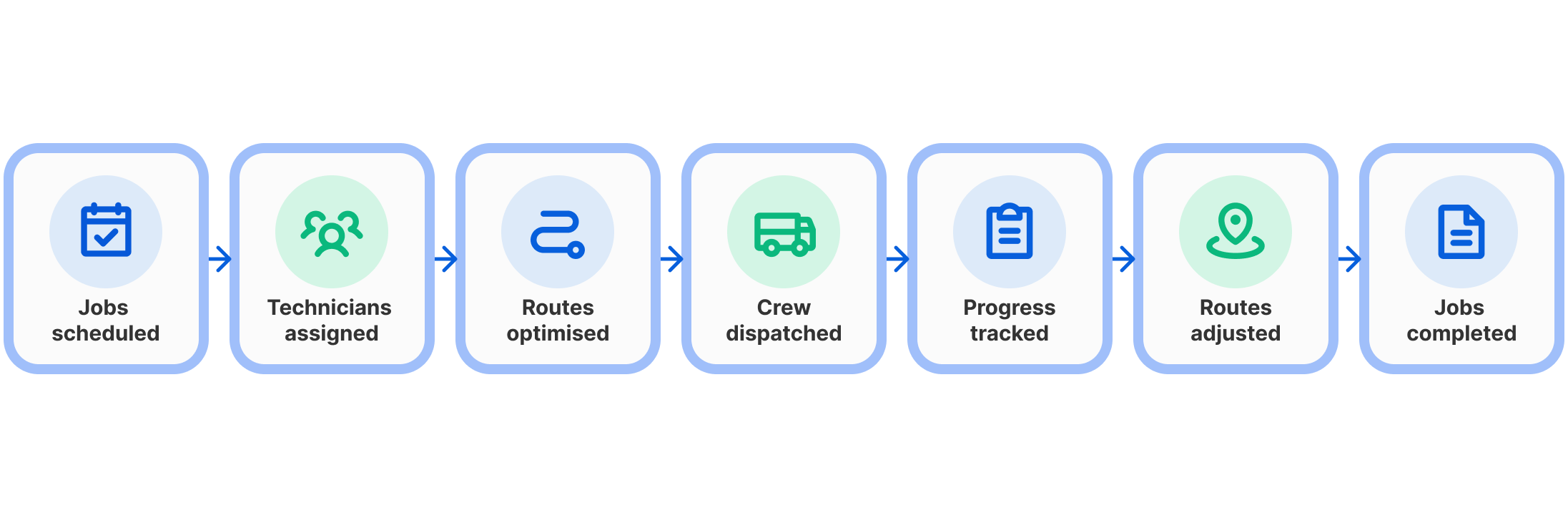
The best route is therefore not always the shortest route. For field service businesses, it also needs to work around the people, jobs and customer commitments involved.
Product features and pricing reviewed in September 2026. Pricing, plans and availability may change. Australian businesses should confirm billing currency, GST treatment and local support before purchasing.
| Company | Best for | Pricing | Rating | Free Trial | Free Plan |
|---|---|---|---|---|---|
| Arrivy | Connected field service routing | US$50/full-access user/month | 4.8/5 | ||
| OptimoRoute | Complex technician scheduling | US$35.10/driver/month | 4.7/5 | ||
| Route4Me | Configurable enterprise routing | Custom quote | 4.6/5 | ||
| Routific | Simple multi-stop routing | US$150/month | 4.5/5 | ||
| Onfleet | High-volume routing | From US$619/month | 4.5/5 | ||
| WorkWave RouteManager | Route optimisation and simulation | US$54 per vehicle per month | 4.4/5 |
How We Selected the Best Route Planning Software?
We compared each platform based on:
- Availability for Australian businesses
- Multi-stop route optimisation
- Multi-technician and multi-vehicle planning
- Appointment and service time windows
- Technician or driver constraints
- Live GPS and route visibility
- Ability to respond to schedule changes
- Mobile functionality
- Customer ETA communication
- Proof of service or delivery
- APIs and integration options
- Reporting and route analytics
- Pricing transparency
- Suitability for field service operations
6 Best Route Planning Software Platforms in Australia
1. Arrivy — Best for Connected Field Service Routing
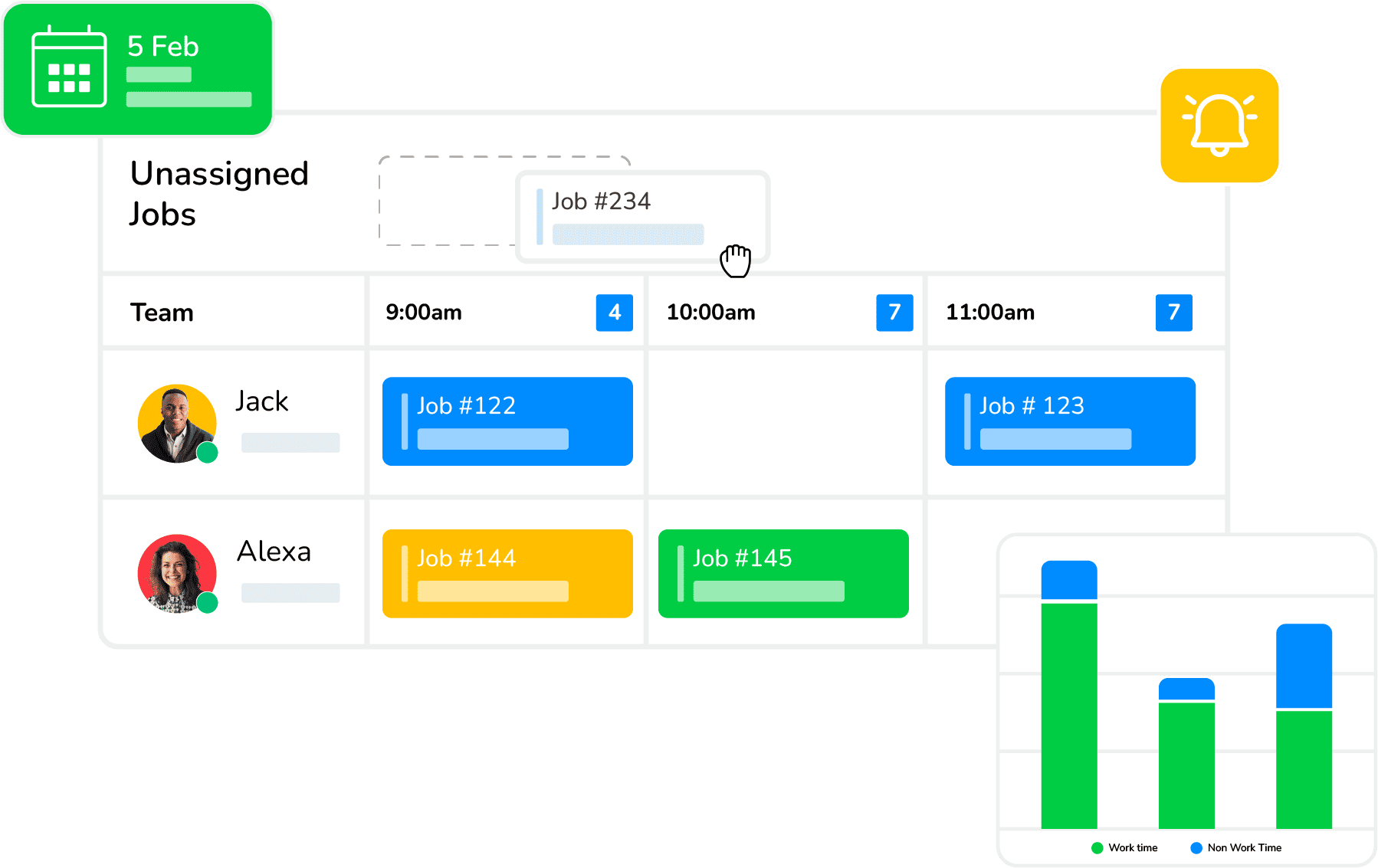
Arrivy approaches route planning as part of the wider field service workflow rather than as a standalone map tool. Businesses can connect routes with scheduled jobs, technician or crew assignments, dispatch, customer communication and field execution. This makes it especially relevant when technicians complete several appointments each day and routes need to change as operational conditions change. Arrivy’s route planning and optimisation software supports multi-stop route optimisation, live route tracking, real-time adjustments and mobile navigation. Route Planning Pro is designed for higher-density operations and can support large task volumes, while customer ETAs and field activity remain connected to the same operational workflow.
Key Features:
Pros:
-
Routing is connected directly with scheduling and dispatch
-
Strong fit for technician and multi-crew operations
-
Supports multi-stop route optimisation
-
Can handle changes to routes during the working day
-
Strong live field visibility
-
Customer communication is connected with job progress
Cons:
-
Complex routing scenarios may need a few optimisation runs to fine-tune the best configuration
-
Businesses primarily looking for fleet maintenance or a traditional transportation management system may need additional software
Pricing:
Arrivy’s Standard plan starts at $25 per full-access user per month, while the Premium plan starts at $50 per full-access user per month and includes route planning, digital forms, advanced reporting and an advanced integration. Standard and Premium plans require at least three full-access users. A 14-day free trial is available without a credit card. Australian buyers should confirm billing currency and applicable taxes.
Best for:
Arrivy is best suited to growing HVAC, plumbing, solar, roofing, maintenance, moving, installation, delivery and other field service businesses that need to connect route planning with scheduling, dispatch, technicians, customer updates and actual field execution.
2. OptimoRoute — Best for Technician Scheduling and Complex Route Constraints
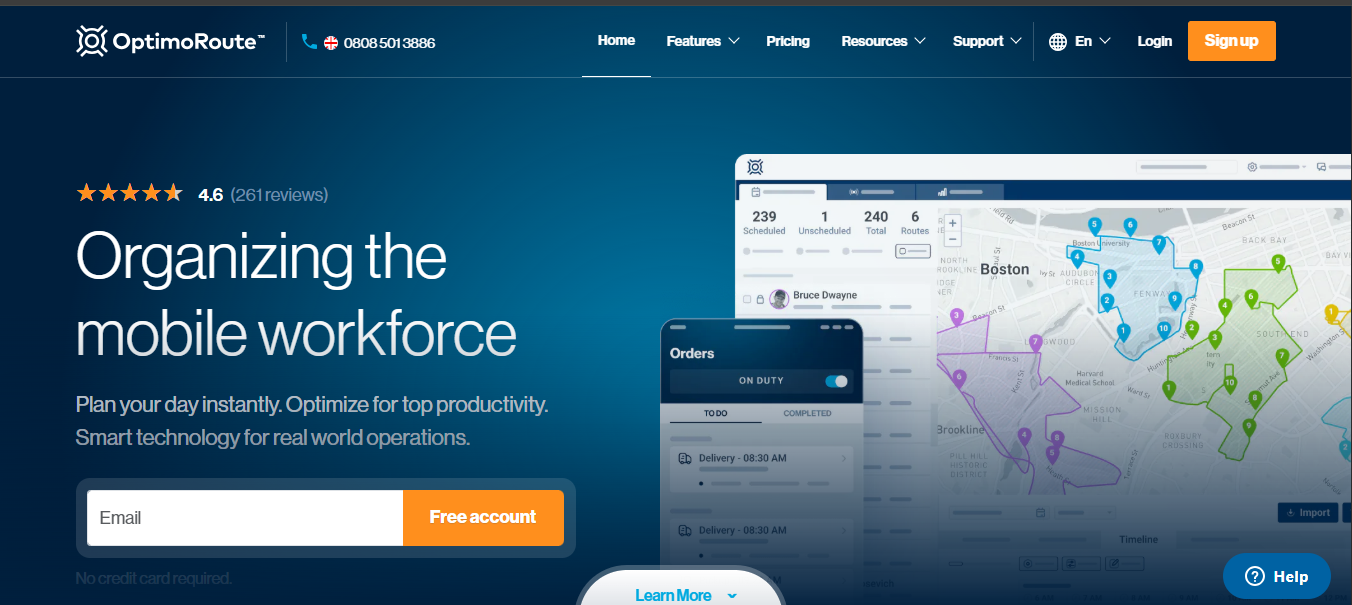
OptimoRoute is a dedicated route planning and scheduling platform used by both delivery and field service businesses. It can optimise work across several drivers or technicians while considering appointment windows, job priority, technician skills and vehicle requirements. This makes it useful where the shortest route is not necessarily operationally possible. Dispatchers can plan routes, make manual adjustments and monitor work through a live dashboard, while technicians receive routes through the mobile application. Live ETAs can change as the day progresses, and Pro plans add capabilities such as analytics, proof of delivery, customer feedback and weekly planning.
Key Features:
Pros:
-
Designed for both delivery and field service operations
-
Strong technician and job constraint management
-
Supports skill-based assignments
-
Handles multiple appointment windows
-
Useful live ETA functionality
-
30-day free trial
-
Clear per-driver pricing
-
Advanced weekly planning available
-
Supports large route volumes
Cons:
-
Live-route edits can require deactivating all active routes first
-
Manual route changes do not automatically re-check routing constraints
-
Users report that small adjustments can sometimes reshuffle much of the planned route
Pricing:
OptimoRoute Lite starts at $35.10 per driver per month when billed annually, while Pro starts at $44.10 per driver per month annually. Monthly billing is also available, and Custom pricing is used for more advanced routing requirements. OptimoRoute provides a 30-day free trial with access to Pro features and a 250-order limit.
Best for:
OptimoRoute is best suited to field service businesses that have complex scheduling constraints, including technician qualifications, customer time windows, different job priorities and larger numbers of daily stops.
3. Route4Me — Best for Highly Configurable Route Operations
Route4Me is a route optimisation platform designed for businesses with complex or configurable routing requirements. It supports route planning, multi-driver optimisation, dispatch, mobile navigation, route tracking and operational reporting. Its modular approach is one of its main differences from simpler route planners. Businesses can add capabilities for areas such as field service, commercial vehicle routing, time windows and advanced team management. Route4Me can also capture photographs, signatures and other proof of service through field workflows. This makes it relevant to organisations that want significant control over how their routing platform is configured as their fleet or service operation becomes more complex.
Key Features:
Pros:
-
Highly configurable routing platform
-
Supports complex multi-driver operations
-
Dedicated field-service functionality is available
-
Strong range of optional modules
-
Proof-of-service capabilities
-
Supports commercial routing requirements
-
Strong analytics and reporting options
-
Suitable for larger or specialised routing operations
Cons:
-
Stops that exceed configured constraints may remain unrouted
-
Manually inserting unrouted stops can push routes beyond optimisation limits
-
Users report occasional navigation inaccuracies and inefficient route sequences
Pricing:
Route4Me now uses customised subscription pricing based on business requirements, route complexity, team size and selected features or add-ons. The company currently offers a 7-day free trial, but businesses need to contact Route4Me for an accurate subscription quote.
Best for:
Route4Me is best suited to larger or more complex field, fleet and service operations that need configurable route optimisation, multiple business rules and the ability to add specialised routing functionality.
4. Routific — Best for Simple Planned Multi-Stop Routes
Routific is primarily a route optimisation and delivery-management platform designed around planned multi-stop routes. Dispatchers can import stops, optimise routes across multiple drivers and send those routes directly to the mobile application. The system considers constraints such as time windows, shift times and vehicle capacity and also supports live driver tracking. Drivers can capture photos, signatures and notes at each stop, while customers can receive tracking information and ETA updates. Routific’s relatively straightforward workflow and volume-based pricing can make it attractive to businesses with predictable daily routes, although its product is more delivery-focused than a broader field service management platform.
Key Features:
Pros:
-
Straightforward route planning workflow
-
Free tier available
-
Unlimited drivers and dispatchers are included
-
Strong planned-route optimisation
-
Real-time driver visibility
-
Useful customer tracking tools
-
Proof-of-delivery functionality
-
Pricing is based on order volume rather than driver count
Cons:
-
Users report occasional overlapping or inefficient routes
-
Address-formatting issues can place stops in the wrong location
-
Multiple orders at the same address are not always grouped onto one driver
Pricing:
Routific is free for businesses routing up to 100 orders per month. Businesses handling between 101 and 1,000 orders pay $150 per month, with additional per-order pricing applied at higher volumes. Unlimited drivers and dispatchers are included, and Routific states that pricing is billed in USD.
Best for:
Routific is best suited to small and midsize businesses running predictable multi-stop routes where straightforward optimisation, driver tracking and proof of service are more important than complete field service management.
5. Onfleet — Best for High-Volume Dynamic Routing and Customer Tracking
Onfleet is a delivery-management platform with strong route optimisation, live operations and customer-tracking capabilities. Its route engine considers delivery locations, time windows, driver schedules, vehicle capacity, service times, traffic information and road restrictions. Dispatchers can monitor work as it moves through the day, while customer notifications and tracking provide visibility into expected arrival times. Higher plans add more advanced route optimisation and operational controls. Although Onfleet is built mainly around last-mile delivery rather than traditional technician service workflows, it can be relevant to field operations where high stop volume, live tracking and customer visibility are the main priorities.
Key Features:
Pros:
-
Strong real-time operational visibility
-
Good customer tracking experience
-
Handles high task volumes
-
Supports multiple route constraints
-
Strong proof-of-delivery tools
-
Unlimited users on current plans
-
APIs and webhooks available
-
Useful for dynamic last-mile operations
Cons:
-
Strict time-window optimisation can leave incompatible tasks unassigned
-
Minimising drive time can allow customer time-window violations
-
Some users report needing manual adjustments when optimisation produces inefficient routes
Pricing:
Onfleet’s Launch plan currently starts at $619 per month and includes 2,500 delivery or pickup tasks, unlimited users, basic route optimisation, customer notifications, proof of delivery, integrations and API access. The Scale plan starts at $1,349 per month for more advanced functionality, including advanced route optimisation and auto-dispatch.
Best for:
Onfleet is best suited to high-volume mobile operations where route optimisation, real-time visibility, customer ETAs and driver execution are central requirements, particularly when the workflow resembles last-mile delivery.
6. WorkWave RouteManager — Best for Route Planning, Tracking and Simulation
WorkWave RouteManager combines route optimisation, dispatch and field tracking for businesses that manage multiple vehicles, drivers or mobile workers. Routes can account for factors such as traffic, time windows, capacity, skills and equipment requirements. Dispatchers can adjust schedules when conditions change, while drivers receive routes through the mobile app and can capture proof of service. RouteManager also supports route simulations, allowing planners to test potential changes without affecting the live operational plan. Its open API can connect orders from outside systems, making the platform useful where route optimisation needs to work alongside existing order-management or operational software.
Key Features:
Pros:
-
Combines route optimisation and execution tracking
-
Supports multiple operational constraints
-
Useful simulation capabilities
-
Strong GPS and route visibility
-
Routes can be adjusted after dispatch
-
Proof-of-service capabilities
-
APIs support integration with external systems
-
Suitable for both drivers and other routed field workers
Cons:
-
Public subscription pricing is not transparent
-
The platform has a stronger delivery and fleet orientation than a complete field service workflow
-
More advanced configurations may require implementation support
-
Businesses needing quoting, work-order management and detailed technician workflows may require additional software
Pricing:
WorkWave Route Manager starts at $49 to $54 per month per vehicle, with a minimum requirement of four vehicles for standard entry plans.
Best for:
WorkWave RouteManager is best suited to businesses managing multiple mobile workers or vehicles that need route optimisation, live execution tracking and the ability to test or simulate different route plans.
What Features Should Australian Field Service Businesses Compare?
The best route planning software should do more than put addresses in a convenient order. Field service teams need routes that reflect how jobs actually work, including appointment commitments, technician availability, job duration and changes that happen throughout the day.
Multi-Stop Route Optimisation
Check whether the software genuinely optimises several jobs across multiple technicians rather than simply displaying stops on a map. Good route optimisation should reduce unnecessary travel while still respecting the constraints that matter to the business.
Technician and Crew Assignment
The nearest technician is not necessarily the right technician. Businesses should check whether routes can consider availability, skills, qualifications, working hours, vehicle requirements and existing workload before assigning work.
Appointment Windows and Job Duration
A route can look efficient on a map and still fail operationally if appointments have specific arrival windows or jobs take different amounts of time. Look for software that includes service duration and customer availability when calculating the route.
Real-Time Route Changes
Field schedules rarely remain unchanged all day. Emergency jobs, cancellations, delays and technician absences can affect the original plan. Check how easily dispatchers can reassign stops, re-optimise routes or make manual adjustments after work has already started.
Live GPS and ETA Visibility
Live tracking helps dispatchers understand whether technicians are travelling, delayed or nearing the next appointment. Accurate ETAs can also improve customer communication and reduce calls asking when a technician will arrive.
Mobile Functionality
Technicians should be able to receive their route, open job information and navigate between appointments from a mobile device. If your teams work in regional areas or locations with unreliable connectivity, also check what remains available when the connection drops.
Customer Notifications
Route planning becomes more useful when ETA changes can automatically update customers. Look for appointment reminders, on-the-way notifications, ETA updates, live tracking and completion messages where these are relevant to your service model.
Proof of Service
Many field businesses need more than confirmation that a technician reached an address. Check whether the mobile workflow can capture photos, notes, signatures, forms or other evidence that the required work was completed.
Integrations and APIs
Route information often begins somewhere else, such as a CRM, booking platform or job management system. Check how jobs enter the routing system and how completed information returns. Re-entering addresses or job data manually can remove much of the efficiency that route optimisation is supposed to create.
Reporting
Good reporting should help managers understand whether routing decisions are actually improving operations. Useful measures may include travel time, distance, jobs completed, planned versus actual arrival times, route completion, technician utilisation and on-time performance.
Why Choose Arrivy for Route Planning Software in Australia?
Arrivy is particularly relevant when route planning is only one part of the operational problem.
A field service business may need to decide which technician should perform the job, when the appointment should happen, how jobs should be sequenced, what happens if the schedule changes and how the customer stays informed.
Arrivy connects route planning with scheduling, dispatch, crew availability, live field visibility and customer communication. Its route optimisation tools can generate multi-stop routes, track route progress and allow dispatchers to respond when priorities change. Higher-density operations can also use Route Planning Pro for larger stop volumes and more complex daily schedules.
The distinction is important for field service businesses. Dedicated route planners can be strong at creating efficient routes, but businesses may still need another platform for job scheduling, work orders, field documentation and customer workflows.
Arrivy is a stronger fit when the business wants routing to remain connected with the complete field execution process rather than operating as a separate routing system.
Conclusion
Choosing the best route planning software in Australia depends on how complex your daily field operations are. Smaller businesses may mainly need straightforward multi-stop optimisation, while growing service teams often require technician scheduling, route changes, live visibility and customer ETA communication.
Dedicated tools such as OptimoRoute, Routific and Route4Me provide strong routing capabilities, while Onfleet and WorkWave RouteManager suit more fleet- or delivery-focused operations. Arrivy is more relevant when routing needs to work directly with scheduling, dispatch, crews and field execution.
Before selecting a platform, test it with a real working day rather than a small sample route. Include appointment windows, technician constraints, cancellations and an urgent job to see how well the software handles the conditions your dispatchers actually manage