 Login








AI Summary
Recommended Reads:
Many restoration companies build their software stack as problems arise, and often end up having a separate tool for each problem.
For example, photos kept getting lost, so the team started using CompanyCam. Jobs were hard to follow, so someone set up a Monday.com board. Along the way the office started texting customers who kept calling for updates, and payments got collected however the crew could manage on site.
Each tool covers part of the job, and now the same job lives in three or four places while someone keeps them in sync by hand.
At that point, every restoration company has the same question: is there a field service app that pulls CompanyCam images into job files, syncs tasks to Monday.com boards, and gives clients a portal for progress and payments?
Below are four platforms that could answer it, and a look at whether you’d still need Monday.com once jobs are tracked in the field.
Do you still need Monday.com once you have a field service platform?
Monday.com is a flexible work-management tool. It organizes tasks, owners, and deadlines and can receive updates through integrations. But field progress won’t appear automatically unless someone enters it or a connected workflow sends it. Without a field integration, a Monday.com board won’t show crew arrivals, daily job progress, or photos from each visit. Someone has to enter or sync that information.
A field service platform tracks the same project from the field. Crews update status from their phones as they work, photos attach to the job, and customers get notified automatically. Status stays current because nobody is re-typing it.
For field work, that makes a separate Monday.com board mostly redundant. It’s still useful for back-office work that isn’t tied to a crew visit:
- Adjust communication and claim follow-ups
- Supplement requests and approvals
- Estimating and sales pipelines
- Marketing, hiring, and internal projects
What restoration companies should evaluate?
Six criteria are worth checking in any platform.
- CompanyCam connection. Photos should attach to the right job automatically, without crews tagging them or the office matching them later.
- Multi-day and multi-phase tracking. Jobs run for days and move through phases like mitigation, drying, and rebuild. The platform should track each day without closing the job early or splitting it into a dozen disconnected tasks.
- Live field status. The office should see when crews are en route, on site, and done without calling them.
- Client portal. Customers should be able to see progress, upcoming visits, and crew arrival without phoning the office.
- Payments. Deductibles, deposits, and final balances should be collectible on site or through the customer experience, with records flowing to accounting.
- Insurance and estimating workflows. If most of your work is insurance-driven, check for Xactimate support and carrier or TPA portal workflows. Restoration-specific suites are strongest here.
Quick comparison
| Platform | CompanyCam integration | Multi-day project tracking | Client portal | Payments | Monday.com | Insurance workflows |
|---|---|---|---|---|---|---|
|
Arrivy |
Native. Tasks link to CompanyCam projects; photos appear in the task |
Yes. Multi-Schedule Tasks with daily status |
Yes. Branded portal, live tracking, notifications |
Native Square; QuickBooks Online and Xero |
Through Zapier or API (no native integration) |
Not a focus |
|
Albi |
Native. Creates CompanyCam projects from Albi projects (not on Basic plans) |
Yes. Restoration job management |
Check during demo |
Albi Pay in-field payments |
Through Zapier |
A focus |
|
Xcelerate |
Native. Automatically creates CompanyCam projects and syncs photos back to Xcelerate jobs. |
Yes. Restoration job management |
Yes |
Invoicing with accounting integration |
Check during demo |
A focus |
|
Job-Dox |
Yes |
Yes. Restoration project management |
Check during demo |
QuickBooks Desktop integration |
Check during demo |
Not a focus |
1
Arrivy — best for operational project tracking and customer experience
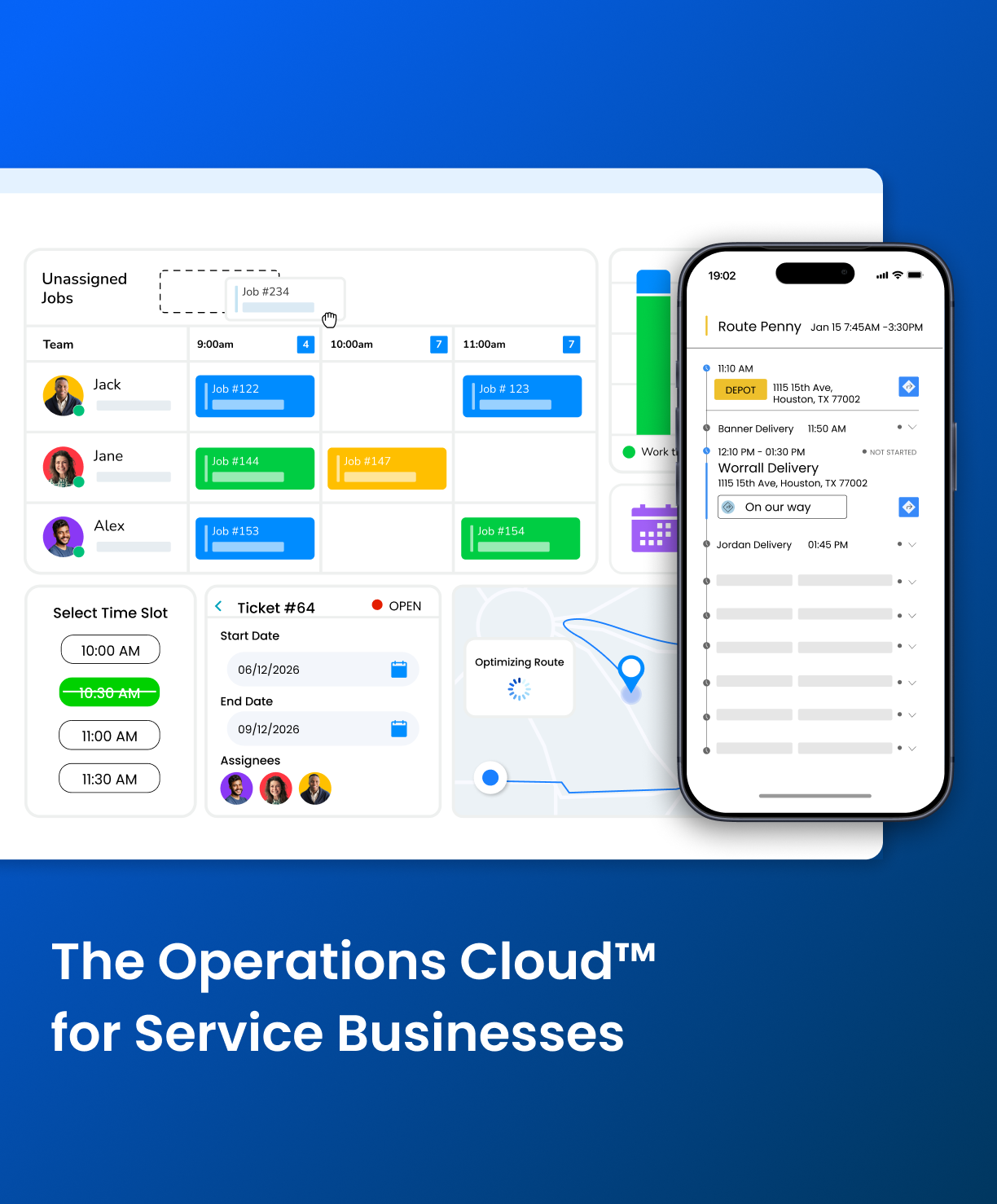
Arrivy is a field service and operations platform for businesses that schedule crews, track work in real time, and keep customers informed.
CompanyCam integration: Its CompanyCam integration links each Arrivy task to the right CompanyCam project automatically. Anything captured in CompanyCam (photos, videos, files) shows up inside the task, so the office sees new photos as they’re added. Crews can open the linked CompanyCam project straight from the Arrivy task and keep using the photo app they already know.
Project tracking: Restoration jobs usually span days, so Multi-Schedule Tasks keep a multi-day job as one task with one journal. Each day the crew taps Day Start and Day Complete, which records that day’s work and labor while the task stays “In Progress.” It’s marked complete on the final day, when the job is ready for invoicing. If drying takes an extra day, you extend the project, and Arrivy still produces a single report with labor hours and materials for the whole job. Across all jobs, dispatchers see live status (en route, arrived, in progress, completed), GPS location, and project-stage filters on a drag-and-drop board.
Client portal and payments: Customers get one tracking link for the job and automated updates as crews work through it. There’s also a branded portal where they can follow progress, see job history, and view upcoming visits. For payments, the native Square integration lets crews charge customers on site, lets customers review charges and add tips, and syncs payments, invoices, and refunds back to the job in real time. QuickBooks and Xero handle accounting.
Arrivy also has digital forms, e-signatures, and an offline mobile app, and it connects to other tools through Zapier, APIs, and webhooks. CompanyCam, tracking, and the client portal are all native, so a separate board for field progress isn’t needed.
Arrivy is a field service and operations platform for businesses that schedule crews, track work in real time, and keep customers informed.
CompanyCam integration: Its CompanyCam integration links each Arrivy task to the right CompanyCam project automatically. Anything captured in CompanyCam (photos, videos, files) shows up inside the task, so the office sees new photos as they’re added. Crews can open the linked CompanyCam project straight from the Arrivy task and keep using the photo app they already know.
Project tracking: Restoration jobs usually span days, so Multi-Schedule Tasks keep a multi-day job as one task with one journal. Each day the crew taps Day Start and Day Complete, which records that day’s work and labor while the task stays “In Progress.” It’s marked complete on the final day, when the job is ready for invoicing. If drying takes an extra day, you extend the project, and Arrivy still produces a single report with labor hours and materials for the whole job. Across all jobs, dispatchers see live status (en route, arrived, in progress, completed), GPS location, and project-stage filters on a drag-and-drop board.
Client portal and payments: Customers get one tracking link for the job and automated updates as crews work through it. There’s also a branded portal where they can follow progress, see job history, and view upcoming visits. For payments, the native Square integration lets crews charge customers on site, lets customers review charges and add tips, and syncs payments, invoices, and refunds back to the job in real time. QuickBooks and Xero handle accounting.
Arrivy also has digital forms, e-signatures, and an offline mobile app, and it connects to other tools through Zapier, APIs, and webhooks. CompanyCam, tracking, and the client portal are all native, so a separate board for field progress isn’t needed.
Pros:
-
CompanyCam photos appear in the job without manual matching
-
Multi-day restoration jobs stay as one project with daily tracking
-
Project status comes from the field, so the office doesn't update a separate board
-
Customers can follow progress without calling the office
-
On-site payments with records synced to the job and accounting
Cons:
-
No native Monday.com integration; back-office boards would connect through Zapier or the API
-
Not built specifically for restoration; Xactimate and carrier or TPA portal workflows are not a focus
Pricing:
- Premium: $50 per full-access user/month; 3-user minimum
- Enterprise: Custom pricing
- Trial: 14 days, no credit card required
Best for:
Restoration companies that already use CompanyCam and want field progress, photos, crew management, customer updates, and payments in one operational system instead of a separate project board.
2
Albi — best for restoration companies wanting a restoration-specific CRM
Albi (Albiware) is built for restoration contractors. It covers job management, CRM, documentation, payments, automation, and estimating, with analytics and a mobile app on top.
Its native CompanyCam integration creates CompanyCam projects from Albi projects, and you choose when: as soon as a project is created, when it reaches selected statuses, or when specific project dates are completed. CompanyCam integration access depends on the Albi subscription tier. Albi Pay handles in-field payments, and the open API connects to other software, including through Zapier.
Because it’s built for restoration and its CompanyCam integration is configurable, Albi is a credible alternative for companies that want one restoration-focused system.
Albi (Albiware) is built for restoration contractors. It covers job management, CRM, documentation, payments, automation, and estimating, with analytics and a mobile app on top.
Its native CompanyCam integration creates CompanyCam projects from Albi projects, and you choose when: as soon as a project is created, when it reaches selected statuses, or when specific project dates are completed. CompanyCam integration access depends on the Albi subscription tier. Albi Pay handles in-field payments, and the open API connects to other software, including through Zapier.
Because it’s built for restoration and its CompanyCam integration is configurable, Albi is a credible alternative for companies that want one restoration-focused system.
Pros:
-
Built around restoration workflows
-
Flexible rules for when CompanyCam projects are created
-
Payments built into the platform
Cons:
-
Requires a $6,000 annual minimum, four user seats, and a $1,000 onboarding fee for small businesses.
-
CompanyCam, Xactimate, invoicing, and team scheduling are unavailable on Base seats.
-
One-year contracts renew automatically unless written cancellation is submitted at least 60 days before renewal.
Pricing:
Albi has Base seats at $60/user/month and Pro seats at $100/user/month, with a $6,000 minimum annual subscription. Its small-business offering also lists a $1,000 one-time onboarding fee.
Best for:
Restoration companies that want a restoration-specific CRM and job system and are willing to move their project tracking into it.
3
Xcelerate — best for restoration teams wanting an all-in-one job system
Xcelerate is restoration job management software used for water, fire and smoke, mold, and storm damage work. It covers scheduling and dispatch, time tracking, field documentation and document management, estimating, invoicing, and communication tools including internal messaging, email notifications, and client portals. It integrates with Matterport and QuickBooks.
With client portals built in, Xcelerate can replace both a project board and separate customer communication tools.
Xcelerate is restoration job management software used for water, fire and smoke, mold, and storm damage work. It covers scheduling and dispatch, time tracking, field documentation and document management, estimating, invoicing, and communication tools including internal messaging, email notifications, and client portals. It integrates with Matterport and QuickBooks.
With client portals built in, Xcelerate can replace both a project board and separate customer communication tools.
Pros:
-
Designed from a restoration contractor's perspective
-
Client portals included
-
Estimating and invoicing in the same system
Cons:
-
Offline access in the iOS app is read-only, preventing field staff from updating jobs while disconnected
-
Mobile app glitches affect data entry, form submissions, and electronic signatures
-
Plans start at $449/month with a $2,000 onboarding fee, and no free trial is available
Pricing:
Contact Xcelerate for current subscription pricing and onboarding costs.
Best for:
Restoration companies that want estimating, job management, and client communication in one restoration-specific system.
4
Job-Dox — best for restoration contractors on QuickBooks Desktop
Job-Dox is project management software for service contractors with a strong restoration focus. It has workflow automation, real-time project updates, and client communication features, and it integrates with CompanyCam, QuickBooks Desktop and Online, Google Calendar, GEOTAB, and GuildQuality.
The CompanyCam connection and the restoration project management focus suit companies that want a project-centric system.
Job-Dox is project management software for service contractors with a strong restoration focus. It has workflow automation, real-time project updates, and client communication features, and it integrates with CompanyCam, QuickBooks Desktop and Online, Google Calendar, GEOTAB, and GuildQuality.
The CompanyCam connection and the restoration project management focus suit companies that want a project-centric system.
Pros:
-
Restoration-focused project management
-
CompanyCam and QuickBooks Desktop integrations
-
Automation tools for repeatable workflows
Cons:
-
No direct Xactimate integration for insurance estimating workflows
-
Limited search functionality for finding specific customer records, emails, and financial information
-
Custom business-process changes require additional support involvement instead of fully self-service configuration
Pricing:
Job-Dox advertises introductory rates of $250/month for up to five users and $500/month for up to ten users. Standard advertised rates are $350 and $650/month, respectively. Enterprise pricing is custom.
Best for:
Restoration contractors who use QuickBooks Desktop and want project management built around restoration jobs.
How a water damage job runs in Arrivy with CompanyCam
Here’s a typical water mitigation job when Arrivy handles tracking and CompanyCam handles photos.
The office creates a Multi-Schedule Task for a four-day job, and Arrivy links it to a CompanyCam project automatically. The homeowner gets a tracking link with the crew’s arrival window.
On day one, the crew taps Day Start, opens the linked CompanyCam project from the task, and documents the loss. The photos show up in the Arrivy task for the office. When the crew taps Day Complete, the job stays “In Progress.”
Days two and three are drying. Technicians check equipment and moisture readings, take daily photos in CompanyCam, and complete daily forms. The office sees each day’s status without calling anyone.
Say the readings are still high. The office extends the job by a day, and the customer’s link stays the same.
On the final day, the crew removes equipment, takes final photos, and marks the task complete. They collect the deductible through Square on site, and the payment syncs to the job and to accounting. Arrivy then produces one task report with labor hours and materials across all five days, including the extra drying day.
If you keep Monday.com: How to connect it
Some restoration companies will keep Monday.com for office work like claims follow-up or supplements.
Arrivy has no native Monday.com integration, but you can build the connection with its Zapier integration or its APIs and webhooks. A typical setup creates an Arrivy task when a Monday.com item reaches a status such as “Approved for mitigation,” then updates the Monday.com item when the Arrivy task is completed.
Treat Arrivy as the source of truth for field progress and Monday.com as the home for office work. Syncing everything both ways usually brings back the duplicate-work problem.