Login
Login




















When sales teams close deals inside a CRM but field teams manage jobs in separate systems, important details often get lost. Job instructions must be re-entered. Schedules fall out of sync. Customers call for updates that office teams cannot easily see. For service businesses, these gaps create delays, confusion, and unnecessary follow-up.
This challenge becomes more visible as service operations grow. CRM adoption continues to increase across the U.S. market and is estimated to grow to USD 37.74 billion by 2035. This shows how these systems have become central for managing customer data and revenue. However, a CRM alone does not manage what happens after a deal is closed or a service request is approved.
Service businesses rely on HubSpot to manage leads, deals, and customer communication. Once work moves into the field, execution takes over. Jobs must be scheduled. Crews need to be dispatched. Technicians require accurate job details. Customers expect clear and timely updates.
This is where many teams face a disconnect. For service businesses using HubSpot, field service management software such as Arrivy extends CRM data into scheduling, dispatch, and real-time field execution. As job volume increases, relying on manual coordination or disconnected tools begins to affect service quality and customer experience.
Prepare Your Service Operations to Scale
Studies show that integrating CRM data with field execution systems can lead to up to 40% more qualified leads. A connected HubSpot field service workflow supports growth without adding operational friction.
This guide explains how HubSpot field service integration addresses said problem. It shows how CRM data moves into scheduling and dispatch workflows, how field activity syncs back to HubSpot, and how sales, support, and operations teams stay aligned across the full service lifecycle.
The goal is to provide a clear and practical view of how service businesses connect CRM systems with real-world service execution, without manual handoffs or fragmented tools.
Recommended Reads
Why HubSpot Alone Isn’t Enough for Field Service Operations
HubSpot plays a critical role in how service businesses manage customer relationships. Sales and support teams use it to track leads, manage deals, handle service requests, and maintain communication history. It becomes the central place for customer data.
The limitation appears once work needs to move into the field.
Field service operations introduce requirements that sit outside a traditional CRM. Jobs must be scheduled across crews and locations. Dispatchers need to assign work based on availability and skill. Technicians need access to job details while on-site. Customers expect accurate arrival windows and timely updates. These activities depend on execution, not just records.
This is where HubSpot reaches the edge of what it is designed to handle.
Where HubSpot Falls Short for Field Service Teams
HubSpot focuses on relationship management, not job execution. As service volume grows, teams often encounter practical gaps such as:
- No native job scheduling across crews and calendars
- No dispatch tools to assign or adjust field work
- No technician-facing mobile workflows for on-site updates
- Limited visibility into job progress once work leaves the CRM
To bridge these gaps, teams rely on spreadsheets, calls, or disconnected tools outside the CRM.
CRM vs Field Operations: A Practical Comparison
The table below highlights where CRM capabilities end and where field operations software takes over.
| Business need | HubSpot CRM | Field Service Management Software |
|---|---|---|
| Lead and customer management | Yes | No |
| Deal and ticket tracking | Yes | No |
| Job scheduling across crews | No | Yes |
| Dispatch and route planning | No | Yes |
| Technician mobile updates | No | Yes |
| Job-day status visibility | Limited | Advanced |
This difference reflects the CRM design boundary. HubSpot manages customer data and communication. On the other hand, FSM platforms such as Arrivy fill this operational gap by handling scheduling, dispatch, and technician workflows. Meanwhile, HubSpot remains the system of record for customer data.
Why Choose FSM Software
Scheduling-dispatch and route-optimization software constitutes 28.16% of the field service management market revenue, reflecting their importance in managing crews, routes, and job execution efficiently.
What Happens without Integration
When CRM data and field execution operate in silos, teams face predictable issues, including:
- Manual handoffs between sales, support, and operations
- Delayed or inconsistent job updates
- Missed appointments or scheduling conflicts
- Customers call for status because updates are not visible
Recent industry research shows that service businesses gain the most value when field service systems are integrated with CRM platforms. Without integration, gaps emerge in job visibility, billing readiness, and resource planning as operations scale. A HubSpot field service integration helps close these gaps by keeping CRM data and field execution aligned, supporting clearer reporting and more informed operational decisions. (Source)
Common Challenges Without Proper HubSpot FSM Integration
When HubSpot and field operations operate without a strong integration, service businesses often experience issues that are not immediately visible in the CRM. These challenges usually surface during busy periods, when job volume increases, and coordination becomes harder to manage.
Disconnected Teams and Information Silos
When information moves through emails, spreadsheets, or verbal updates instead of shared systems, it results in:
Sales teams lack visibility into job progress
Support teams depend on operations for answers
Operations teams work without a full customer context
Each team does its job, but not from the same source of information.
Manual Scheduling and Repetitive Data Entry
Without integration, approved deals and service requests must be copied manually into scheduling tools. This creates common issues including:
Incorrect customer details copied into job records
Missed scheduling information
Duplicate records across systems
These problems slow down job creation and reduce confidence in operational data.
Limited Visibility on Job Day
Once work moves into the field, HubSpot offers little insight into what is actually happening. Teams struggle to answer basic questions such as:
Has the technician arrived
Is the job still in progress
When will the work be completed
Without live field updates flowing back into the CRM, office teams rely on calls or messages to stay informed.
Poor Customer Communication
Disconnected systems make it difficult to keep customers informed. This often leads to:
Customers calling to check job status
Conflicting information shared by different teams
Reduced trust in service delivery timelines
Customer experience suffers even when field teams perform well.
Inaccurate Reporting and Decision Making
When field execution data does not sync back to HubSpot, CRM reports show an incomplete picture. Therefore, managers struggle to:
Track service completion accurately
Measure response times
Connect field performance to customer records
Decisions made on incomplete data increase operational risk.
Why These Challenges Grow Over Time
Many service businesses manage these issues manually at low volume. As operations scale, the same gaps create compounding problems. What once felt manageable becomes a source of missed appointments, internal frustration, and customer dissatisfaction.
This is why service businesses eventually move beyond basic CRM usage and look for a proper HubSpot field service integration that connects data with execution.
Fix the Disconnect Between Office and Field
What Is a HubSpot Field Service Integration?
A HubSpot field service integration connects HubSpot with field service software such as Arrivy, so customer data and job execution stay aligned throughout the service lifecycle. Instead of treating CRM activity and field work as separate processes, the integration allows both systems to share updates in a controlled way. In this setup, HubSpot manages customer and deal data, while Arrivy manages how that work is scheduled, dispatched, and executed in the field.
At a basic level, this integration ensures that information created in HubSpot does not stop at the point of sale or service request. It continues into scheduling, dispatch, and job execution, then flows back into the CRM once work is underway or completed.
CRM Data That Needs to Flow into Field Operations
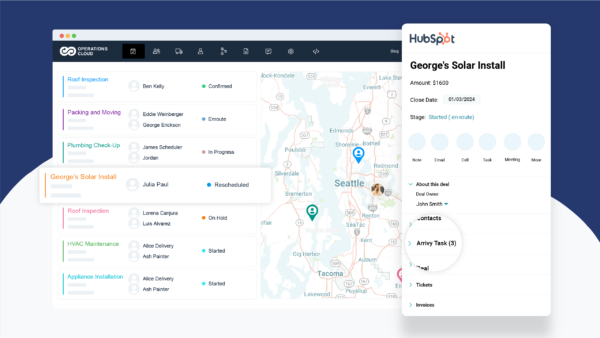
For field teams to do their work effectively, certain CRM data must move out of HubSpot and into operational workflows. This data provides context and removes the need for manual re-entry.
Common examples include:
Contacts
Customer names, phone numbers, and service addresses used for job assignments and technician access.
Deals or service requests
Records that indicate approved work, installations, or billable service activity.
Tickets
Support issues or service cases that require a field visit.
Custom properties
Details such as job type, priority, SLA, location notes, or special instructions.
When this information flows directly into field service software, dispatchers and technicians work from the same customer context that sales and support teams see in HubSpot. Arrivy uses this CRM data to create actionable jobs without requiring duplicate entry.
Field Data That Needs to Flow Back into HubSpot
Integration is not one-directional. Field execution generates updates that matter to office teams and customers. These updates need to return to the CRM to keep records accurate and visible.
Typical field updates include:
When this data syncs back to HubSpot, sales and support teams no longer need to chase updates. They can see service progress directly within CRM records. Arrivy captures these updates during job execution and syncs them back to HubSpot so office teams always see real service progress.
How This Differs from Basic Data Sync
CRM and field service integration goes beyond syncing contacts or updating deal fields. It supports operational workflows that change throughout the day.
The difference becomes clearer when comparing basic CRM sync with operational integration.
| Capability | Basic CRM sync | Field service integration |
|---|---|---|
| Contact and company data | Yes | Yes |
| Deal or ticket updates | Yes | Yes |
| Job scheduling and dispatch | No | Yes |
| Technician status updates | No | Yes |
| Job-day visibility | No | Yes |
| Customer service confirmation | Limited | Advanced |
This distinction matters for service businesses that depend on timely execution as well as accurate records.
How Integration Improves Daily Operations
When CRM data and field activity stay connected, teams spend less time coordinating and more time delivering service. Dispatch decisions rely on real- time information. Customers receive updates they can trust. Office teams understand what is happening in the field without leaving HubSpot.
With this foundation in place, it becomes easier to see how HubSpot connects to real job execution across the full service workflow.
How HubSpot Field Service Integration Works (End-to-End Workflow)
A HubSpot field service integration works best when it follows the same path your teams already use. It connects them, so information moves forward without manual handoffs.
Below is how that workflow typically looks in practice for service businesses.
Step 1: Lead or Service Request Created in HubSpot
Everything starts in HubSpot.
Sales or support teams create records based on how the business operates. This may include:
A lead submitted through a web form
A chat or call logged by a support agent
A service ticket created for an existing customer
A deal created by sales for approved work
At this stage, HubSpot captures customer details, service requirements, and internal notes. This information becomes the source of truth for what needs to happen next.
Step 2: Job Creation and Scheduling
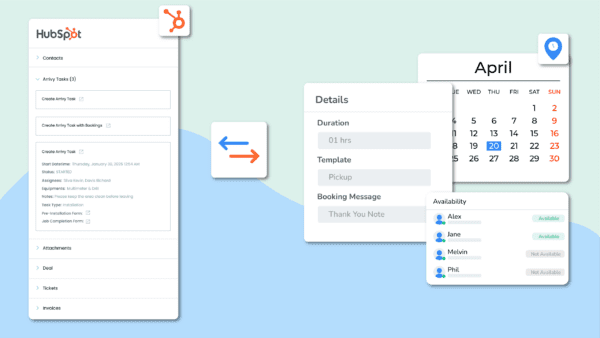
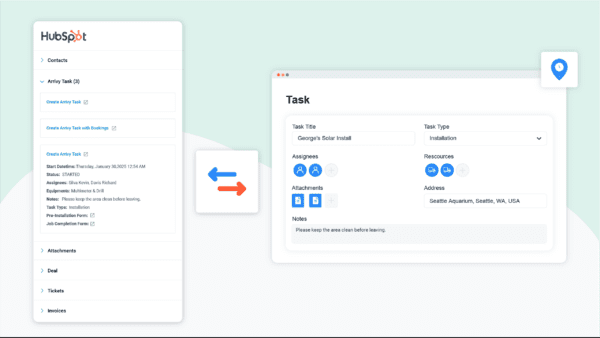
Once a deal or ticket reaches the right stage, the integration creates a corresponding job or task in Arrivy for scheduling and dispatch. Customer details, service address, and job-specific information move with the record, eliminating the need for operations teams to re-enter data.
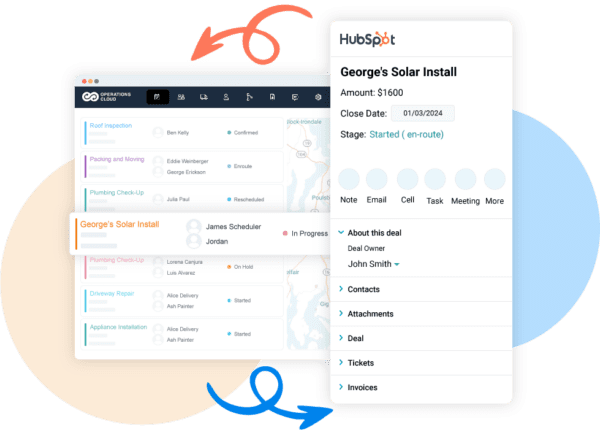
This step removes the need for operations teams to re-enter information.
Scheduling decisions typically account for:
Technician availability
Job location
Required skills or certifications
Expected job duration
Dispatchers schedule work using operational views such as calendars or maps, while HubSpot continues to store customer and request details.
Step 3: Dispatch and Field Execution
After scheduling, the job moves into execution.
Field teams access their assignments through Arrivy’s mobile app, which includes:
Customer address and contact information
Job instructions and notes
Scheduled time windows
As technicians begin work, they update job status in the field. These updates reflect real activity, not planned outcomes.
Common updates include:
En route
Arrived on site
Work in progress
Job completed
Customer notifications often trigger at this stage, based on job status changes and scheduling rules.

Step 4: Job Completion and CRM Sync
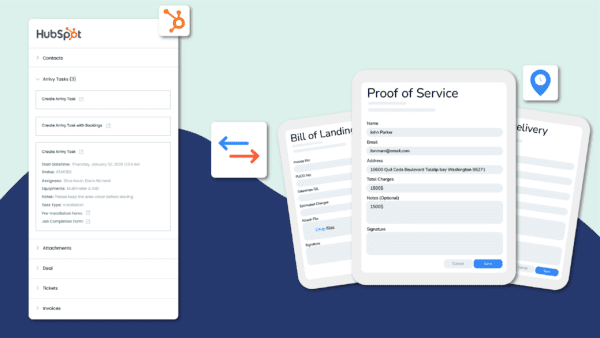
Once work is completed, Arrivy sends execution details back to HubSpot.
This may include:
Completion time
Technician notes
Photos or service documentation
Customer confirmation or signature
HubSpot records update automatically, so sales and support teams can see what happened without needing to call dispatch or field staff.
What This Workflow Replaces
Without integration, this same process usually relies on manual steps.
| Without integration | With integration |
|---|---|
| CRM record copied into spreadsheets | Job created automatically |
| Dispatch calls technicians for updates | Status updates sync automatically |
| Support teams request job details | Updates visible in HubSpot |
| Customers call for ETAs | Notifications triggered by job status |
The difference lies in the continuity of work.
Why Integration Becomes Critical at Scale
As service volume increases, small inefficiencies compound quickly. A connected workflow ensures that CRM activity and field execution move together, even as teams grow and schedules become more complex.
This end-to-end connection sets the foundation for measurable improvements in response time, coordination, and automated customer experience.
Key Benefits of HubSpot Field Service Integration
When CRM data and field execution operate as one connected flow, service businesses gain clarity across teams. The benefits show up in daily operations, customer interactions, and reporting accuracy.
Single Source of Truth Across Teams
A HubSpot field service integration ensures that sales, support, and operations work from the same customer and job information.
Instead of asking for updates or reconciling notes across tools:
Sales teams see when work is scheduled and completed
Support teams view job progress without contacting dispatch
Operations teams receive accurate customer context from the CRM
Everyone references the same records, which reduces miscommunication and follow-ups.
Faster Response and Job Turnaround
Manual handoffs slow down service delivery. Integration removes unnecessary steps between CRM activity and job execution.
Benefits include:
Jobs created automatically when deals or tickets reach the right stage
Schedulers working with complete job details from the start
Fewer delays caused by missing information or duplicate entry
As a result, teams schedule work sooner and complete jobs faster.
With Arrivy managing scheduling and dispatch, approved HubSpot records move into execution without manual coordination.
Better Customer Experience
Customers judge service businesses by how clearly and reliably they communicate.
With CRM and field data connected:
Customers receive accurate appointment confirmations
Arrival windows reflect real schedules, not estimates
Status updates follow actual field activity
This reduces inbound calls asking for updates and builds confidence in the service process.
Revenue, Reporting, and Service Performance Visibility
When field execution data flows back into HubSpot, service businesses gain clearer insight into how service delivery affects both revenue and performance.
With CRM and field data connected, teams can:
Confirm when billable work is completed
Link job outcomes to deals and service requests
Track response times and completion trends
Identify recurring delays or operational bottlenecks
This visibility helps leaders make informed decisions based on actual service outcomes, not assumptions. Arrivy supplies the execution data that makes this level of visibility possible inside HubSpot.
Reduced Operational Friction
Disconnected systems create hidden work that slows teams down. A HubSpot field service integration removes many of these friction points by keeping CRM data and field execution in sync.
With integration in place:
Job details move from HubSpot into scheduling without re-entry
Technician updates sync automatically instead of relying on calls or sms
Job information stays consistent across sales, support, and operations
Status reporting reflects real field activity, not manual updates
The result is fewer interruptions, faster coordination, and more time spent delivering service instead of managing process gaps.
Practical Impact for Growing Service Businesses
As service operations grow, coordination becomes harder to manage manually. A HubSpot field service integration supports that growth by keeping customer data, scheduling, and execution aligned without adding process overhead.
This alignment prepares teams to handle higher job volume while maintaining service quality.
What to Look for in a HubSpot Field Service Integration Tool
Not all integrations labeled as “HubSpot compatible” support real field operations. Many only sync contacts or update deal fields, which does not solve scheduling, dispatch, or job-day visibility.
Service businesses should evaluate integration tools based on how well they support execution, not just data exchange. The top 5 points to consider are:
1. Native HubSpot App Marketplace Integration
A reliable field service integration should be available through the official HubSpot App Marketplace.
2. Real-Time Sync That Reflects Job-Day Activity
Field work changes throughout the day. A useful integration must reflect those changes without delay.
3. Scheduling, Dispatch, and Mobile Support
CRM platforms do not handle job execution. A field service integration should extend HubSpot into operational workflows.
4. Customer Communication Tied to Execution
Customer updates should follow actual field activity. It reduces inbound calls and keeps customer expectations aligned with reality.
5. Industry Fit and Operational Flexibility
Service businesses operate differently across industries. The integration should adapt to these differences rather than enforce a rigid workflow.
Use Arrivy as a Native HubSpot App
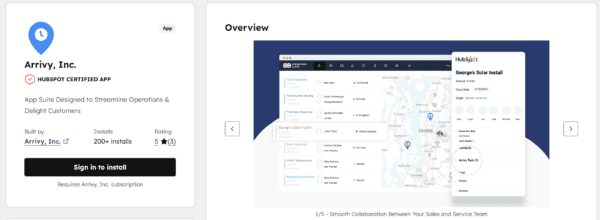
Arrivy is a HubSpot Certified App that extends HubSpot into scheduling, dispatch, and real-time field execution.
Evaluation Checklist
Use this checklist to assess whether a field service integration supports real operational workflows beyond basic CRM sync.
A reliable HubSpot field service integration should:
If an integration does not meet these criteria, it is unlikely to support real field execution at scale.
Example: How Service Businesses Use HubSpot and Field Service Software Together
Consider a residential solar installation business that manages sales and customer communication in HubSpot, while using Arrivy to handle scheduling, dispatch, and technician workflows.
The company handles site assessments, installations, and follow-up service visits. Each job involves coordination between sales, operations, technicians, and customers. A HubSpot field service integration connects these teams without forcing them to rely on manual handoffs.
From the Office: Sales and Support Teams
A homeowner submits a request for a solar installation through the company’s website. The sales team captures the lead in HubSpot, qualifies the opportunity, and moves it through the pipeline. Once the deal is approved, HubSpot holds all relevant details, including customer information, service address, and installation notes.
Support teams also work from HubSpot. If a customer calls with a scheduling question or follow-up request, support agents can see the full context without contacting operations.
From Operations: Scheduling and Dispatch Teams
As soon as the installation is ready to be scheduled, the integration makes the job available to operations. Dispatch teams see the installation request with customer details already attached. They schedule the job based on crew availability, location, and installation requirements.
If weather conditions or crew availability change, operations adjust the schedule without re-entering data or sending updates manually across teams.
From the Field: Installation Crews
Installation crews receive assignments with a complete job context. They can see the service address, installation notes, and scheduled time window on their mobile device. This helps crews arrive prepared and reduces last-minute calls to the office.
During the installation, crews update job status as work progresses. These updates reflect what is happening on site, not what was planned earlier in the week.
Back in HubSpot: Shared Visibility Across Teams
As installation progress updates come in from the field, HubSpot records update automatically. Sales teams can confirm when installations are completed. Support teams answer customer questions without chasing updates from dispatch.
After the job is finished, completion details such as notes, documentation, and confirmation become part of the customer record in HubSpot.
From the Customer’s Perspective
The homeowner receives consistent communication throughout the process. Appointment confirmations, arrival updates, and completion notices align with the actual installation timeline. Customers spend less time calling for updates and gain confidence in how the company manages service delivery.
This solar business example shows how HubSpot field service integration supports real service operations. Each team continues using the system designed for their role, while shared data keeps everyone aligned from the first inquiry through installation completion.
Explore All Arrivy Integrations
Arrivy integrates with 50+ business tools across CRM, scheduling, communications, payments, and field operations. Explore how Arrivy fits into your existing tech stack.
Conclusion
A recent industry survey found that businesses attribute 32% of performance delays to integration complexity, highlighting how disconnected systems continue to slow service operations. For service businesses, this gap appears when CRM data stops at deal closure while field execution happens elsewhere.
CRM systems like HubSpot are essential for managing relationships, revenue, and communication. But service delivery happens in the field, where schedules change, crews move, and execution defines customer experience. HubSpot field service integration closes this gap by extending CRM data into scheduling, dispatch, and real-time job execution, then syncing field updates back into the CRM.
With platforms like Arrivy, service businesses gain shared visibility across sales, support, and operations. Teams spend less time finding updates, customers receive communication based on real field activity, and leaders can rely on accurate service data as operations scale.
The result is a connected workflow where CRM strategy and field execution work together, giving service businesses the reliability and control needed to grow without any inadequacies.