Field service managers often assume productivity means a full schedule. It does not. Field technician productivity measures the value each technician delivers per available working hour. Most teams leave a significant portion of that untapped.
The signs show up slowly. Jobs run over schedule. Billable hours fall short of hours worked. Customers call back with the same issue. Each one feels like an isolated problem. Together, they point to one root cause: you are not tracking the right things.
Field service teams rely on field service management software to track field technician productivity across scheduling, dispatch, and job execution.
This guide gives you 7 productivity metrics with real benchmarks and a 5-step process to turn that data into decisions that improve your field service operation.
What Is Field Technician Productivity?
Field technician productivity measures how much value a technician produces per working hour, based on job output, quality of work, and time efficiency.
Most teams reduce this to one number: jobs completed per day. That number alone misleads you. A technician who closes 6 jobs in 8 hours on simple HVAC checks looks more productive than one who closes 3 complex industrial equipment repairs in the same shift. The raw count tells you nothing useful.
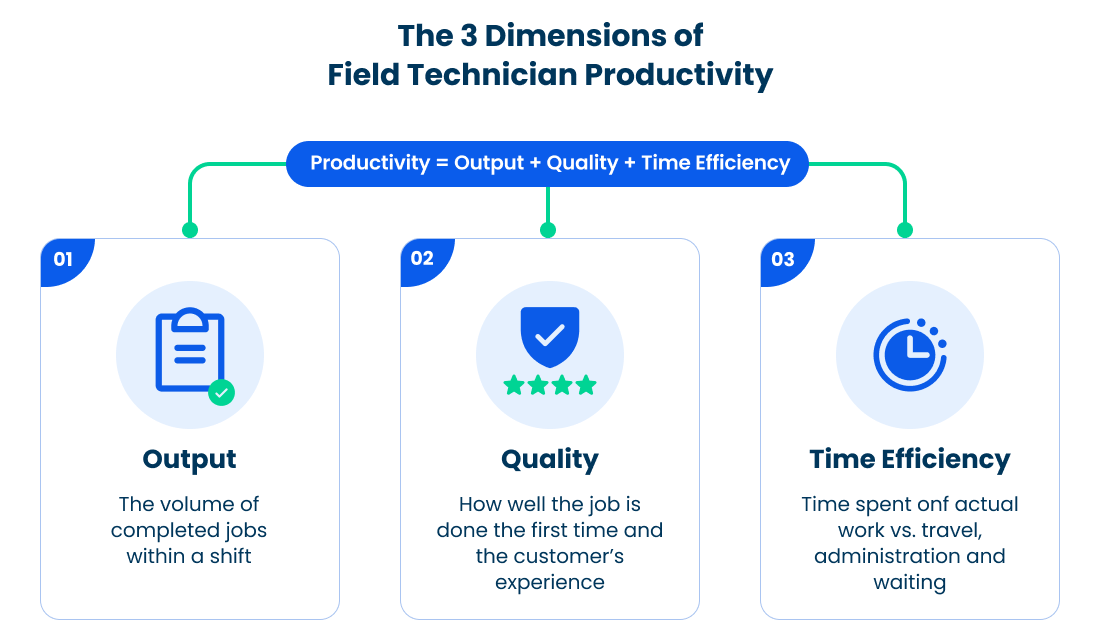
Productivity has three dimensions:
1) Output
The volume of jobs completed within a shift, measured against the expected completion rate for that job type.
2) Quality
Whether the job was done right the first time, reflected in the first-time fix rate and customer satisfaction scores.
3) Time Efficiency
How much of a technician’s shift is spent on actual work versus travel, administration, and waiting? This is often called wrench time.
The difference between productivity and utilization also matters here. Utilization measures what percentage of available hours a technician spends on productive activity. Productivity measures the quality and output of that activity. A technician with 90 percent utilization and a low first-time fix rate is highly utilized and underproductive. Tracking both gives you the full picture.
Why Tracking Field Technician Productivity Matters?
Inefficient productivity tracking affects revenue, service quality, and your ability to scale. Here are the key reasons why tracking is essential:
Revenue Leakage
Untracked idle time and unbillable hours reduce margins. If technicians spend 30 to 40 percent of their shift on travel or admin without visibility, your schedule does not reflect real capacity.
Customer Retention
According to the PwC Report, 73 percent of customers value experience as much as the product. Missed SLAs and repeat visits lead directly to churn.
Operational Visibility
Without clear data, you cannot identify skill gaps, routing inefficiencies, or job types that consistently run over time.
For instance, in a 20-technician HVAC team, reducing travel time from 37 percent to 25 percent increased daily job capacity without adding headcount. In another service team, improving job data and parts availability raised the first-time fix rate from 62 percent to 81 percent within weeks.
Common Challenges in Tracking Field Technician Productivity
Most tracking systems fail for the same reasons. Knowing them up front saves you from building the wrong foundation.
Fixing these issues starts with tracking the right metrics in a structured way.
Field Technician Productivity Metrics You Should Track
The seven metrics below reveal a different layer of your team’s performance. Before you go deeper, here are the benchmark ranges top-performing teams aim for:
| Metric | Benchmark |
|---|---|
| Job Completion Rate | 80 to 85 percent |
| First-Time Fix Rate | 70 to 75 percent |
| Average Job Duration | Within 20 percent of the Mean Time to Recovery (MTTR) baseline |
| Travel Time vs Work Time | Work time at least 50 to 55 percent |
| Technician Utilization Rate | 80 to 85 percent |
| On-Time Arrival Rate | 90 percent or higher |
| Customer Ratings | 4.2 to 4.4 out of 5 |
1. Job Completion Rate
This measures how many scheduled jobs a technician completes within a given period. A good benchmark is 80 to 85 percent. If this number is high but the first-time fix rate is low, jobs are getting closed without being fully resolved.
2. First-Time Fix Rate
This shows how often jobs are resolved on the first visit without a repeat call. The benchmark is 70 to 75 percent, with top teams exceeding 80 percent. According to Aberdeen Group, best-in-class teams reach 88 percent of FTFR, compared to 63 percent for average performers.
3. Average Job Duration
This tracks how long a technician takes to complete a job from arrival to sign-off. The benchmark is staying within 20 percent of your MTTR baseline. Shorter times are not always better, since rushed work often leads to repeat visits.
4. Travel Time vs Work Time Ratio
This measures how much of a shift is spent traveling versus doing actual work. Work time should reach at least 50 to 55 percent of the day. High travel time usually points to inefficient routing or scheduling.
5. Technician Utilization Rate
This shows the percentage of available hours spent on productive work. A strong range is 80 to 85 percent, while going above 90 percent often leads to burnout and lower quality. The goal is balanced utilization.
6. On-Time Arrival Rate
This tracks how often technicians arrive within the scheduled time window. Top-performing teams maintain rates above 90 percent. Low performance here usually indicates scheduling or communication gaps rather than technician behavior.
7. Customer Ratings and Feedback
This reflects service quality from the customer’s perspective, usually on a 1 to 5 scale. High-performing teams maintain averages between 4.2 and 4.4. Always review scores by technician, since averages often hide consistent underperformance.
How to Track Field Technician Productivity: A Step-by-Step Process
Tracking productivity is a system built across five connected steps. Here is how to build it.

Step 1: Capture Job-Level Data
Start at the job level. Every productivity insight you need lives inside individual job records, but only if you capture the right data points from the start.
For each job, your system should log:
Job start time
On-site arrival time
Work completion time
Parts used
Customer sign-off timestamp
Job category and complexity level
Totals and averages come later. Granularity at the job level is what makes those totals meaningful. A weekly report that shows 200 jobs completed tells you nothing. The same 200 jobs with arrival times, durations, and part usage patterns provide you with complete details.
Step 2: Track Time Accurately
Time tracking is where most field service operations lose data quality. The problem is a lack of accuracy.
There are four distinct time categories every technician shift contains
| Time Category | Definition |
|---|---|
| Clock-in Time | When the technician starts their shift |
| Travel Time | Time spent moving between jobs or to the first job |
| On-Site Time | Time spent at the customer location |
| Wrench Time | Time spent performing actual work, within on-site time |
Most manual systems combine all of these into one number. When that happens, you lose the ability to distinguish a technician who spends 4 hours on-site from one who spends 4 hours traveling. They look identical on paper.
Step 3: Monitor Performance in Real Time
Historical data tells you what went wrong. Real-time data gives you the chance to take the necessary measures at the right time.
A useful real-time dashboard surfaces:
Which technicians are currently on-site versus in transit
Which jobs are running beyond their expected duration
Which SLA windows are at risk in the next two hours
Where delays are creating scheduling knock-on effects
The goal is to give dispatchers and managers the visibility to make better decisions in the moment. A dispatcher who can see an SLA at risk two hours out can address it instantly. On the contrary, a dispatcher working from a morning report will address it the next day.
Your field service management software should make this view available without manual data entry from the field.
Step 4: Analyze Performance Trends
Single-day snapshots mislead. That is why you must look into the trends.
Consider two technicians on your team:
Alex completes 6 jobs per day on average and has a 91 percent on-time arrival rate. Sarah completes 4 jobs per day and arrives on time 78 percent of the time. On the surface, Alex looks stronger across the board.
Now look at their first-time fix rates over 30 days. Alex sits at 61 percent. Sarah sits at 83 percent. Alex is closing jobs fast and generating repeat visits. Sarah is taking longer and solving problems completely. The 30-day view changes every conclusion you drew from the daily snapshot.
This is why it is important to run your performance analysis on two cycles:
1) Weekly review
2) Monthly review
Step 5: Close the Loop and Optimize Operations
The final step is feeding your productivity insights back into the decisions that shape daily operations.
Use your data to drive three specific decisions:
Scheduling
If travel time ratios are high across your team, the problem is in your dispatch logic. Adjust geographic clustering of jobs before adding headcount.
Training
If a technician’s average job duration runs consistently above your MTTR baseline, investigate it. It may be a skill gap. It may be that they handle more complex job types. The data helps you know where to dive deeper.
Routing
If on-time arrival rates drop on specific days or routes, your route planning needs adjustment. Match the pattern to the geography and fix the route.
Manual vs. Automated Productivity Tracking
The method you use to track productivity determines the quality of decisions you make from that data. Here is a direct comparison.
| Action | Manual Tracking | Automated Tracking |
|---|---|---|
| Data Entry | Spreadsheets and paper forms | Auto-captured via FSM software |
| Insight Speed | Delayed, end of day or week | Real-time dashboards |
| Accuracy | Error-prone, inconsistent | Standardized and accurate |
| System Connectivity | Siloed, no integration | Connected across scheduling, CRM, and billing |
| Manager Visibility | Reactive | Proactive |
| Scalability | Breaks down as the team grows | Scales with operations |
Manual tracking works for a team of three. At scale, the cost of delayed and inaccurate data compounds faster than most operations leaders realize. According to McKinsey, organizations that automate field operations reporting reduce administrative overhead by up to 30 percent and free managers to focus on decisions instead of data cleanup.
How Arrivy Helps You Track Field Technician Productivity
Arrivy helps field service teams capture cleaner job data, track technician performance in real time, and improve output per technician without relying on manual reports. This means fewer repeat visits, better utilization, and higher output per technician.
Here is how:
Accurate job and time tracking
Arrivy records job start, arrival, work time, and completion automatically, so you get consistent productivity data without manual entry errors.
Real-time visibility for daily decisions
You see who is on-site, who is delayed, and which jobs are at risk, so you can adjust schedules before delays impact customers.
Connected performance metrics
All key metrics sit in one place. Job completion rate, first-time fix rate, travel time, utilization, and customer ratings link to each technician. You identify gaps and take action with clear data.
Team Assistant for on-site execution
Arrivy’s AI feature, Team Assistant, gives technicians instant answers based on their task and role. They access job procedures and task details inside the app. This reduces delays and improves the first-time fix rate.
Customer feedback tied to each job
Customers rate the service at job completion. The score links to the technician and job record. You track service quality with full context.
One system across operations
Scheduling, dispatch, field work, and customer communication stay connected. Your data stays consistent. Your decisions rely on a complete operational view.
Most field service tools show reports after the day ends. Arrivy gives real-time visibility so you can act before delays affect customers.
Conclusion
Field technician productivity improves when you track the right metrics and act on them during the day. Tracking field technician productivity consistently helps you improve output, reduce repeat visits, and scale operations without adding unnecessary cost.
You need clear job data, real-time visibility, and consistent processes to reduce delays and improve the first-time fix rate. Arrivy brings these elements into one system, so your team spends more time on actual work and less time waiting, guessing, or correcting mistakes.