 Login







AI Summary
A technician inspecting a roof notices loose flashing around the chimney. They take a photo, move toward the ridge, and find three cracked shingles. There’s also a blocked gutter near the front downspout.
By the end of the inspection, they have photographs of everything. The trouble starts when they sit down to write the report. They still need to explain where each problem was found, match the photos with their observations, and identify what needs attention.
Those details are easier to record while standing in front of the problem. By describing what they see and taking photos as they work, technicians can capture information that AI can help organize into a report.
This guide covers what a site visit report should include, how to document findings using voice and photos, and how to turn those observations into a report with AI.
From Site Walkthrough to Report, in Minutes
Take photos and speak through your observations as you inspect.
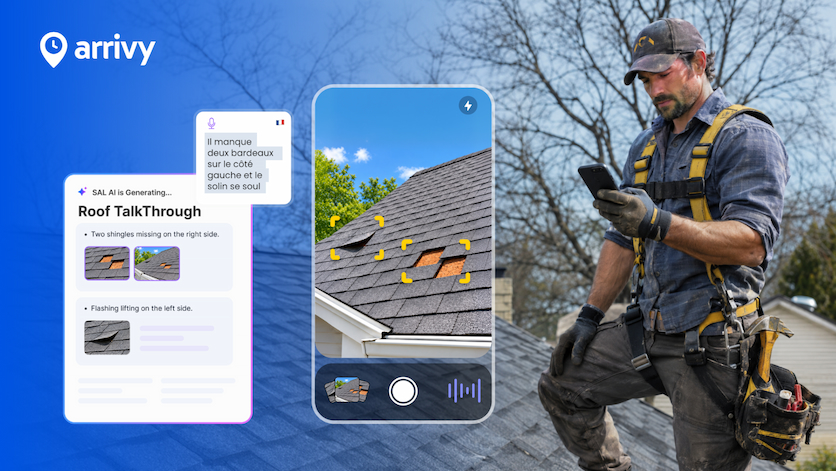
AI TalkThrough captures live captions and organizes your findings
into editable notes, with relevant images placed alongside them.
Watch how it works inside Arrivy Digital Forms.
What should a site visit report include?
Someone reading a site visit report should be able to understand what happened without having to speak to the person who conducted the inspection.
The information needed will depend on the type of visit, but most reports should cover the following:
| Information | What to record |
|---|---|
| Visit details |
Site address, date, technician's name, and reason for the visit. |
| Areas inspected |
Locations, equipment, or systems checked, including areas that couldn't be accessed. |
| Findings |
Problems observed, their exact locations, and relevant measurements or quantities. |
| Photos |
Images showing the location and condition of each finding. |
| Work completed |
Repairs, maintenance, or other work carried out during the visit. |
| Recommended actions |
Issues requiring further inspection, repair, or follow-up. |
How to document a site visit in 5 steps
Step 1: Know what you’re inspecting
Before beginning the walkthrough, check the job details and the reason for the visit. For an HVAC visit, that may mean checking the equipment mentioned in the service request.
Start with the areas relevant to the job and follow a consistent inspection order. As you move through the site, record anything that limits your inspection. If a section of the roof is unsafe to access or a mechanical room is locked, include that in the report. Otherwise, someone reading it later may assume those areas were checked.
If you’re using Arrivy, you can begin with the Digital Form attached to the job. This gives you a place to record the inspection details and keep the resulting notes with the task.
For teams handling several jobs each day, having a consistent field service workflow also helps ensure technicians know which information to collect before closing a job.
Step 2: Describe what you find while you’re there
Writing an inspection report from memory gets harder when several problems look similar. Describe each finding while you’re still looking at it.
Say where the issue is and explain what you can actually see. Include measurements or quantities when they’re relevant, and mention any follow-up you believe is necessary.
You can also explain what you haven’t confirmed. If there’s a water stain on the ceiling but the source of the leak is unknown, record the staining without assigning a cause.
With Arrivy AI TalkThrough, technicians can speak through their findings while completing a Digital Form. Live captions appear as they talk, allowing them to see the words being captured during the walkthrough. They can focus on explaining the condition in ordinary language and review the resulting notes later.
Step 3: Take photos that explain the problem
Take a wider photo that shows where the issue is, then a close-up that shows the condition. Describe what you’re photographing so the office can match the image to the right finding.
For instance, an HVAC technician might say, “This photo shows corrosion on the connection behind the outdoor unit.” That tells a reviewer what to look for.
Avoid keeping several nearly identical images. If a photo is blurry, retake it while you’re still on site. With AI TalkThrough, technicians can take photos as they speak, and AI places relevant images alongside the generated notes.
For roofing contractors, keeping inspection photos with the job record can also make approvals and follow-up work easier.
Our guide on how digital roofing forms simplify approvals and reduce paperwork explains how these records fit into the broader job process.
Step 4: Turn your observations into a report with AI
When the walkthrough is finished, select Done. AI TalkThrough uses the spoken observations and photos to create structured notes within the Digital Form. Related images appear alongside the findings, and the technician can review the draft before completing the form.
What if your team speaks different languages?
Arrivy AI TalkThrough allows the form author to choose the language of the AI-generated notes. The available output options include English, French, Spanish, Polish, Russian, and Arabic.
This gives teams more flexibility over the language used in their completed site visit reports.
Step 5: Check the report before completing the job
Even when AI organizes the notes, the technician should review the finished draft before completing the form. Verify locations, counts, measurements, and photo placement. If an issue still needs attention, make sure the wording doesn’t suggest the repair was completed.
For example, “gutter cleared and drainage checked” describes finished work. “Recommend clearing the gutter” describes a follow-up. That difference matters when the office plans the next visit.
AI TalkThrough allows users to edit the generated text, make corrections, and adjust the images directly inside the Digital Form. Additional observations and photos can also be added when needed.
After reviewing the content, complete the form according to your team’s usual process. The notes and photos can be included in the completed form PDF, depending on the form settings, so the office or customer has a record of the inspection.
Example: Documenting a roof inspection with voice and photos
During a roof inspection, the technician describes three findings and photographs each affected area. The reviewed report might read:
| Spoken observation | Reviewed report entry |
|---|---|
| "The flashing is lifting on the north side of the chimney." |
Chimney flashing: Flashing is lifting along the north edge. Inspect the affected section before quoting repairs. |
| "There are three cracked shingles near the ridge." |
Roof ridge: Three cracked shingles observed. Assess the damaged shingles for replacement. |
| "The front gutter is clogged near the downspout." |
Front gutter: Debris is blocking the gutter near the downspout. Recommend clearing the blockage and checking drainage. |
The technician confirms the recommendations during review and checks that the correct photograph accompanies each finding.
The office can use the resulting report to understand the damage and determine what information is needed for an estimate or follow-up visit.
Once the repair scope and costs have been confirmed, teams can use Arrivy’s job quoting software to prepare a professional quote with supporting photos and job details.
A few habits that make site reports more useful
The quality of a report still depends on what the technician observes and records. AI can organize the information, but a vague description remains difficult to work with.
Keep these habits in mind during your next inspection.
Use locations someone else can identify. “Loose connection behind the outdoor AC unit” is clearer than “loose connection found.”
Record the condition before making repairs. When appropriate, take a photo of the original problem. If work is completed during the visit, document the result as well.
Include quantities when they matter. A report describing three damaged shingles or two leaking joints gives the office a better understanding of the work involved.
Don’t leave limitations out. If an area couldn’t be inspected, mention it so the report accurately reflects the scope of the visit.
Check recommendations before submitting. The person conducting the inspection should confirm what needs to happen next, particularly when the report will be used to prepare an estimate or communicate with the customer.
Spend less time writing site visit reports
A technician who records each finding during an inspection has less information to reconstruct afterward. The office also receives notes that are easier to review because the observations and supporting photos have been documented together.
With Arrivy AI TalkThrough, your team can speak through a site visit, capture photos, and turn the walkthrough into editable notes inside Arrivy Digital Forms.