Login
Login





















Quick Answer:
Field service scheduling and dispatch is the process of planning field assignments and then coordinating their execution as technicians, crews, customers, and job conditions change. Scheduling determines which qualified resource should handle each job and when the work should happen. Dispatching puts those assignments into action, monitors field activity, and helps teams respond to delays, cancellations, urgent requests, and other exceptions. Together, they connect the original service plan with what actually happens in the field.
A field service schedule can look perfectly organized at the beginning of the day. Technicians have assigned jobs. Customer appointment windows are confirmed. Routes make sense. Workloads appear balanced.
Then the day starts. A job runs long, an urgent request arrives, or technician availability changes. Suddenly, the original plan no longer matches what is happening in the field.
At that point, a good schedule is only the starting point.
What field service teams also need is to coordinate work as it moves into the field and adjust the original plan when actual conditions change. That is where dispatch becomes essential.
Scheduling determines what should happen. Dispatch keeps that plan working as field conditions change.
When the two functions are connected, operations teams can make better assignments, respond faster to disruptions, keep field teams informed, protect customer commitments, and make more effective use of available capacity.
This guide explains how field service scheduling and dispatch work together from planning through job completion. It covers the difference between scheduling and dispatching, the role of the dispatcher, the scheduling-to-dispatch handoff, real-time exception management, best practices, KPIs, software capabilities, and the role of automation and AI.
What Is Field Service Scheduling and Dispatch?
Field service scheduling and dispatch is the combined process of planning field work, assigning it to the right resources, communicating those assignments, monitoring execution, and adjusting the plan when conditions change.
The two functions are closely related, but they focus on different parts of the operation.
Field service scheduling focuses primarily on planning. Teams determine which technician, crew, vehicle, or other resource should handle each job based on factors such as skills, availability, expected duration, customer appointment windows, geography, travel time, equipment requirements, and capacity.
Field service dispatching focuses primarily on execution. Once work has been scheduled, dispatch teams coordinate those assignments as the day unfolds. That can include releasing jobs to field teams, monitoring technician and job status, responding to delays, assigning urgent work, reassigning technicians, and communicating schedule changes.
A simple way to think about the relationship is:
Scheduling builds the plan. Dispatch manages the plan in motion.
Effective field service operations connect the two rather than treating them as isolated activities. A well-built schedule gives dispatch a realistic starting point, while effective dispatch keeps the plan useful when the workday changes.
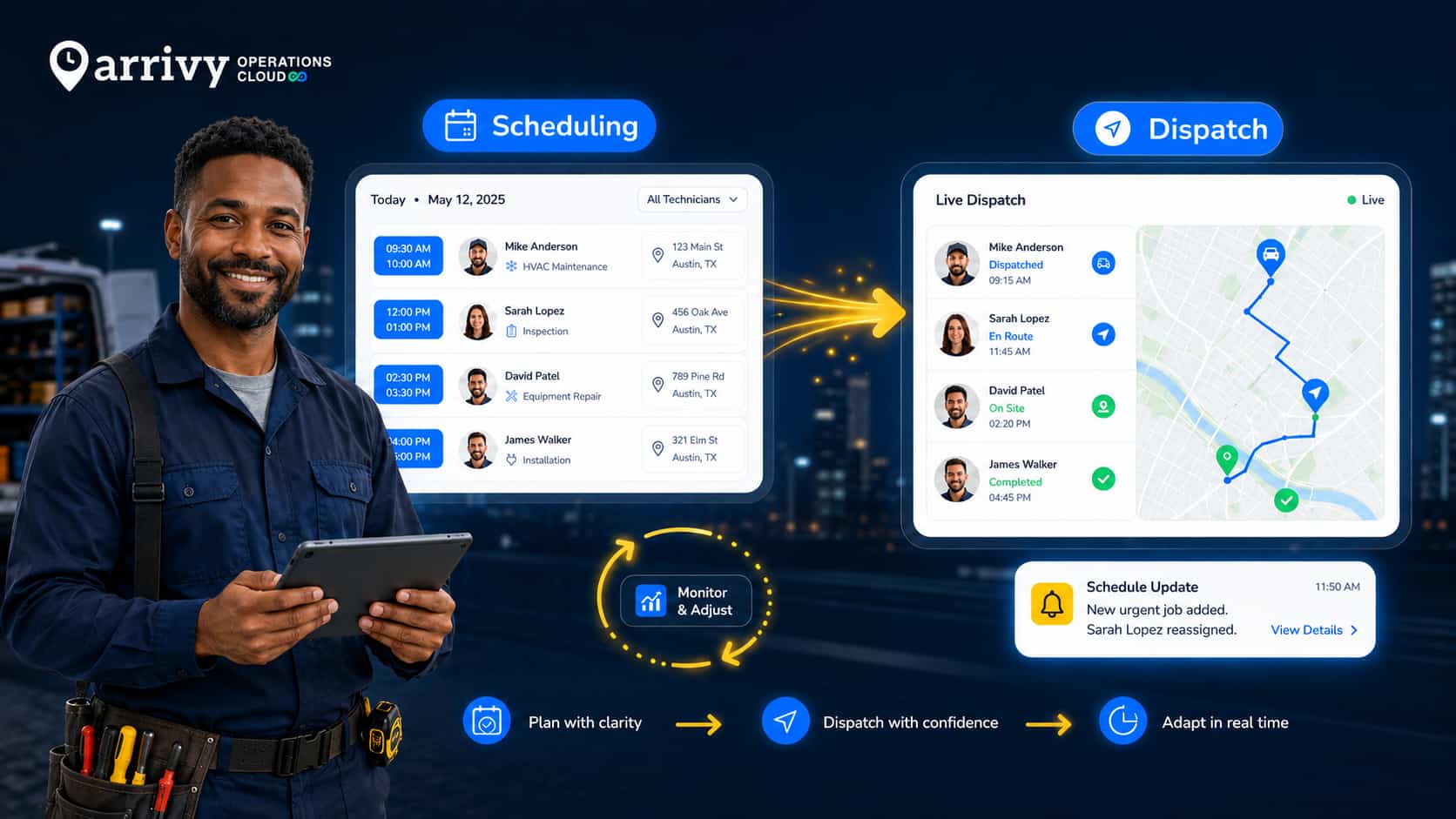
The result is a continuous operating cycle:
Field Service Scheduling vs. Dispatching: What’s the Difference?
Field service scheduling and dispatching are closely connected, but they solve different operational problems.
| Field Service Scheduling | Field Service Dispatching | |
|---|---|---|
| Primary purpose | Build the plan | Execute and adapt the plan |
| Main question | Who should do what, and when? | What needs to happen now? |
| Key inputs | Skills, availability, capacity, job duration, geography | Technician status, delays, location, priorities, job progress |
| Typical output | Planned assignments and appointment times | Active assignments and operational changes |
| Common changes | Moving future appointments or balancing workload | Reassigning work, handling delays, inserting urgent jobs |
| Primary visibility | Schedule, calendar, capacity, routes | Dispatch board, technician status, live job activity |
For example, scheduling may assign a repair to a certified technician at 11:00 a.m. because the technician has the right skills, is working nearby, and has enough time available.
If that technician’s earlier job runs long, dispatch determines what happens next. The dispatcher may delay the appointment, move it to another qualified technician, or adjust other assignments to protect customer commitments.
In practice, strong field service operations need both. A well-built schedule gives dispatch a realistic starting point, while effective dispatch keeps the schedule useful when the workday changes.
For a deeper look at technician matching, capacity planning, route-aware scheduling, and job-duration planning, see our field service scheduling guide.
What Does a Field Service Dispatcher Do?
A field service dispatcher coordinates scheduled work as technicians and crews move through the day.
The role typically includes reviewing upcoming assignments, confirming that jobs are ready for execution, monitoring technician and job status, responding to delays, managing cancellations, assigning urgent work, and rebalancing workloads when the original schedule no longer fits current conditions.
A dispatcher may need to answer questions such as:
The dispatcher’s role therefore goes beyond simply assigning jobs.
Scheduling gives the dispatcher a plan to work from. Dispatching is the ongoing decision-making required to keep that plan aligned with what is actually happening in the field.
How Scheduling and Dispatch Work Together
Field service scheduling and dispatch work best as one connected process.
A typical workflow looks like this:
1. Build a Realistic Schedule
Start by matching each job with the right technician, crew, or resource based on requirements such as skills, availability, expected duration, geography, customer windows, equipment, and capacity.
The goal is not simply to fill calendar space. It is to create a schedule that can realistically be completed.
For a deeper look at technician matching, capacity planning, job durations, and route-aware scheduling, see our field service scheduling guide.
2. Hand the Assignment to Dispatch
Once a job is scheduled, the information needed to execute or reassign it should move with the assignment. The information may include:
A schedule can look correct on a calendar and still fail in execution if the information needed to perform or reassign the job does not move with it.
3. Dispatch the Technician or Crew
Dispatch moves the assignment from planning into active field work.
Technicians should receive the job details they need without calling the office for missing information, including where to go, what work is expected, relevant customer or site details, and any special requirements.
This creates a clear transition from planned appointment to active assignment.
4. Monitor Job-Day Execution
Once work is underway, dispatch needs to know whether actual progress still matches the schedule.
Useful statuses may include Dispatched, En Route, On Site, and Completed.
If a job finishes early, capacity may open up. If it runs long, later appointments may become unrealistic. Current field status helps dispatch identify those issues before they create larger downstream problems.
5. Manage Exceptions and Adjust the Plan
This is where dispatch becomes most important.
Jobs run long, technicians become unavailable, customers cancel, urgent work arrives, and traffic or resource issues affect the original plan.
When that happens, dispatch may need to compare technician qualifications, current status, route impact, workload, customer priority, SLA commitments, and overtime risk before deciding what to move.
The best response is not always sending the nearest available technician. It is finding the option that solves the immediate problem without creating several new ones.
6. Complete the Job and Improve Future Planning
The process should not end when the job is closed.
Actual job duration, travel time, delays, reassignments, and completion results can improve future scheduling and dispatch decisions. The strongest field service operations use what happened today to build a more realistic plan tomorrow.
Common Field Service Scheduling and Dispatch Challenges
Even a well-built schedule can change quickly once technicians are in the field. The goal is not to eliminate every disruption, but to identify problems early enough to adjust the plan without creating unnecessary downstream delays.
| Challenge | Operational Impact |
|---|---|
| Jobs run longer than expected | Later appointments and technician availability become unreliable |
| Urgent work appears | Existing assignments may need to move without breaking customer or SLA commitments |
| Technician availability changes | Call-outs, overruns, or early completions can change available capacity |
| The nearest technician is not qualified | Skills, certifications, equipment, and workload must be considered alongside distance |
| Office and field status become disconnected | Dispatch decisions may be based on outdated job or technician information |
| Coordination relies on calls and messages | Dispatchers spend time chasing status instead of managing exceptions |
That is why effective field service scheduling and dispatch depends on current operational visibility. Dispatchers need to understand the original plan, what is actually happening in the field, and the downstream impact of a change before deciding how to respond.
Field Service Scheduling and Dispatch Best Practices
The strongest scheduling and dispatch operations do not depend on constant manual intervention. They create clear rules for planning, maintain accurate field status, and give dispatchers enough context to handle exceptions without disrupting the rest of the day.
Keep Technician and Job Status Current
Dispatch decisions depend on knowing what is actually happening in the field.
Use a small, consistent set of statuses such as Dispatched, En Route, On Site, Delayed, and Completed so dispatchers can quickly understand which technicians are available and which jobs may affect later assignments.
Give Dispatchers Live Operational Visibility
Dispatchers should be able to see active jobs, upcoming work, technician or crew status, routes, priorities, and customer commitments without switching between multiple tools.
The goal is to have enough context to understand the impact of a change before making it.
Define Clear Reassignment Rules
When a job needs to move, teams should have a consistent way to evaluate alternatives.
Reassignment criteria may include:
These rules can support both manual decisions and automated recommendations.
Automate Operational Notifications
When assignments or appointment times change, technicians and customers should not be left working from outdated information.
Automated notifications can reduce manual calls and help keep field teams, office staff, and customers aligned as the plan changes.
Use Automation With Human Oversight
Automation can compare qualifications, location, workload, and other constraints quickly, but some decisions still depend on context.
Dispatchers should be able to override recommendations when customer relationships, safety concerns, contractual commitments, or unusual field conditions require judgment.
Review Exceptions and Improve the Process
Repeated exceptions often point to a deeper planning or operational issue.
Review which jobs were reassigned, which appointments ran late, where travel was underestimated, and which urgent jobs were difficult to accommodate.
That information can improve future scheduling assumptions, dispatch rules, staffing, and resource planning.
A strong scheduling and dispatch process does not eliminate change. It makes change easier to manage.
KPIs for Field Service Scheduling and Dispatch
The most useful KPIs show whether the original plan is holding up in the field and how effectively the team responds when it does not. The following KPIs matter most:
These metrics are most useful when reviewed together.
For example, a high reassignment rate may point to unstable scheduling, poor availability data, or frequent operational disruptions. Slow emergency response combined with consistently high utilization may indicate that the schedule leaves too little capacity for unplanned work.
Likewise, fast dispatch times are not especially valuable if first-time fix rates are low because technicians are being assigned without the right skills or resources.
The goal is not to optimize one number in isolation. It is to understand whether scheduling and dispatch are producing a stable, responsive operation from planning through execution.
What to Look for in Field Service Scheduling and Dispatch Software
Field service scheduling and dispatch software should support both sides of the operation: building a workable plan and managing that plan as field conditions change.
Key capabilities to evaluate include:
| Capability | What to Look For |
|---|---|
| Visual scheduling | Clear calendar, resource, list, or map views for jobs, teams, and capacity |
| Skills-based assignment | Matching based on qualifications, availability, and job requirements |
| Dispatch dashboard | Visibility into active work, upcoming jobs, technician status, and exceptions |
| Live job and technician status | Current information on whether work is dispatched, en route, on site, delayed, or completed |
| Reassignment tools | Fast movement of jobs between technicians, crews, or appointment times |
| Route and location context | Travel-time and geographic insight when evaluating changes |
| Mobile access | Job details, schedules, instructions, and status updates available to field teams |
| Customer notifications | Appointment confirmations, delay notices, ETA updates, and schedule-change communication |
| Integrations | Connections with CRM, ERP, work orders, inventory, accounting, and other operational systems |
| Reporting and automation | Performance tracking, alerts, recommendations, and workflow automation |
When evaluating software, test what happens when the plan changes, not just when every appointment runs on time. A useful platform should make it easy to see the impact of a delay, compare reassignment options, update field teams, and communicate changes to customers.
If your main priority is evaluating dispatch tools specifically, see our dispatch software guide.
How AI and Automation Support Scheduling and Dispatch
AI and automation can help field service teams evaluate more operational constraints at once and respond faster when the plan changes.
For example, software can compare technician availability, skills, certifications, location, workload, route impact, and job priority when suggesting an assignment or reassignment. Automation can also flag conflicts, surface jobs at risk of delay, trigger notifications, and update connected workflows when job status changes.
The value is not simply replacing manual decisions. It is reducing the time required to compare options.
If an urgent job arrives, an AI-assisted system can quickly identify which technicians are realistically eligible rather than relying on proximity alone.
Human judgment still matters, especially when decisions involve unusual customer requirements, safety concerns, contractual commitments, or field conditions that are not fully represented in the system.
A practical model is:
Automation for speed and comparison. Human oversight for context and exceptions.
Used this way, AI can make field service scheduling and dispatch more responsive without turning operational decisions into a black box.
For a deeper look at connected workflows and automation, see our field service automation guide.
How Arrivy Connects Scheduling and Dispatch
The challenge with field service operations is not simply putting jobs on a calendar or showing technicians on a map. Scheduling and dispatch work best when teams can move from planning into job-day execution without losing context between systems.
Arrivy connects these workflows in one field service management platform, giving office and field teams shared visibility into jobs, crews, schedules, routes, and customer communication.
Teams can use Arrivy to support:
The value of connecting these capabilities is continuity. The information used to create an assignment remains available as the job moves into dispatch and execution, while field activity can provide better context for future planning.
For operations teams, that means less time reconstructing what changed across separate tools and more time managing the work itself.
See how Arrivy Scheduling & Dispatch helps teams move from planning to field execution.
Explore Scheduling and Dispatch
Conclusion
Field service scheduling creates the plan. Dispatch keeps that plan workable as jobs, technicians, priorities, and customer conditions change.
When the two are connected, teams can respond faster to exceptions, protect service commitments, and use actual field results to improve future planning.
That creates a continuous cycle from service request till job closure.
The goal is not to create a schedule that never changes. It is to build an operation that can adapt without losing control.
Start scheduling and dispatching with immense context.
Book a Demo