
 Login
Login






















Facility management software can solve very different operational problems depending on the organization using it.
One team may need to keep hundreds of assets on preventive maintenance schedules. Another may need to coordinate technicians across customer locations, collect field documentation, and keep site contacts informed. A national retailer may be more concerned with managing outside contractors across hundreds of facilities.
That is why choosing the best facility management software is less about finding the platform with the longest feature list and more about matching the software to the way your operation actually works.
This guide compares Arrivy, MaintainX, ServiceChannel, FMX, and Limble across those different operating models.
AI Summary
Facility management software helps organizations manage the operational work around maintenance, work orders, assets, technicians, contractors, field activity and multiple facilities.
The five platforms serve different parts of a facility-management operation.
- Arrivy is best for coordinating facility service work across schedules, technicians, crews, routes, field documentation, job progress and customer or site communication.
- MaintainX is better suited to maintenance teams that need mobile work orders, preventive maintenance, procedures, asset records and parts management.
- ServiceChannel is strongest for large multi-location organizations that manage facility work through external service providers and contractor networks.
- FMX combines maintenance management with broader facility operations such as facility scheduling, utilities, inventory and capital planning.
- Limble is strongest where preventive maintenance, equipment history, downtime, spare parts and asset reliability are central to the operation.
Best Facility Management Software: Quick Comparison
| Platform | Best For | Field/Mobile Focus | Free Trial | Pricing |
|---|---|---|---|---|
| Arrivy | Facility service execution | Strong | 14 days | Standard $25/full-access user/month; Premium $50 |
| MaintainX | Preventive maintenance | Strong | Yes | Free; Essential $20/user/month annually; Premium $65 |
| ServiceChannel | Provider-led multi-location FM | Strong provider workflow | No | Custom; priced per location |
| FMX | Facility operations and planning | Moderate | 14 days | Custom quote + implementation fee |
| Limble | Asset reliability and maintenance | Strong maintenance-mobile focus | 30 days | Calculated/custom pricing |
What Is Facility Management Software?
Facility management software helps organizations coordinate the maintenance, work requests, assets, people, contractors, and operational information required to keep buildings and service locations functioning.
The category overlaps with several adjacent software types.
A CMMS primarily concentrates on maintenance activities such as work orders, preventive maintenance, equipment repairs, inventory, and asset reliability. CAFM and wider facility-management systems can extend beyond maintenance into broader facility functions, while IWMS products can go further into areas such as workplace and real-estate management. Field service management software places more emphasis on scheduling, dispatching, and supporting mobile technicians carrying out work across locations.
Understanding the overlap matters because the same search for “facility management software” can lead to very different products.
What part of our operation is hardest to manage today?
If the answer is asset reliability, a maintenance-first CMMS deserves priority. If it is a distributed portfolio and outsourced contractors, provider management becomes more important. If it is getting technicians from scheduled job to completed and documented service, field-execution functionality matters much more.
5 Best Facility Management Software Platforms in 2026
1. Arrivy — Best for Facility Service Operations and Mobile Crews
Arrivy is a field service management software that approaches facility operations primarily from the field-execution side.
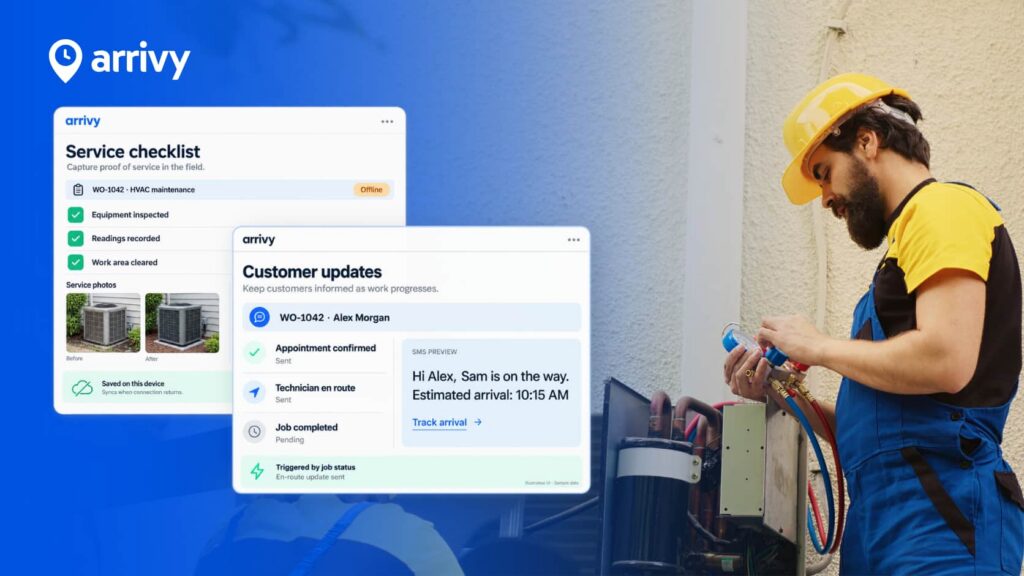
It covers scheduling and dispatch, work orders, crew management, route planning, mobile field activity, offline digital forms, customer communication, job progress, reporting, integrations, and multi-stage project workflows.
This makes Arrivy particularly relevant to businesses where facility work needs to move through a workflow such as:
- Request
- Schedule
- Assign
- Dispatch
- Travel
- Complete Work
- Document
- Communicate
- Invoice
- Close
Rather than trying to be a deep asset-reliability CMMS or workplace-management IWMS, Arrivy’s stronger fit is coordinating the operational handoffs around mobile work.
Why We Included Arrivy
Arrivy connects several parts of service delivery that often end up spread across separate scheduling, communication, mapping, and paperwork systems. Teams can schedule and dispatch jobs, create crews, monitor team location and job progress, capture notes and photos, use digital forms, work with forms offline, and give customers or site contacts live updates.
Key Features:
Pros:
- Connects scheduling, dispatch, field work, and documentation.
- Strong fit for mobile crews working across multiple locations.
- Keeps forms, photos, routes, and customer updates tied to the job.
- Integrates with CRM, accounting, and other business systems.
Cons:
- Not built for deep preventive-maintenance workflows.
- Asset and spare-parts management are more limited than specialist CMMS tools.
- Does not replace dedicated IWMS or space-management software.
Pricing:
- Standard: $25 per full-access user/month
- Premium: $50 per full-access user/month
- Enterprise: Contact Arrivy
- Minimum: 3 full-access users on Standard and Premium
- Trial: 14 days, no credit card required
Best for:
Facility service organizations where the operational difficulty is getting the right technician or crew to the right site, keeping the office aware of progress, documenting work properly, and communicating with the customer or facility contact.
2. MaintainX — Best for Mobile-First Preventive Maintenance
MaintainX is a maintenance-first platform built around work orders, preventive maintenance, procedures, asset data, parts, purchasing, and technician execution.
Its facility-management product emphasizes digital work orders, preventive maintenance, inspections, maintenance history, inventory, and reporting. Offline work is supported in the mobile application for eligible full users and administrators.
Why We Included MaintainX
MaintainX offers a clearer CMMS-style fit for organizations where keeping equipment maintained is the central requirement. Premium adds functionality such as meter-based maintenance, parts inventory, purchase orders, time and cost tracking, REST API access, and external work orders. Enterprise extends further into resource planning, integrations, permissions, and multi-site management/reporting.
Key Features:
Pros:
- Easy to use for daily maintenance.
- Strong mobile work-order experience.
- Good preventive-maintenance tools.
- Responsive onboarding and support.
- Solid asset and parts management.
Cons:
- Costs rise with more paid users.
- Notifications can become noisy.
- Reporting can feel limited.
- Some workflows need more customization.
Pricing:
- Basic: $0/user/month
- Essential: $20/user/month billed annually; $25 monthly
- Premium: $65/user/month billed annually; $75 monthly
- Enterprise: Custom pricing
Best for:
Internal maintenance and facility teams that want a mobile CMMS with preventive maintenance, structured procedures, work orders, asset history, and progressively deeper inventory and reliability functionality.
3. ServiceChannel — Best for Multi-Location Facilities and External Service Providers
ServiceChannel is built for multi-location facility operations, combining work orders, preventive maintenance, assets, spend, budgets, compliance, and contractor performance.
Its provider-management tools also support onboarding, trade/location assignments, insurance and compliance tracking, performance monitoring, approved rates, and provider agreements.
Why We Included ServiceChannel
ServiceChannel addresses a problem that is different from simply scheduling an internal maintenance team. For organizations with many locations and extensive reliance on external HVAC, electrical, plumbing, refrigeration, cleaning, or other contractors, the provider network itself becomes part of the facility-management problem.
Key Features:
Pros:
- Strong multi-location visibility.
- Excellent provider-management depth.
- Good contractor compliance controls.
- Centralizes work orders and spend.
- Well suited to outsourced facility operations.
Cons:
- Interface can feel complex.
- Navigation has a learning curve.
- Provider workflows can be administrative.
- Exception handling can require extra steps.
Pricing:
ServiceChannel does not publish one fixed platform price. Its official pricing information states that platform subscriptions are priced per location, with buyers receiving a customized quote based on their deployment.
Best for:
Large multi-location organizations where a meaningful share of facility work is completed by external providers and management needs visibility into work orders, compliance, rates, spend, and contractor performance.
4. FMX — Best for Broader Facility Operations and Capital Planning
FMX covers a wider set of facility-management functions than a maintenance-only system. Its facilities offering spans maintenance management, capital planning and forecasting, utility management, facility scheduling and reservations, and parts inventory.
An important buying detail is that FMX's broader facilities-management use case is assembled across several FMX products rather than assuming every capability sits inside one single maintenance module.
Why We Included FMX
FMX is useful when “facility management” really does extend beyond maintenance. A school, university, public facility, or other organization may need work orders alongside room reservations, utilities, inventory, and multi-year replacement planning. FMX is structured around that broader requirement.
Key Features:
Pros:
- Easy for staff to adopt.
- Strong customer support.
- Covers broader facility workflows.
- Useful scheduling and reservation tools.
- Good fit for multi-department use.
Cons:
- Setup can take significant effort.
- Reporting can feel restrictive.
- Calendar views can become crowded.
- Full functionality may require multiple modules.
Pricing:
- FMX uses custom pricing rather than publishing a standard per-user rate.
- A one-time implementation fee applies.
- Vendors and partners do not count as billable users.
- Users who only submit work or scheduling requests can be added without being counted as billable users.
Best for:
Organizations that need facility maintenance to sit alongside wider facility functions such as reservations, utilities, inventory, and capital planning.
5. Limble — Best for Asset Maintenance and Reliability
Limble is a CMMS-oriented platform centered on maintenance, work orders, preventive tasks, assets, inventory, and operational reporting.
Its facility-management product focuses on maintenance, repairs, preventive tasks, asset information, and maintenance KPIs.
Why We Included Limble
Limble provides one of the clearest asset- and maintenance-centered alternatives in this comparison. Its plans connect individual equipment records with maintenance history, preventive schedules, parts, downtime, and work orders. This makes it useful for facility teams that need to understand not just what work was performed but what is happening to the underlying assets over time.
Key Features:
Pros:
- Easy for technicians to learn.
- Strong preventive-maintenance workflows.
- Good asset-history visibility.
- Responsive implementation support.
- Useful parts and inventory tools.
Cons:
- Performance can occasionally feel slow.
- Mobile closeout can take too many steps.
- Reporting has some gaps.
- Full setup requires careful data preparation.
Pricing:
Limble currently offers Standard, Premium+, and Enterprise. The company uses calculated/custom pricing rather than displaying one universal dollar amount.
Best for:
Maintenance teams where asset reliability, preventive maintenance, downtime, spare parts, and equipment history are more important than customer-facing dispatch and route management.
What Features Should You Look for in Facility Management Software?
The right features depend on how your facility operation works, but the best place to start is the full journey from request to completion.
Look for software that can handle the parts of that workflow that create the most friction today:
- Work requests and work orders: Requests should be easy to create, prioritize, assign, track, and close without relying on separate spreadsheets, emails, or calls.
- Scheduling and resource assignment: If technicians or crews perform the work, the system should help match jobs with the right people based on availability, location, workload, or skills.
- Preventive maintenance: Maintenance-heavy teams should be able to schedule recurring work, track service history, monitor downtime, and keep asset records up to date.
- Mobile and offline access: Field teams should be able to view jobs, update status, complete forms, capture photos, and record work even when connectivity is limited.
- Inspections and documentation: Checklists, forms, signatures, photos, and other evidence should stay linked to the job or asset they belong to.
- Routing and field coordination: Service-heavy operations may need dispatch visibility, travel planning, route optimization, live status updates, and follow-up scheduling.
- Contractor and provider management: Organizations that outsource facility work should look for provider onboarding, compliance tracking, service coverage, rate controls, and performance monitoring.
- Multi-site management: Businesses managing several facilities should be able to separate assets, teams, providers, permissions, and reporting by location while still keeping a portfolio-wide view.
- Reporting and integrations: The platform should provide useful operational reporting and connect with the CRM, accounting, ERP, document storage, or other systems already in use.
The most important thing is not whether a platform offers every possible feature. It is whether those features support the way work actually moves through your operation. The best facility management software is the one that fits an operating model without forcing teams into unnecessary workflows.
Why We Recommend Arrivy
If your team is already creating work orders but still relying on calls, texts, spreadsheets, and separate apps to get the job completed, that is where Arrivy fits.
You can schedule the work, assign the right crew, plan the route, track progress in real time, and keep the customer or site contact updated from the same workflow. Field teams can complete forms, upload photos, collect signatures, and document the job without sending information back manually.
For managers, that means better visibility into who is doing what, where the crew is, what has been completed, and what still needs attention.
And Arrivy does not need to replace your CRM, accounting, or other back-office systems. It can sit between those systems and the field, handling the operational execution from scheduled job to completed work.
For facility service teams managing multiple crews, locations, and visits every day, that is where Arrivy delivers the most value.
Frequently Asked Questions
Related Articles


See all you can accomplish with Arrivy.


