 Login
Login






















AI Summary
Roofing software does not all solve the same problem. A measurement-first platform, roofing CRM, photo documentation tool, and field service platform can all appear under the term “roofing software.” The best choice depends on whether your biggest challenge happens during sales, estimating, production, field execution, or documentation.
What happens after a homeowner approves the quote but the crew schedule changes, materials are delayed, another inspection is needed, and dozens of jobsite photos still have to reach the office?
That is where running a roofing company becomes more complicated than simply winning the job. Sales teams need accurate measurements and estimates, production managers need visibility into crews and materials, field teams need job details, and customers expect clear updates throughout the project.
Roofing business management software helps bring those moving parts together. Depending on the platform, it can manage leads, estimates, roof measurements, schedules, crews, jobsite documentation, material orders, customer communication, invoices, and reporting.
This guide compares six roofing software platforms in 2026: Arrivy, QuoteIQ, Roofr, AccuLynx, CompanyCam, and ServiceTitan.
What Is Roofing Business Management Software?
Roofing business management software helps contractors manage the commercial and operational stages of roofing jobs from initial enquiry through completion.
Depending on the software, that may include:
- Roofing CRM and lead management
- Roof measurements
- Estimates and proposals
- Scheduling and dispatch
- Crew management
- Production tracking
- Material ordering
- Jobsite photographs
- Digital forms
- Customer communication
- Invoicing and payments
- Job costing
- Reporting
- Integrations
A small residential roofer may mainly need estimates, scheduling, customer records, and invoices. A growing multi-crew business may need stronger production scheduling, job costing, routing, documentation, and customer communication.
Insurance restoration contractors may place more importance on measurement reports, supplements, mortgage checks, and claim documentation.
The best software is therefore not necessarily the platform with the longest feature list. It is the one that fits the part of your roofing operation that is hardest to manage.
Features and pricing reviewed in October 2026. Vendors may change plans, pricing, and product functionality.
Roofing Business Management Software Compared at a Glance
| Company | Best for | Rating | Free Trial |
|---|---|---|---|
| Arrivy | Connected roofing field execution | 4.8/5 | 14-day free trial |
| QuoteIQ | Estimating, measurement, and small-to-midsize operations | 4.7/5 | 14-day free trial |
| Roofr | Roof measurement and sales workflows | 4.7/5 | Free Starter plan |
| AccuLynx | Roofing-specific CRM and production management | 4.8/5 | Demo available |
| CompanyCam | Jobsite photo documentation | 4.6/5 | Free trial |
| ServiceTitan | Large and enterprize roofing operations | 4.8/5 | Demo available |
Editorial ratings are our assessment of each platform for roofing business management and are not customer-review scores.
How We Selected the Best Roofing Business Management Software
We compared each platform based on:
- Roofing-specific functionality
- Lead and customer management
- Roof measurement capabilities
- Estimating and proposals
- Scheduling and dispatch
- Crew coordination
- Multi-day job management
- Production visibility
- Jobsite photo documentation
- Digital forms and field records
- Material ordering
- Customer communication
- Mobile access
- Route planning
- Job costing
- Invoicing and payments
- Accounting and CRM integrations
- Reporting
- Scalability
- Pricing transparency
Arrivy publishes this comparison and is one of the products reviewed. Each platform has been considered according to the role it actually plays in roofing operations rather than assuming that every roofing application provides the same type of functionality.
The comparison is based on publicly available vendor documentation and current pricing information, rather than undisclosed hands-on testing.
6 Best Roofing Business Management Software Platforms in 2026
1
Arrivy — Best for Connected Roofing Field Operations
Arrivy is an operations and field service platform for roofing companies that need stronger coordination after a job moves into execution.
Its roofing project management software connects roofing schedules, crews, multi-day work, customer communication, work orders, forms, photographs, signatures, and job progress. This makes it particularly useful when a roofing company already has sales or estimating tools but needs better control over what happens between an approved job and completed work.
Roofing teams can organize inspections, installation visits, repair calls, follow-ups, and other job stages without treating every appointment as a disconnected event. Customers can also receive appointment and progress updates while office teams maintain visibility into what is happening in the field.
Arrivy is an operations and field service platform for roofing companies that need stronger coordination after a job moves into execution.
Its roofing project management software connects roofing schedules, crews, multi-day work, customer communication, work orders, forms, photographs, signatures, and job progress. This makes it particularly useful when a roofing company already has sales or estimating tools but needs better control over what happens between an approved job and completed work.
Roofing teams can organize inspections, installation visits, repair calls, follow-ups, and other job stages without treating every appointment as a disconnected event. Customers can also receive appointment and progress updates while office teams maintain visibility into what is happening in the field.
Key Features:
Pros:
-
Strong fit for multi-crew roofing operations
-
Keeps scheduling and field execution connected
-
Supports multi-day and multi-visit roofing jobs
-
Customer updates stay connected to job progress
-
Field teams can capture forms, photos, and signatures
-
Offline forms are useful on jobsites with unreliable connectivity
-
Route planning supports roofing repair and service teams with multiple daily stops
-
Works alongside existing CRM, accounting, and business systems
-
Useful for roofing companies that do not want to replace their entire software stack
Cons:
-
Roofing companies needing deep insurance restoration or supplement workflows may still need specialized roofing software
-
Teams may need a short setup period to tailor forms, schedules, and workflows to their roofing operations.
-
Very small roofing businesses with only basic scheduling and invoicing needs may not use the full range of Arrivy’s features.
Pricing:
Arrivy currently starts at $50 per full-access user per month for Premium, with a minimum of three full-access users. A 14-day free trial is available.
Best for:
Arrivy is best suited to growing roofing businesses that need to coordinate multiple crews, inspections, installations, repairs, customer appointments, documentation, and job progress after work moves into the field.
2
QuoteIQ — Best for Estimating, Measurement, and Growing Roofing Businesses
QuoteIQ combines CRM, estimates, invoices, scheduling, payments, automation, and several contractor-focused tools within one platform.
For roofers, one of its more relevant capabilities is MapMeasure Pro, which supports satellite-based roof measurement and pitch information. Higher plans expand into job costing, route optimisation, employee tools, GPS functionality, inventory, and crew management.
This makes QuoteIQ especially interesting to small and midsize roofing contractors that want a broad set of business tools without immediately moving into a more complex enterprize system.
QuoteIQ combines CRM, estimates, invoices, scheduling, payments, automation, and several contractor-focused tools within one platform.
For roofers, one of its more relevant capabilities is MapMeasure Pro, which supports satellite-based roof measurement and pitch information. Higher plans expand into job costing, route optimisation, employee tools, GPS functionality, inventory, and crew management.
This makes QuoteIQ especially interesting to small and midsize roofing contractors that want a broad set of business tools without immediately moving into a more complex enterprize system.
Key Features:
Pros:
-
Transparent public pricing
-
Entry plan works for solo operators
-
Roofing measurement available within the broader platform
-
Combines estimating, scheduling, CRM, and invoicing
-
Advanced plans add route optimisation and operational tools
-
Job costing and QuickBooks integration are available
-
14-day free trial
-
Useful for contractors wanting several tools under one subscription
Cons:
-
Advanced capabilities such as route optimisation and inventory require higher plans
-
Crew management sits at the upper end of the plan structure
-
Larger roofing operations may need to compare its production depth with more specialized platforms
-
Businesses primarily looking for field execution rather than CRM and estimating may not need the full feature bundle
Pricing:
QuoteIQ’s Essentials plan starts at $29.99 per month. However, MapMeasure Pro and some advanced roofing features are available only on higher plans. Verify current plan pricing and inclusions directly with QuoteIQ before subscribing
Best for:
QuoteIQ is best suited to solo roofers and growing roofing companies that want estimating, invoicing, scheduling, CRM, and roof measurement functionality within one contractor-focused platform.
3
Roofr — Best for Roof Measurement and Sales Workflows
Roofr is built specifically for roofing businesses and places measurement, proposals, sales, and job management close together.
Roofers can order aerial measurement reports, create proposals and work orders, manage job boards, communicate with customers, order materials, and move won work toward production. Its Scale plan expands into crew management, job costing, reporting, custom workflows, and role-based permissions.
Roofr’s measurement-first approach makes it particularly useful for residential contractors that want roof dimensions and estimating data connected directly with the sales process.
Roofr is built specifically for roofing businesses and places measurement, proposals, sales, and job management close together.
Roofers can order aerial measurement reports, create proposals and work orders, manage job boards, communicate with customers, order materials, and move won work toward production. Its Scale plan expands into crew management, job costing, reporting, custom workflows, and role-based permissions.
Roofr’s measurement-first approach makes it particularly useful for residential contractors that want roof dimensions and estimating data connected directly with the sales process.
Key Features:
Pros:
-
Purpose-built for roofing
-
Strong connection between measurements and estimates
-
Free Starter plan available
-
Unlimited users are included across core plans
-
Direct supplier integrations
-
Measurement reports can feed directly into roofing sales workflows
-
Proposals, work orders, and invoices stay within the same platform
-
Higher plans support production and crew management
Cons:
-
Measurement reports carry separate per-report costs
-
More advanced production management requires the Scale plan
-
Advanced route management is not its primary focus
-
Businesses needing broader multi-trade or complex field-service operations may require additional systems
Pricing:
Roofr offers a free Starter plan. Its Essentials plan currently costs $249 per month, or $209 per month when billed annually, while Scale costs $349 per month, or $299 per month annually. Measurement reports are priced separately depending on the plan and turnaround time.
Best for:
Roofr is best suited to residential roofing businesses that want aerial measurements, proposals, material ordering, and sales management closely connected in one roofing-specific system.
4
AccuLynx — Best for Roofing-Specific CRM and Production Management
AccuLynx is a roofing-specific business management platform covering the process from lead management through estimating, production, material ordering, payments, and reporting.
Its roofing focus is particularly visible in aerial measurement integrations, supplier ordering, labor management, production calendars, supplement tracking, permits, mortgage checks, and insurance-oriented workflows.
Roofing teams can also manage estimates, contracts, photos, communications, materials, job milestones, and production records within the same job file.
AccuLynx is a roofing-specific business management platform covering the process from lead management through estimating, production, material ordering, payments, and reporting.
Its roofing focus is particularly visible in aerial measurement integrations, supplier ordering, labor management, production calendars, supplement tracking, permits, mortgage checks, and insurance-oriented workflows.
Roofing teams can also manage estimates, contracts, photos, communications, materials, job milestones, and production records within the same job file.
Key Features:
Pros:
-
Designed specifically for roofing contractors
-
Strong roofing CRM and production functionality
-
Deep supplier integrations
-
Good support for insurance restoration workflows
-
Measurement reports can feed into estimates
-
Strong production and labor management
-
Roofing photos and documents stay within the job file
-
Mobile roofing app available
-
Suitable for established roofing companies with several departments
Cons:
-
Pricing is not publicly displayed
-
Some production features are reserved for the Elite plan
-
The platform may be more extensive than smaller roofing companies need
-
Businesses mainly seeking scheduling and field execution may not need its deeper sales and insurance functionality
Pricing:
AccuLynx offers Pro and Elite plans, but pricing is provided through a custom quote rather than a published monthly starting rate. The Elite tier adds functionality such as custom workflows, production calendars, permit tracking, supplement tracking, and additional production reporting.
Best for:
AccuLynx is best suited to established residential roofing and insurance-restoration companies that need roofing-specific CRM, estimating, production, material ordering, and claim-related workflows.
5
CompanyCam — Best for Roofing Photo Documentation
CompanyCam approaches roofing operations from a different direction.
Rather than functioning primarily as a full roofing CRM, its core strength is jobsite photo and video documentation. Roofing crews can capture timestamped visual records, organize them by project, annotate images, create reports, use checklists, and give office teams near-real-time visibility into work happening on site.
That can be especially valuable in roofing, where before-and-after conditions, flashing, underlayment, decking, repairs, weather damage, and completed work often need visual evidence. CompanyCam also integrates with other contractor platforms when teams want documentation connected to a broader CRM or project-management system.
CompanyCam approaches roofing operations from a different direction.
Rather than functioning primarily as a full roofing CRM, its core strength is jobsite photo and video documentation. Roofing crews can capture timestamped visual records, organize them by project, annotate images, create reports, use checklists, and give office teams near-real-time visibility into work happening on site.
That can be especially valuable in roofing, where before-and-after conditions, flashing, underlayment, decking, repairs, weather damage, and completed work often need visual evidence. CompanyCam also integrates with other contractor platforms when teams want documentation connected to a broader CRM or project-management system.
Key Features:
Pros:
-
Strong photo-first jobsite documentation
-
Particularly useful for roofing proof-of-work
-
Photos stay organized by project instead of individual camera rolls
-
Offline capture available
-
Office staff can review field progress without repeatedly contacting crews
-
Reports can be generated from jobsite documentation
-
Useful integrations with roofing and contractor software
-
Easy to use alongside an existing CRM
Cons:
-
Its strongest role is documentation rather than full roofing CRM or production management
-
Roofing companies may still need another system for deep scheduling, lead management, or accounting
-
Costs increase as more users are added
-
Some advanced workflow and AI functionality requires higher plans
Pricing:
CompanyCam’s Core plan starts at $63 per month when billed annually and includes one user, with additional users priced separately. Crew starts at $119 per month and Scale at $249 per month when billed annually. A free trial is available.
Best for:
CompanyCam is best suited to roofing companies that need reliable, organized photographic documentation of inspections, installations, repairs, damage, and completed work—especially when another platform already handles CRM and scheduling.
6
ServiceTitan — Best for Large Roofing Operations
ServiceTitan is a broader contractor management platform that has expanded significantly into roofing and exterior businesses.
It combines CRM, scheduling, dispatch, estimating, pricebooks, invoicing, payments, reporting, payroll-related workflows, marketing, customer communication, and field-mobile functionality. For roofing businesses, ServiceTitan also connects with measurement providers and major roofing suppliers.
Its scale and breadth make it most relevant to established roofing businesses with dedicated sales, production, field, finance, and management teams rather than small contractors simply looking for scheduling or estimates.
ServiceTitan is a broader contractor management platform that has expanded significantly into roofing and exterior businesses.
It combines CRM, scheduling, dispatch, estimating, pricebooks, invoicing, payments, reporting, payroll-related workflows, marketing, customer communication, and field-mobile functionality. For roofing businesses, ServiceTitan also connects with measurement providers and major roofing suppliers.
Its scale and breadth make it most relevant to established roofing businesses with dedicated sales, production, field, finance, and management teams rather than small contractors simply looking for scheduling or estimates.
Key Features:
Pros:
-
Broad end-to-end business management functionality
-
Strong scheduling and dispatch capabilities
-
Suitable for multi-location operations
-
Extensive reporting
-
Roofing supplier integrations available
-
Integrates with roofing measurement providers
-
Supports sales, field, production, and office workflows
-
Strong fit for larger organisations wanting fewer disconnected systems
Cons:
-
Pricing is not publicly disclosed
-
The breadth of the platform may be more than small roofing businesses require
-
Implementation and configuration can be more involved than lightweight roofing apps
-
Businesses should confirm which features and integrations are included in their specific package
Pricing:
ServiceTitan uses custom per-technician pricing. Its Starter, Essentials, and The Works packages provide progressively broader capabilities, but businesses need to request pricing directly from ServiceTitan.
Best for:
ServiceTitan is best suited to larger residential and commercial roofing businesses that want an extensive platform spanning CRM, sales, scheduling, dispatch, field execution, reporting, and financial operations.
What Features Should Roofing Businesses Compare?
Choosing roofing software should start with the way work actually moves through your company.
A three-person residential roofing business that completes a few replacements each week has different software requirements from an insurance-restoration company handling hundreds of leads or a repair company sending multiple crews to several properties every day.
Roof Measurement and Estimating
Accurate roof measurements affect material quantities, labor estimates, pricing, and profitability. Roofing businesses should determine whether they need measurement functionality built directly into their software or whether they are comfortable using a specialist measurement provider.
For example, QuoteIQ includes MapMeasure Pro, Roofr provides its own measurement reports, while AccuLynx connects with providers such as EagleView, Hover, Geospan, and GAF QuickMeasure. A contractor completing mostly roof replacements may consider this one of the most important buying criteria.
CRM and Lead Management
Roofing companies often receive enquiries from websites, referrals, canvassing, storm events, repeat customers, and advertising campaigns.
A roofing CRM should make it easy to see:
- Where the lead came from
- Who owns it
- When follow-up is due
- Whether an inspection has been scheduled
- Whether an estimate was sent
- Whether the homeowner approved the work
- What should happen next
QuoteIQ, Roofr, AccuLynx, and ServiceTitan all place significant emphasis on CRM or sales management at different levels. If your business already has a CRM that works well, replacing it may be unnecessary.
In that situation, Arrivy can act as the operational layer that takes approved work into scheduling, crew assignment, customer updates, and field completion.
Roofing Crew Scheduling
Winning a roofing project is only useful if the right crew can actually complete it.
Look for software that can coordinate:
- Inspectors
- Sales representatives
- Installation crews
- Repair technicians
- Subcontractors
- Vehicles
- Multi-day work
- Follow-up visits
Roofing schedules also change because of weather, material availability, access issues, or previous jobs taking longer than expected.
This is one of the areas where Arrivy is particularly relevant. Its scheduling and dispatch capabilities help office teams see availability, assign crews, adjust work when plans change, and keep jobs moving without rebuilding the schedule manually.
Production and Job Management
A roofing job often passes through several stages:
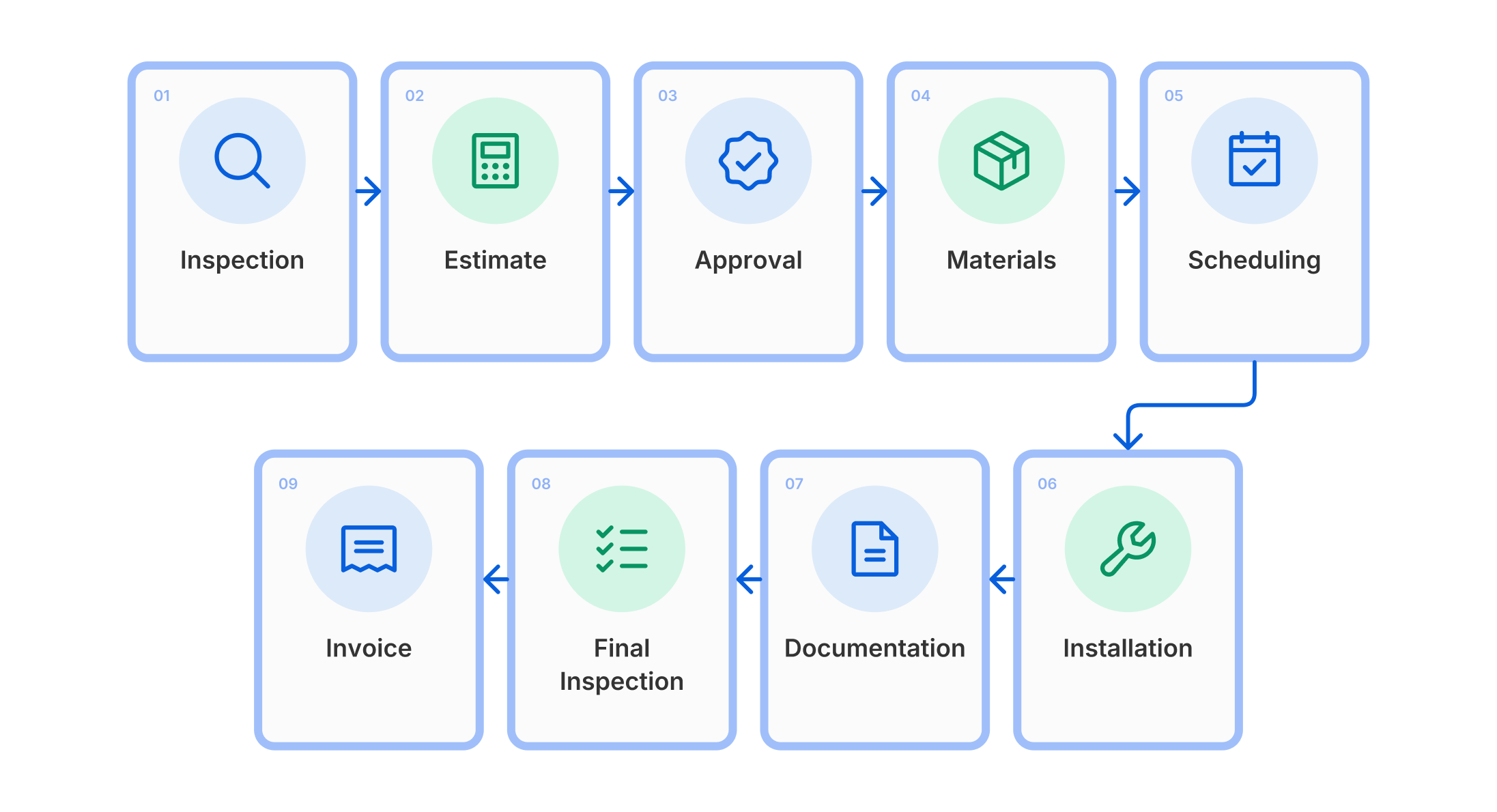
The software should make it clear where every job currently sits.
AccuLynx and ServiceTitan provide deeper end-to-end business workflows, while Roofr adds production functionality to its roofing sales platform. Arrivy focuses more heavily on the operational execution side once work is ready to be scheduled and delivered.
For roofing businesses already using a sales or estimating system, this can be useful because they do not necessarily need to replace the tools that already work well before improving field execution.
Jobsite Photo Documentation
Photos are particularly important in roofing because they document conditions that may later be questioned by a customer, insurer or property manager.
For example, photo records can document:
- Pre-existing damage
- Decking conditions
- Flashing installation
- Underlayment
- Material delivery
- Safety setup
- Completed work
- Cleanup and final inspection
Arrivy can also keep photos, digital forms, signatures, and other field records attached to the work being performed. This is useful when the business wants documentation to stay connected with the same schedule, task, crew, and customer record rather than sitting in a separate photo application.
Material Ordering
Materials can represent a significant part of the cost of a roofing job. Contractors should check whether software can connect measurements and estimates with the materials required for production. Roofr integrates with suppliers including ABC Supply, QXO, and SRS, while AccuLynx also provides direct supplier ordering capabilities.
For companies handling a large number of replacements, reducing manual material entry can save considerable administrative effort. Arrivy is not primarily a roofing material-ordering platform, so businesses that need deep supplier or purchasing functionality may use it alongside a specialist roofing or inventory system.
Customer Communication
Roofing jobs involve more customer communication than simply telling someone when a crew will arrive.
Customers may need updates about:
- Inspection appointments
- Schedule changes
- Weather delays
- Material delivery
- Crew arrival
- Work progress
- Additional visits
- Job completion
Software that connects communication with the actual job can reduce the number of manual calls and texts office teams have to make.
Arrivy is especially strong here because customer communication is tied closely to field activity. Teams can send appointment updates, arrival information, and other job-related notifications as work progresses rather than managing those messages separately.
Route Planning
Route optimisation is not equally important for every roofer. A replacement crew may spend the entire day at one property, making complex routing unnecessary. A roof repair, inspection, maintenance, or storm-response team, however, may complete several stops each day. For those businesses, route planning can help reduce unnecessary drive time and make it easier to fit urgent jobs into an existing schedule.
Arrivy’s route planning and optimization software can be particularly useful for this type of operation because routing sits alongside scheduling and crew assignment, helping dispatchers coordinate technicians who need to move between several jobs during the day.
Job Costing and Profitability
Revenue does not tell a roofing company whether the job was profitable.
Useful software should help businesses understand costs such as:
- Materials
- Labor
- Subcontractors
- Dump fees
- Equipment
- Travel
- Change orders
- Additional work
Platforms such as QuoteIQ, Roofr, AccuLynx, and ServiceTitan provide job-costing or broader financial functionality at different levels.
Arrivy is more focused on operational execution than deep roofing accounting, so companies using dedicated accounting or job-costing software can keep those systems in place while using Arrivy to manage field work, timesheets, job progress, and operational records.
Integrations
Few established roofing companies operate entirely inside one application.
A typical software stack may already contain:
- CRM
- Accounting
- Roof measurement
- Photo documentation
- Financing
- Material suppliers
- Cloud storage
- Communication tools
Before replacing those systems, determine whether the roofing management software can integrate with them.
This is another area where Arrivy can fit well. It can sit alongside existing CRM, accounting, document-storage, and other business systems rather than forcing the roofing company to move every process into one platform.
The goal should be to reduce duplicate entry and disconnected information rather than adding another isolated application.
Why Choose Arrivy for Roofing Business Management?
Arrivy becomes particularly relevant when the hardest part of the roofing operation happens after the job has been sold.
Consider a roofing company running several crews.
One replacement spans two days. Another crew is completing three repair calls. An inspection needs to be moved because of the weather. One technician becomes unavailable. Customers are asking when crews will arrive, while the office still needs photographs, forms, signatures, and completion records from each site. That is where connected field execution matters.
Arrivy’s roofing project management software keeps scheduling, crews, routes, customer communication, field documentation, and job progress connected rather than leaving the office to coordinate each part through calls, spreadsheets, text messages, and separate apps. Its strength is different from several tools in this comparison.
QuoteIQ and Roofr are stronger when roof measurement and estimating sit at the centre of the software decision.
AccuLynx provides deeper roofing-specific CRM, production, and insurance-related workflows.
CompanyCam is particularly strong for dedicated photo documentation.
ServiceTitan provides a much broader enterprize platform for roofing companies that want extensive functionality across the business.
Arrivy is particularly useful when a roofing company already has good sales, estimating, or accounting systems and needs a stronger operational layer between approved work and completed work. Its scheduling and dispatch software helps teams coordinate crews, adjust assignments, and keep field work moving as schedules change.
Conclusion
The best roofing business management software in 2026 depends on where complexity exists inside the business.
QuoteIQ provides a broad contractor platform with transparent pricing and built-in roof measurement options. Roofr is particularly strong when measurements, proposals, and roofing sales need to stay tightly connected. AccuLynx provides one of the deepest roofing-specific CRM and production environments, particularly for established and insurance-focused contractors. CompanyCam is an excellent fit when jobsite photographic documentation is the priority, while ServiceTitan is built for larger roofing businesses that need a broad system covering multiple departments.
Arrivy stands out when the priority is coordinating what happens in the field—schedules, crews, multi-visit jobs, routes, customers, field records, and completion. Before choosing software, test it against a real roofing job. Start with the homeowner enquiry, create the estimate, schedule the inspection, assign the crew, change the installation date, capture jobsite photos, complete the work, and hand the final information to accounting. The software that handles those transitions with the least friction is usually more valuable than the one with the longest feature list.