

Are you a service business owner and struggling with issues like missed opportunities or managing work orders? The solution lies in Field Service Management (FSM) software, which can help you align your business operations effortlessly.
Field Service Management (FSM) software might sound technical, but it is simply a digital platform that helps businesses organize and optimize operational services outside the office. Moreover, FSM improves the efficiency of everyday field operations and promotes a better customer experience. This is why over 64% of service-based organizations globally use FSM software.
What Is FSM Software and How Does It Work?
Field Service Management (FSM) software is a digital solution that enables businesses to manage and monitor field operations. In simple words, FSM software allows companies to assign jobs, track technicians, arrange job-day inventory, and deliver services with greater productivity.
Interesting Take: The global FSM market is estimated to grow at a CAGR of 12.8 % from 2023 to 2028.
These stats raise a question, i.e, why are field service businesses investing a lot in FSM software? The answer lies in the inevitable use of SFM software to compete in the highly competitive market. If you are having a lot of questions in your mind regarding FSM software and are in search of the best FSM software for your business, then this guide will help you make better decisions.
Common Field Service Management Challenges
If you are running a field service business, then you may relate to the common challenges without FSM software deployment. These challenges might be solved manually, but at the cost of time and resources. That is why it is better to move towards better solutions instead of making extra efforts. Some of the predicted challenges that any service-based business might face include:
- Inefficient Scheduling and Dispatching
- Poor Communication Between Operations and Field Teams
- Limited Visibility into Job Progress
- High Operational Costs
- Inventory and Resource Management Issues
- Customer Dissatisfaction
- Data Silos and Lack of Integration
A Real-World Example of Why FSM Software is the Need of the Hour?
Let’s assume that you run a solar installation company but do not use FSM software. Do you think it will cause you any problems? If your answer is No, see how FSM makes a difference:
Field Operations: Before vs After FSM Software
In a nutshell, FSM software facilitates you to organize your business operations so that you may look into other matters instead of panicking over workflow disruption.
Who Uses FSM Software? Industry Use Cases
Any business that deploys a workforce outside the office can benefit from FSM tools. Here is the list of some common industries:
Key Features of FSM Software
It is important to understand the features of FSM software because this provides an idea of the utility and efficiency of the software for the business’s needs. In this regard, 77% of field service organizations invest in software that makes information easily available and usable for their teams.
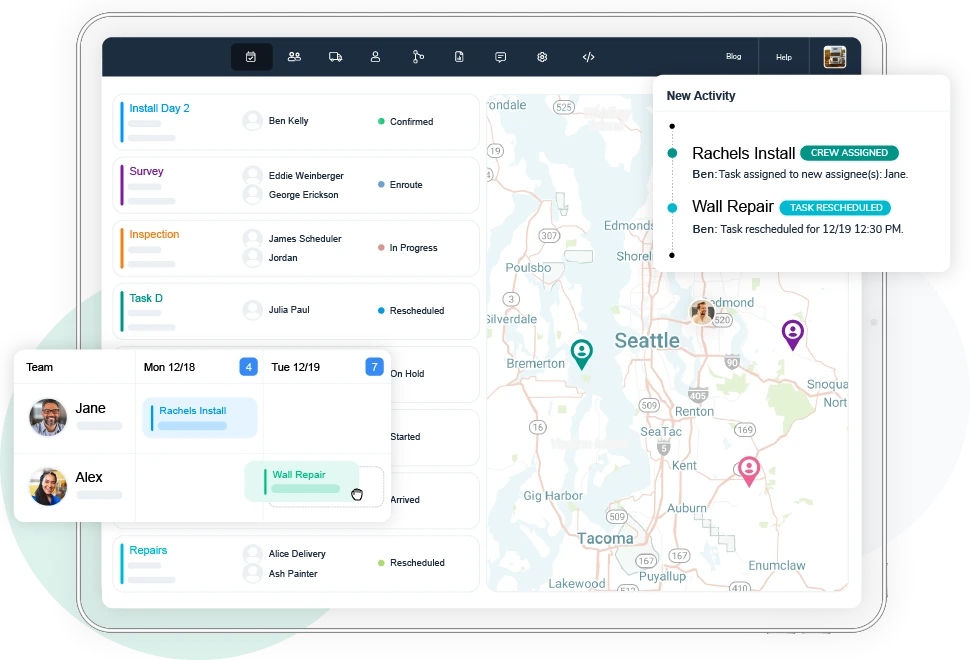
Scheduling & Dispatching → FSM software helps in scheduling, dispatching, and monitoring your field team by providing features of booking calendars, route planning, team and resource management, notifications, and automation.
Mobile Workforce Management → FSM software provides mobile access to the field crew, enabling them to post job statuses, communicate, and access paperwork. Simultaneously, FSM provides the crew details like job statuses, time tracking (GPS, clock in/out), and reporting to the scheduler.
Inventory Management → FSM software not only helps in dispatching, but also manages inventory and machinery to avoid delays, leading to reduced costs and better ROI (Return on Investment).
Customer Experience → The customer remains updated regarding the job status via real-time visibility provided by the FSM software. This provides service transparency and builds loyalty.
Digital Forms & E-Signatures → FSM software promotes paperless documentation to avoid losing data. It helps in collecting, signing, and storing data in the field. Most of the FSM software also provides offline access to the documents, which is helpful for accessing data even without the internet.
Self-Scheduling → The self-scheduling feature of FSM software empowers the customers and schedulers to self-schedule services. This makes the scheduling process more efficient and helps in making instant changes with real-time information visibility.
Route Planning & Optimization → FSM software helps in saving time and resources by providing route planning and optimization. Real-time route adjustments, service time windows, traffic constraints, etc, are taken care of while planning the route.
Analytics, Reporting, and KPIs → One of the most helpful features of FSM software that directly affects the business growth is tracking performance metrics. FSM software provides stats such as response times, job completion rates, and ROI to make data-driven decisions.
Explore our breakdown of must-have FSM features here: Read the full guide →
How Does FSM Software Work?
FSM software works end-to-end, starting from a customer request and ending with job completion. Firstly, a customer request enters the system (via CRM or website). Secondly, the FSM software creates a work order and assigns it to a technician based on skills and location. Thirdly, the technician receives details through a mobile app. After completing the job, the technician updates the progress in real-time by collecting the documents and signatures in the field. Lastly, the system automatically updates inventory, invoices customers, and logs the data for reporting purposes.
Benefits of Using FSM Software
The solution to almost all the challenges of field service management lies in the FSM software that helps the business in the following ways:
- Eliminates manual scheduling errors
- Minimizes paperwork and delays
- Reduces travel time & fuel costs, ensuring increased ROI
- Increases first-time fix rates
- Improves customer experience & service transparency
- Enhances payroll accuracy & reduces time theft
- Integrates with CRM, ERP, QuickBooks, HubSpot, etc.
- Increases technician productivity
Why Is FSM Software Important for Businesses?
FSM software fills the void in operational efficiency for better outcomes. With the relevant FSM features, businesses can boost their service productivity, increase revenue, and enhance customer experience.
Interesting Stats
According to Intuit’s 2024 survey, 95% of growing businesses say integration between their software systems is essential for scaling. (Source)
Customer Experience
Everyone is busy these days, which is why 80% of customers rate service quality equal to product value; hence, customers expect on-time, transparent, and efficient services. FSM ensures accurate scheduling, real-time updates, and faster problem resolution that builds trust and loyalty.
Business Efficiency
As the data is centralized, FSM software reduces miscommunication. This further helps in eliminating repetitive tasks, which leads to lower operational costs. 70 to 80% of companies adopting mobile-driven FSM software solutions report improved productivity and efficiency.
Adaptability & Growth
The modern FSM software is not an all-in-one solution. Rather, it promotes flexibility and user requirements. If your business requires specific integrations instead of a one-stop solution, FSM software will integrate with the required CRM, ERP, and accounting tools. This allows businesses to scale operations without adding extra costs.
Businesses can stay ahead of competitors by adapting to new technologies like AI-powered routing and having an up-to-date digital transformation. It is noteworthy that when businesses integrated FSM tools with their ERP and CRM systems, 63% reported that it helped them make smarter, data-driven decisions.
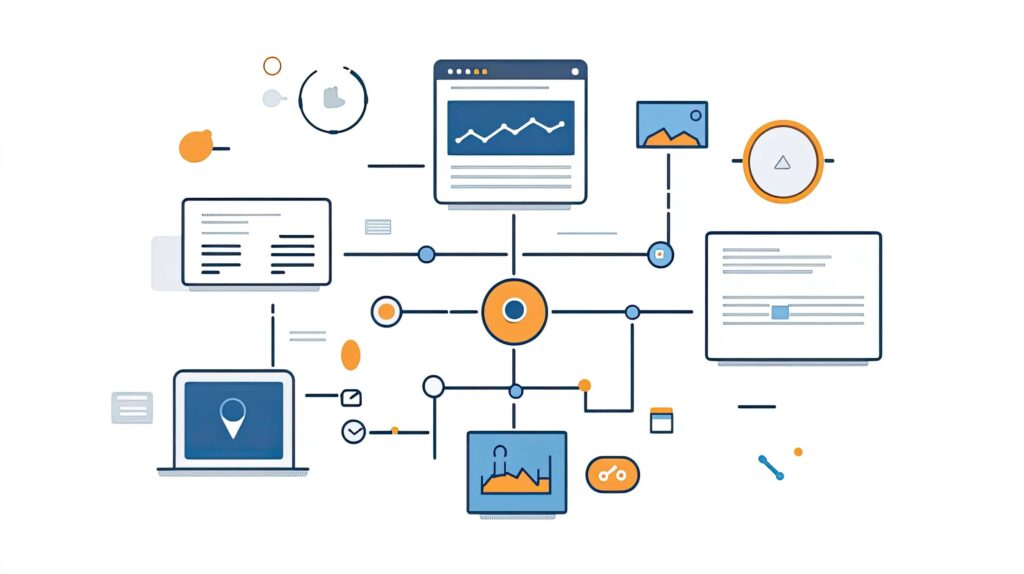
How FSM Automation Connects Office Operations, Field Teams, and Customers
FSM automation plays a key role in bridging the gap between your office operations, field teams, and customers. The exclusive dependence on spreadsheets, CRM, and accounting tools often results in operational loss. Here, FSM emerges as a saviour to solve problems that are silently lowering your profits. The following comparisons show how FSM software makes a positive impact on your business.
FSM vs. Spreadsheets
| Aspect | Spreadsheets | FSM |
|---|---|---|
| Error-prone | Manual data entry leads to a high chance of human errors. | Automated updates reduce errors significantly. |
| Real-time Visibility | No real-time visibility, requires manual refresh and sharing. | Provides real-time updates on jobs, workers, and customers. |
| Scalability | It is difficult to manage large amounts of data. | Designed to scale with business operations as it grows. |
FSM vs. CRM
CRM focuses on sales and customer data while FSM extends into service delivery. Together, they enable upselling and cross-selling (e.g., new maintenance plans).
| Aspect | CRM | FSM |
|---|---|---|
| Data Handling | Stores customer data, purchase history, and sales opportunities. | Stores job details, service requests, technician performance, and asset history. |
| Automation | Automates lead tracking, customer follow-ups, and sales workflows. | Automates scheduling, dispatching, invoicing, and service workflows. |
| Integration | Can start FSM job creation from sales opportunities. | Syncs service data with CRM for upselling and cross-selling. |
FSM vs. Accounting Tools
FSM integration with accounting tools enables work orders to sync with accounting/billing tools (QuickBooks, Xero, etc), automating technician timesheets and ultimately reducing time theft. When you integrate your accounting system with FSM, completed job details, crew working hours, materials, and other data flow automatically into the invoice without manual entry.
| Aspect | Accounting Tools | FSM |
|---|---|---|
| Job to Invoicing | Requires manual entry of work details before invoicing. | Work orders automatically flow into invoicing and billing tools (QuickBooks, ERP). |
| Dispatch to Payroll | Timesheets are often entered manually and are prone to errors/time theft. | Technician hours are automatically captured via mobile apps and are integrated with payroll. |
| Integration | Integrates with ERP/finance systems but not field operations. | Integrates with both financial systems and field operations. |
How to Choose the Best FSM Software
Choosing the best FSM software for your business can be confusing if you focus more on tools than on your business requirements. This is made easy for you. Follow these parameters for choosing the right FSM software:
Business size → Consider whether you are a small, mid-sized, or large business.
Features → Does it cover scheduling, mobile apps, invoicing, and inventory?
Ease of Use → User-friendly for technicians and office staff.
Scalability → Can it grow with your business?
Integrations → CRM, ERP, accounting software.
Pricing → Fits within your budget.
Support → Reliable training and after-sales service.
How to Implement FSM Software in Your Business?
Depending on your business needs, follow the following parameters to implement FSM software in your business:
Assess Your Business Needs → Identify scheduling, inventory, mobile, or reporting gaps.
Compare & Select Vendors → Features, pricing, and scalability as per your business needs.
Plan Integrations → CRM, ERP, accounting tools, mobile workforce apps.
Train Field & Office Teams → To overcome resistance to change, mobile app training can be introduced.
Monitor & Optimize → Track KPIs (first-time fix, travel costs, ROI) for improvement.
What Makes Arrivy’s FSM Software Stand Out
Among the various FSM solutions available in the market, Arrivy stands out for its strong focus on customer needs and measurable ROI. Arrivy’s flexible customization options allow businesses to adopt only the features they need, helping them avoid wasted technician hours, fuel, resources, and even detention fees that quietly cut profit while maximizing efficiency. Here are the top features that set Arrivy apart from other FSM platforms:
| Arrivy’s Features | Key Highlights |
|---|---|
| API First Integrations | You do not need a specific platform; Arrivy allows connectivity with enterprise systems, third-party applications, and custom solutions. |
| Native Booking Calendars | Two types of calendars (Static and Dynamic) are available according to your needs. It empowers customers to self-schedule according to their preferences. |
| AI-Powered Route Planning | Your endless tasks are aligned in one go by Arrivy’s native booking calendars. With AI-powered route planning, scheduling, and field operations are optimized. |
| Offline Digital Forms | Arrivy lets you work anywhere with offline forms. Smart auto-fill, PDF integration, and built-in automation keep your workflows connected. |
| App-free Customer Access | Web-based customer portals by Arrivy provide a white-label experience that increases trust and loyalty for your brand. |
Seeking something more tailored to your business needs? Let’s take a closer look at Arrivy’s features designed to enhance your field service operations.
Unified Task Management
- Linked tasks for connected jobs.
- Visual differentiation for scheduled, unscheduled, and cancelled tasks.
Scheduling & Dispatch
- Integration with Scheduling syncs with task calendars to flag discrepancies (e.g., late clock-ins). And supports break management (e.g., logging lunch breaks as Non-Work Hours).
- Dynamic scheduling based on technician proximity, skills, and availability.
Crew Timesheet Feature
- Granular Time Categorization tracks time in 4 categories: Work Hours, Non-Work Hours, Travel Hours, and Not Applicable.
- Role-Based Control for Field Crew, Team Leads/Schedulers, and Admins.
- Real-Time Visibility displays live time logs per task in the Team Time Sheet (e.g., “ENROUTE,” “STARTED” visible in both web and mobile apps). Includes timestamps, duration, and activity type (e.g., travel, work).
- Automated Reporting generates Time Reports with filters for individual crew members, date ranges, and task types.
Mobile-First Design
- Technicians update job status in a single tap.
- Easy-to-use, intuitive app for techs/crews.
- GPS-enabled clock-in/out.
Offline Mode for Field Teams
- Technicians can update statuses, add notes, or review details without connectivity, syncing data once online.
Multi-Channel Communication
- Unified inbox for customer interactions (SMS, email, in-app messages).
- Two-way messaging between crews, customers, and dispatchers.
Customizable & Transparent Customer Experience
- Web/mobile access for customers to view job history, invoices, and request repeat services.
- Integrated feedback/NPS surveys post-service.
- Instant SMS and email updates with job-specific details.
- White-labeling options for a branded experience for customers.
- Real-time crew tracking on interactive maps.
- Customer access to appointment rescheduling or cancellations.
- A complete job history journal for better trust and transparency.
Intelligent Tracking & Activity Feed
- Centralized logs of all job-related activities.
- Multimedia attachments from field teams.
- Automated alerts for delays or changes.
- Live ETA updates for customers and dispatchers.
Audit Trail & Compliance
- Every status change, note, and action is logged with timestamps, creating a full audit trail for compliance and accountability.
- Supports regulatory requirements with detailed records of field activities.
- Compliance & Dispute Resolution done by audit-ready logs with immutable timestamps. Resolves discrepancies using historical data (e.g., GPS-verified travel time).
Automated Workflows & Triggers
- Customizable rules for auto-assigning tasks, sending reminders, or escalating delays (reducing no-shows by 30%).
- API-driven automation for smooth backend processes (e.g., invoicing post-task completion).
Advanced Reporting & Analytics
- Real-time dashboards for dispatchers to monitor KPIs (e.g., job completion rates, technician efficiency).
- Historical data trends to optimize scheduling and resource allocation.
Resource Optimization Tools
- Equipment tracking (e.g., tools, vehicles) to prevent shortages or misallocation.
Enterprise-Grade Integrations
- Clean connection with your CRM, storage, invoicing & payment processing tools, communication & team collaboration platforms, and other platforms like Hubspot, QuickBooks, Salesforce, etc.
- Also offers open APIs for custom integrations.
Scalability for Enterprises
- Supports high-volume operations with role-based permissions and multi-location management.
- Dedicated APIs for ERP/legacy system integration.
See how Arrivy simplifies field service management for your team.
The Future of FSM Software & Arrivy’s Role
Approximately 80% of businesses now prefer cloud deployments; hence, FSM software implementation holds a pivotal place in the future of the Field Service Management market. Arrivy understands the importance of adapting according to the contemporary market needs by providing:
- AI Automation → Modern FSM is using AI for scheduling and route optimization. Arrivy also predicts delays and auto-assigns tasks.
- Personalized Workflows → FSM is adapting to different industries. Arrivy allows businesses to tailor their operations to specific needs.
- IoT Integration → Devices are now auto-sending service requests. Arrivy’s API-first design makes IoT syncing simple.
- Augmented Reality (AR) → Remote experts are now guiding crews via AR overlays. Arrivy’s Activity Feed, having multimedia notes, is a step in this advancement.
- Sustainability → FSM focuses on reduced fuel use and carbon footprint. Arrivy’s route optimization already serves this purpose by minimizing travel time.
Conclusion
The service-centric organizations are readily investing in the FSM software solution. This is a clear sign of how essential it is for business growth. By automating dispatch, enabling mobile crew management, connecting office operations with the field, and providing customer transparency, FSM creates a logical flow leading towards improvements and profitability.
If your company is still dependent on manual methods, embracing FSM could be the determining factor that propels you towards an extraordinary level of success.