

Roofing contractors face a critical operational challenge. They need to track hundreds of leads, convert them into accurate estimates, schedule complex multi-crew jobs, invoice customers, and keep their field teams informed, all while maintaining customer relationships across months-long projects. A generic CRM built for SaaS sales teams or B2B lead pipelines isn’t up to snuff. Roofing needs a CRM that understands the unique workflow of the industry.
But there’s a problem. Roofing CRMs vary wildly in what they actually deliver. Some excel at estimating but fall flat on project management. Others automate workflows beautifully but lack the depth contractors need for scaling. And most miss a critical gap when they connect the office to the pipeline, but leave field crews disconnected from real-time job updates and customer communication.
Recommended Reads
This guide compares the five leading roofing CRM platforms based on real user feedback, feature depth, integration capability, and pricing, and reveals why the most successful roofing companies are pairing CRMs with dedicated field operations tools (Arrivy) to create a truly connected workflow.
What Makes a Roofing CRM Different from Generic CRMs
Before evaluating specific platforms, it’s important to understand what separates a purpose-built roofing CRM from a general-purpose platform like HubSpot or Salesforce.
The Roofing Workflow Cycle
Generic CRMs are designed around a sales cycle: lead → opportunity → deal closed. But roofing has a fundamentally different operational arc:
A true roofing CRM must simplify this entire cycle. A generic CRM handles steps 1-5 reasonably well. But steps 6-9 are where vertical-specific platforms gain an edge and where gaps usually emerge.
Roofing CRM vs. Field Service Management (FSM)
Another critical distinction: CRMs manage relationships and proposals; FSM manages scheduling and field execution. The best roofing operations use both. A CRM closes the deal; an FSM gets the job done. The gap between them is where many roofing companies lose efficiency, accountability, and customer experience.
Add Field Operations to Your Roofing CRM
Arrivy integrates with leading roofing CRMs to handle scheduling, routing, and real-time job updates.
The Five Leading Roofing CRM Platforms: In-Depth Analysis
1. JobNimbus
Target: Mid-to-large residential roofing companies
User Rating: 4.6/5 stars
What It Does Well
Standout features:
See exactly which marketing channels are driving your best leads and highest conversion rates
Create detailed proposals instantly, upload measurement data, and get quotes out the door fast
Capture and annotate photos right from the jobsite with mobile forms
Drag-and-drop boards make it easy to assign work to crews and track progress
Set up triggers so the system automatically sends follow-ups and reminders when job statuses change
Homeowners can review invoices and pay online without phone calls or paperwork
Customizable dashboards show you sales performance, crew productivity, close rates, and profitability at a glance
Direct connections to EagleView, CompanyCam, QuickBooks, and hundreds of tools via Zapier
JobNimbus has a strong track record with contractors who’ve scaled significantly. One roofing company documented growing from $1M to $15M in revenue after implementing the platform. Users consistently describe it as indispensable for managing complex workflows.
Pricing
Best For
Weaknesses
How Arrivy Solves JobNimbus’s Field Visibility Problem
Connect Your Roofing CRM to Arrivy
Turn Your Roofing CRM Into a Live Operations System.
2. AccuLynx
User Rating: 4.5/5 stars
What It Does Well
Standout features:
Order aerial measurements directly from AccuLynx and sync them into estimates automatically
Track material procurement, crew scheduling, and job sequencing across multiple sites
Manage dependencies between roofing, siding, gutters, and other trades
Available through paid add-on for custom integrations and field mapping
Large user base with best-practice forums and shared templates
Send material orders directly to suppliers like QXO, SRS, and ABC Supply
Long-term AccuLynx users report stability and comprehensive feature depth. One user who’s been with the platform since 2012 noted its organizational capabilities and reliability. However, recent price increases have sparked frustration: “It was fantastic until they jacked up prices. Now it’s cheaper to hire an extra staff member than keep using it.”
Pricing
Best For
Weaknesses
3. Roofr
Target: Small-to-mid estimating-focused teams
User Rating: 4.7/5 stars
What It Does Well
Standout features:
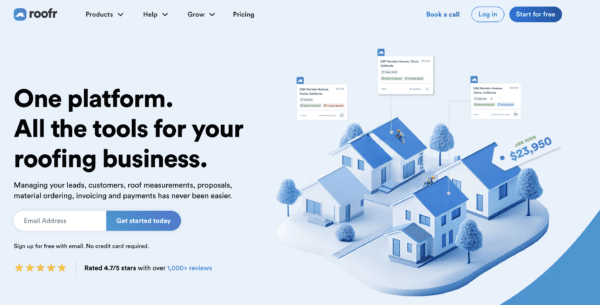
Upload aerial imagery and receive detailed roof measurements within approximately 2 hours
Branded quotes with before/after photos, damage assessment, and financing options
Visual 2D/3D renderings with square footage, pitch calculations, and line-item breakdowns
Connects to HubSpot, Salesforce, and other CRMs via Zapier
Fast quote generation on tablet during site visits; fully responsive web-based platform
Flat monthly rate with no per-user fees
Customers can sign proposals digitally directly from the document
Roofr users consistently praise its ease of use and speed. One small roofing business owner shared: “Roofr is my right hand in our business. It saves time, money, and gives professional reports that impress homeowners.” Another user from Goolsby Ladder noted: “The roof diagram instills confidence in customers. They know they’re dealing with professionals.”
Pricing
Best For
Weaknesses
4. iRoofing
Target: Independent roofers and small-to-mid sales teams
User Rating: 4.3/5 stars
What It Does Well

Standout features:
Use satellite, drone, or blueprint imagery to measure roofs without ever climbing a ladder. Unlimited measurement reports included.
Generate quotes on the spot while standing at the customer’s site
Show homeowners what different shingle colors and materials will look like on their actual house. Users report that this often doubles close rates.
Browse major manufacturers’ products and overlay them on the customer’s roof during your presentation
Brand your company presentation and look professional in front of homeowners
Get contracts signed digitally right there in the field
Convert estimates into purchase orders and send them directly to distributors like ABC Supply or SRS
Customer database tracks prospects, project history, and communications
Video tutorials and 1-on-1 Zoom sessions at no extra cost
Contractors love how much time iRoofing saves them. One roofer said it replaced expensive third-party measurement services and let his team “produce a detailed estimate in less than an hour instead of days.” Another called it “amazing as a measuring and sales tool… everything under one roof.” Reddit users consistently mention it’s “easy to use” and offers “the most bang for your buck when measuring roofs.”
Pricing
Best For
Weaknesses
5. JobProgress (Leap)
User Rating: 4.5/5 stars
What It Does Well
Standout features:
Store everything in the cloud, including insurance forms, estimates versus actual claims, invoices, photos, permits, change orders
Build project templates for each phase of work and track every deliverable and approval along the way
Crews create detailed proposals on tablets with line items and terms, then capture signatures on the spot
Designed specifically to manage the back-and-forth of insurance documentation and claim tracking
Field staff get the full experience on their phones, not a lite mobile version
Companies running operations across multiple states report stable performance
QuickBooks, EagleView, Google apps, plus connections to Leap’s broader sales ecosystem for real-time bidding
JobProgress gets high marks for reliability, especially from larger operations. One user called consolidating their entire customer lifecycle into JobProgress “life-changing.” Contractors running multi-site operations particularly value how well it handles complex projects.
Pricing
Weaknesses
Feature-by-Feature Comparison Matrix
| Feature | JobNimbus | AccuLynx | Roofr | iRoofing | JobProgress |
|---|---|---|---|---|---|
| Lead Tracking | Advanced | Advanced | Basic | Basic database | Good |
| Estimating | Comprehensive | Comprehensive | Best-in-class | Instant on-site | Good |
| Scheduling & Dispatch | Advanced | Advanced | Basic calendar | Basic mobile mgmt | Good |
| Job Costing & Profitability | Advanced | Advanced | None | Basic | Advanced |
| Customer Portal | Billing portal | Yes | Limited | None | Yes |
| Mobile App | Good | Good | Excellent (web-based) | Mobile-first (tablet/ phone only) | Full parity |
| Photo / Documentation Tools | Built-in | Built-in (via CompanyCam) | Built-in | Instant job-site sharing | Built-in |
| Reporting & Analytics | Advanced | Advanced | Basic | Basic | Advanced |
| API & Custom Integrations | Open API | Via paid add-on | Via Zapier | No integrations | Open API |
| QuickBooks Integration | Native | Native | Zapier only | None | Native |
| Aerial Measurement | Native (EagleView) | Native (both) | Via measurement service | Built-in DIY unlimited | EagleView |
| Offline Mobile Access | Limited | Limited | Good | Works on mobile | Full |
| Ease of Setup | 1–2 weeks | ~3 weeks | 1–2 weeks | Under 1 hour | Few weeks |
| Learning Curve | Moderate | Steep | Shallow | Shallow | Steep |
| Pricing Transparency | Demo required | Demo required | Public pricing | Public pricing | Public pricing |
The Critical Gap All Five Platforms Miss: Real-Time Field Operations
All five platforms above excel at lead generation, estimation, and scheduling, but they struggle with real-time field visibility and dynamic customer communication.
Consider this scenario. A roofing crew is scheduled to arrive at 9 AM. By 8:45 AM, they’re stuck in traffic. A thunderstorm is approaching, potentially pushing the job to next week. The homeowner is anxious and waiting. And the office manager has no idea there’s a problem.
With the five CRMs above, that situation unfolds like this:
- The crew calls the office (if they remember)
- The office updates the job status manually in the CRM
- Someone has to call or text the customer
- Rescheduling requires back-and-forth phone calls
- The office manager calls the customer to inform him (if they remember)
But with dedicated field operations software integrated into the CRM, that situation becomes:
- The crew taps a button or sends a written update to the office via app with push notifications enabled: “Running 15 minutes late”
- The customer automatically receives an ETA update via SMS
- If rescheduling is needed, the system suggests next available slots
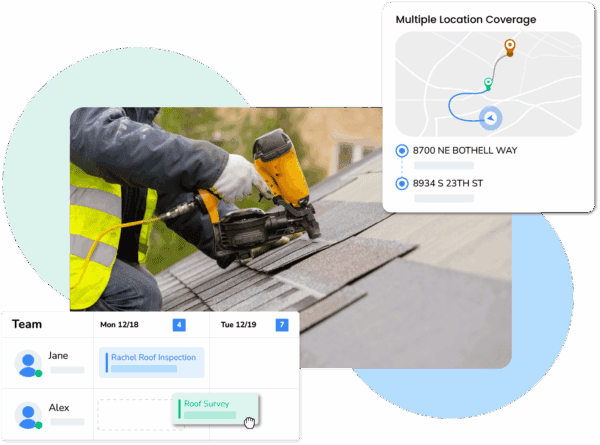
- The homeowner can track crew location and progress in real-time

This gap is why the fastest-growing roofing companies use two layers of software: a CRM (like JobNimbus or AccuLynx) for sales pipeline and estimation, and a field operations platform like Arrivy for real-time crew coordination and customer communication.
See How It Works With Your CRM
Connect your roofing CRM to Arrivy and see live scheduling, crew updates, and customer notifications in action.
Why This Matters for Your Bottom Line
Research shows that real-time transparency reduces no-shows, increases customer satisfaction scores, and improves crew utilization. In a roofing business, this translates to tens of thousands in additional annual revenue.
The five platforms above can integrate with field ops tools through manual setup, API customization, or Zapier workflows. The seamless two-layer approach is where industry leaders gain a competitive edge.
Integration Ecosystem – Where Each Platform Connects
| Integration / Tool | JobNimbus | AccuLynx | Roofr | iRoofing | JobProgress |
|---|---|---|---|---|---|
| QuickBooks | Native | Native | Limited / No public evidence | Limited / No public evidence | Via API / Zapier |
| EagleView | Native | Native | Limited / No public evidence | Limited / No public evidence | Native |
| HOVER | Native | Native | Limited / No public evidence | Limited / No public evidence | Limited / No public evidence |
| RoofSnap | Via API / Zapier | Native | Limited / No public evidence | Limited / No public evidence | Limited / No public evidence |
| CompanyCam | Native | Native | Limited / No public evidence | Limited / No public evidence | Limited / No public evidence |
| Marketing / Lead Gen (Google Ads, FB Leads, HubSpot) | Strong (native + Zapier) | Good (HubSpot supported) | Mostly via Zapier / middleware | Built-in remote surveying / lead capture (storm focus) | Mostly via Zapier |
| Field ops / scheduling (Arrivy) | Via API / Zapier (no native) | Via API / Zapier (no native) | Via API / Zapier (no native) | No, iRoofing doesn’t offer an API | Via API / Zapier (no native) |
| CRM (HubSpot / Salesforce) | HubSpot strong; Salesforce via Zapier | HubSpot supported | Via Zapier | Limited / No public evidence | Limited / No public evidence |
Pricing Comparison: Total Cost of Ownership
| Platform | Pricing Model | Typical Team Size (5 ppl) | Annual Cost Range | Add-On Fees | Setup & Training |
|---|---|---|---|---|---|
| JobNimbus | ~$300/user/month | $1,500/mo | $18,000 | Custom features extra | Included (1–2 weeks) |
| AccuLynx | $60–120/user/month | $300–600/mo | $3,600–7,200 | Many features require add-ons | Professional ($1,000–2,000) |
| Roofr | Flat team rate | $99–169/mo | $1,188–2,028 | Rarely | $0 (self-service) |
| iRoofing | $149/user or $1,489/yr for 3 users | $745/mo or $2,483/yr | $8,940 or $2,483/yr | None | Free unlimited training |
| JobProgress | $249/mo (3 users) + $99/user | $447/mo (5 users) | $5,364 + $500 setup | Marketing add-ons available | $500 setup fee |
How to Choose: Decision Framework
The Strategic Advantage: CRM + Field Operations Integration
The most successful roofing companies we’ve studied use a two-layer system:
Layer 1: CRM (JobNimbus, AccuLynx, Roofr, iRoofing, or JobProgress)
Layer 2: Field Operations (Arrivy)
Why This Works:
Companies using this two-layer approach report:
Best practice setup:
Conclusion
The data is clear. Roofing companies that successfully scale use two integrated tools, not one. A purpose-built roofing CRM handles lead generation, estimation, project management, and invoicing. A dedicated field operations platform delivers real-time crew visibility and automated customer communication.
This approach addresses the core operational challenge of connecting office planning to field execution in a way that’s transparent to customers, efficient for crews, and profitable for the business.
Evaluate the five CRMs above based on your company size, workflow priorities, and budget. Then consider adding a field operations layer to close the gap between what’s promised to customers and what’s actually delivered in the field.
The combination creates a competitive advantage that generic CRMs alone cannot match. This eliminates data silos and gives your office and field teams a unified view of every job, from initial estimate to final completion.