


Between 2020 and 2024, moving companies watched their operational costs jump 80%. At the same time, roughly three out of four transportation companies report they can’t find enough workers to fill their crews. The math is brutal if you think. Your costs are up, your labor pool is down, and your margins are getting squeezed from both sides.
Yet many moving companies still don’t track their key performance metrics. They’re running multi-million dollar operations on instinct, spreadsheets, and paper checklists – the same way they did a decade ago when labor was cheap and customers were less demanding.
With mover wages climbing from $16.23 to $19.12 per hour in just three years according to the Bureau of Labor Statistics, you need every crew member to be more productive.
When labor costs the same for everyone, the company that completes jobs 20% faster with fewer errors wins. When customers expect constant updates, the company that automates communication captures more five-star reviews.
Digital crew checklists and work orders create that competitive edge by connecting your office, crews, and customers in real time. In this blog, we will look at the inefficiencies of traditionally handling operations, why checklists and work orders matter, and how digitizing them could be the key to your next growth phase.
Recommended Reads
The Hidden Inefficiencies in Traditional Moving Operations
Paper-based checklists and handwritten notes
Paper checklists seem simple enough. Print them out, hand them to your crew leader, and expect them to check off each task. But what actually happens? Notes get illegible, pages get lost, or coffee spills on critical information. And when something goes wrong three days later, good luck reconstructing what actually happened on the job.
When your entire operation relies on someone remembering to transcribe handwritten notes when they get back to the office, you’re one distraction away from a customer complaint or a damage claim you can’t defend.
Lack of visibility between office and field teams
Your crews are out in the field all day. Your office team is fielding customer calls. And nobody really knows what’s happening until everyone’s back at the warehouse. Did the crew arrive on time? Have they started loading? Is the customer happy? When a customer calls asking for an update, your dispatcher is reduced to guessing or interrupting the crew with a phone call.
This visibility gap creates a cascade of problems. Dispatchers can’t accurately schedule the next job because they don’t know when the current one will finish. Customers feel ignored because they haven’t heard anything in hours. And crews feel unsupported because the office doesn’t understand what they’re dealing with in the field.
Inconsistent job completion and missed customer updates
Without standardized processes, every move gets handled differently depending on who’s on the crew. One team might take photos of furniture conditions before loading. Another might skip that step entirely. This inconsistency frustrates customers and exposes you to liability. When a damage claim arrives weeks later and you have no photos, no signatures, and no documentation of what actually happened, you’re settling claims you might have successfully defended.

Why Crew Checklists Matter for Every Move
Ensuring consistent job quality and accountability
A good crew checklist ensures nothing critical gets missed regardless of who’s on the job. When every crew follows the same steps in the same order, you get consistent results. New hires know exactly what’s expected. Experienced crews don’t skip steps when they’re rushed. And customers receive the same quality service whether it’s your A-team or your backup crew.
The accountability factor matters just as much. When tasks are assigned to specific crew members and tracked, everyone knows their role. There’s no “I thought someone else was handling that” confusion. Each person checks off their tasks as they complete them, creating a clear record of who did what and when.
Reducing rework and damage claims
Consider that your crew loads furniture without properly wrapping certain items. Two days later during unloading, there’s damage. Now you’re dealing with a claim, potentially buying new furniture, and definitely losing money on a job that should have been profitable.
Checklists with mandatory steps like photographing furniture condition, confirming proper wrapping, and verifying inventory counts catch these problems before they cost you. When a crew must check a box confirming they’ve wrapped the dining table, they actually wrap the dining table. That simple step prevents damage and the rework that comes with it. One Reddit user who recently completed a large move noted that professional movers who followed clear processes worked dramatically faster than expected:
“”
“You’ll be in awe at how efficiently they get stuff boxed and loaded compared to how long it would have taken you.”
That efficiency comes from repeatable processes, not from working faster and making mistakes.
Improving customer communication through verified steps
Customers don’t want to wonder what’s happening with their belongings. When your crew completes checklist items (e.g., arrived at origin, completed walkthrough, began loading, finished loading, in transit, arrived at destination), that information can automatically flow to the customer. They see progress happening, which dramatically reduces anxiety and phone calls to your office.
Better yet, when customers receive updates tied to actual completed tasks rather than vague time estimates, they trust you more.
“Loading complete” with a timestamp means something concrete.
“We’ll be there around 2 PM” means nothing when 2:30 rolls around with no updates.
What Moving Work Orders Actually Do
Centralizing job details, tasks, and instructions
A work order is your single source of truth for a job. Instead of having job details in your CRM, special instructions in an email, inventory lists in a spreadsheet, and crew assignments scribbled on a whiteboard, everything lives in one place. The crew sees exactly what they need to know, like customer address, access codes, inventory list, special handling instructions, who’s assigned to which tasks, and what needs to happen in what order.
This centralization eliminates the game of telephone that causes so many problems. The customer told the sales rep they have a narrow staircase. The sales rep noted it in the CRM. The dispatcher saw it but forgot to mention it. The crew shows up unprepared. But with a proper work order, that narrow staircase is documented once and visible to everyone who needs to know.
Assigning roles and tracking progress in real-time
Different crew members have different skills and responsibilities. Your crew leader handles customer communication and supervises the job. Your most experienced mover handles fragile items and specialty furniture. Your newer crew members handle boxes and lighter items. Work orders let you assign specific tasks to specific people and track who’s completing what throughout the day.
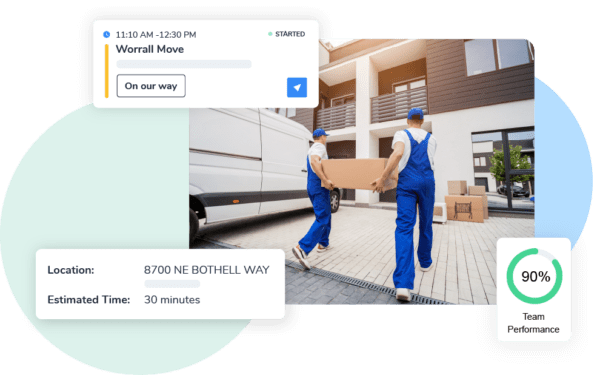
Real-time tracking means your office knows what’s happening without interrupting the crew. You can see that the crew checked in at the origin address at 8:15 AM, completed the walkthrough at 8:47 AM, and is currently loading the truck. When a customer calls for an update, you have actual information to share rather than guesses.
Integrating with estimates, invoices, and customer updates
Work orders shouldn’t exist in isolation. When they connect to your other systems, everything clicks into place. The estimate you created becomes the work order. The work order captures actual time spent and services rendered, which feeds into your invoice. Similarly, customer updates trigger automatically based on work order progress. And photos taken during the job attach to the customer record for future reference.
This integration eliminates duplicate data entry and the errors that come with it. You estimated three hours of labor, but the work order shows it took five hours because of unexpected access issues. Now, your invoice reflects the actual time automatically, and you have documentation supporting the additional charges.
Going Digital: The Shift from Paper to Platform
Benefits of digital crew checklists (real-time updates, photos, e-signatures)
Digital checklists transform how crews document their work. Instead of scribbling notes that might be readable later, crews tap their phone to check off completed tasks. Those updates sync immediately to your office. Crews can also take photos to show that the furniture was in good condition before loading. Customers can sign directly on the screen to confirm delivery, and the signature is stored permanently with the job record. This means you capture information once, accurately, and make it available to everyone who needs it.
Digital work orders that sync with scheduling and dispatch tools
Consider what happens when coordination systems can’t scale.
One transportation company managing 250+ trucks and 1,600 vans tried running everything through Google Sheets. As a result, they got tasks duplicated across different sheets, frequent errors, missed loads, and skipped maintenance appointments. Their coordination system simply couldn’t keep up with their operation size.
Digital work orders integrated with scheduling eliminate this problem. When a job is scheduled, the work order is automatically created and assigned to the crew. When the crew completes the job, that information feeds back to scheduling so the next job can be dispatched accurately. There’s no duplicate entry, no confusion about who’s supposed to be where, and no missed jobs because someone forgot to update a spreadsheet.
How automation ensures no step is missed
The most valuable aspect of digital systems is what they prevent. You can’t mark a job complete without getting a customer signature. You can’t leave the destination without taking photos of the delivered furniture. The system simply won’t let you proceed until required steps are completed.
This built-in enforcement means consistency across all jobs and all crews. All of your crews follow the same mandatory steps because the system requires it.
How Digital Crew Checklists & Work Orders Streamline Moving Operations
Pre-Move Preparation: Task assignments and inventory validation
Before the truck leaves your warehouse, proper preparation sets up the entire job for success. Digital work orders let you assign specific responsibilities, like who’s leading the crew, who’s responsible for fragile items, and who’s handling furniture disassembly. The crew sees their assignments before arrival, eliminating the scramble of figuring out roles.
Inventory validation becomes systematic. The crew reviews the expected inventory list against what’s actually at the origin. Any discrepancies, for example, additional items, missing items, or different furniture than estimated, get documented immediately. This protects you from disputes later when the customer claims you agreed to move items that weren’t on the original estimate.
Moving Day Execution: Job tracking, check-in/out, and customer status updates
The job starts when your crew checks in at the origin address. That check-in triggers a customer notification: “Your crew has arrived and is beginning your move.” Throughout the day, as the crew completes checklist items, progress updates flow automatically. The customer sees that loading is underway, then complete, then that the truck is in transit, then that the crew has arrived at the destination.
Your office sees the same information in real time. When a customer calls asking for their delivery window, your dispatcher has actual data: “The crew completed loading at 11:15 AM and should arrive at your new home around 1:30 PM based on current traffic.” That specific answer builds trust in a way that “sometime this afternoon” never will.
Post-Move Wrap-Up: Damage reports, e-signatures, and review triggers
The job isn’t finished when the last box is unloaded. The crew completes their final checklist items, which include inventory verification, damage inspection, customer walkthrough, and signature collection. If there is any damage, it’s documented with photos and notes right there, while both parties are present. This immediate documentation prevents the “he said, she said” situations that mess up damage claims.
The customer’s signature on the digital work order confirms delivery and satisfaction. That signature, along with all the photos and notes from throughout the job, is permanently attached to the job record. And because the work order knows the job is complete, it can trigger a follow-up email asking for a review, turning happy customers into online testimonials while their positive experience is fresh.
The Real-World Impact: What Digital Systems Actually Deliver
Moving companies that implement digital checklists and work orders consistently see measurable improvements across their operations:
- Fewer job-day delays because crews have clear task assignments and don’t waste time calling the office for clarification
- More jobs completed per day with the same crew size
- Dramatic reduction in customer complaint calls when automated updates keep customers informed
- Better online reviews from customers who feel informed and in control
- Freedom to delegate job oversight effectively because the system provides visibility and accountability
- Strategic decision-making based on actual metrics rather than instinct
- Lower labor costs per job even as wages increase, because crews work more efficiently
- Reduced damage claims through mandatory documentation steps
Implementing Crew Checklists & Work Orders with Arrivy
Assign tasks and subtasks to each crew member
Arrivy lets you create detailed work orders with specific task assignments for each crew member. Your crew leader gets tasks around customer communication and job supervision. Your experienced movers get tasks for handling specialty items. Your newer crew members get tasks appropriate to their skill level. Everyone sees exactly what they’re responsible for, and the system tracks completion in real time.
You can create standardized checklists for different move types (local residential, long-distance, commercial, specialty items), so crews don’t have to remember every step. The checklist prompts them through the process, ensuring consistency regardless of which crew is handling the job.
Capture signatures, photos, and notes digitally
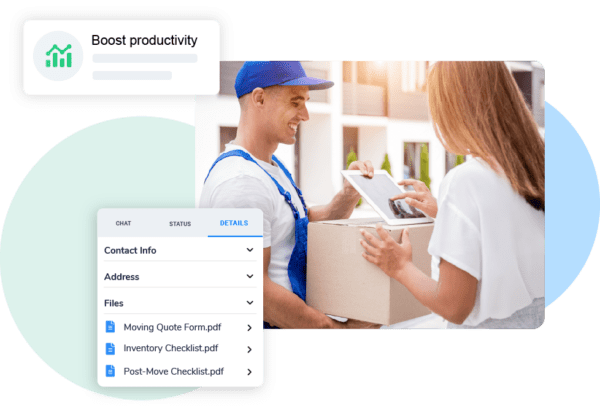
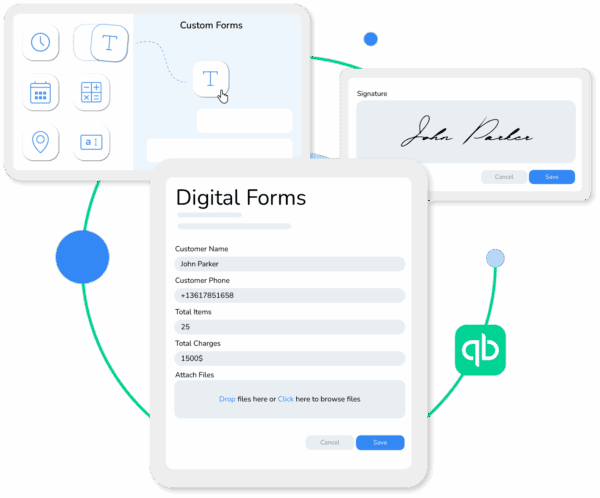
Documentation happens in context as the work progresses. Your crew takes photos of furniture condition before loading and attaches them to the specific inventory item. When the customer confirms delivery, their signature is captured on a phone or tablet and immediately synced to your office. Crew notes about access issues, special handling, or customer requests are added to the work order in real time, not hours later.
This digital capture eliminates the paperwork chase at the end of the day. There’s no stack of forms to collect or handwriting to decipher. Everything is already in your system, organized by job, and available to whoever needs it.
Automate updates for office teams and customers
When a crew completes a checklist item, Arrivy can automatically notify your office and send updates to the customer. You configure the automation once, like what triggers updates, who receives them, and what they say, and then it runs consistently for every job. Your dispatcher doesn’t have to remember to text customers. Your operations manager doesn’t have to call crews for status updates. The information flows automatically based on actual work completion.
This automation frees your office team to handle exceptions and customer service rather than spending their day tracking down basic information. When the system handles routine updates, your people can focus on solving problems and improving the customer experience.
Sync everything with scheduling, dispatch, and reporting
Arrivy’s work orders integrate with scheduling and dispatch, creating a connected workflow from estimate to completion. When you schedule a job, the work order is created automatically with all relevant details. When the crew completes the work order, that information feeds into your reporting so you can track metrics like job duration, labor costs, customer satisfaction, and crew performance.
This integration gives you visibility into your operation that paper systems simply cannot provide. You can identify which crews are most efficient, which types of jobs take longer than estimated, and where bottlenecks occur.

Wrapping Up
The moving industry is facing real pressure. Costs are up 80%, labor is scarce and expensive, competition is intense, and customers expect more transparency and communication than ever before. You can’t control most of these factors, but you can control how efficiently your operation runs.
Arrivy’s digital crew checklists and work orders address the coordination and communication issues that plague moving operations. They ensure consistent job quality across all your crews. They reduce costly mistakes, rework, and damage claims. They keep customers informed and satisfied without requiring constant manual updates. And they give you the visibility you need to run your business strategically.