


Salesforce helps service businesses win work. But the real challenge begins after the win. Even though many teams rely on Salesforce to manage customers, opportunities, and forecasts, closing an opportunity does not guarantee smooth execution in the field.
For teams that operate in the field, jobs do not stay inside a CRM. They move into scheduling queues, dispatch calendars, technician workflows, and customer communications. This is where execution often starts to break down. Information is re-entered. Context is lost. Timelines slip. Costs become harder to track. Over time, Salesforce data becomes less useful once work leaves the office.
In this scenario, Field Service Management Software supports the operational side of service delivery. It turns approved work into executable jobs and keeps teams aligned throughout execution. When Salesforce is integrated with an FSM platform like Arrivy, service businesses gain stronger control over execution, clearer cost visibility, and better use of the systems they already trust.
Recommended Reads
This article explains how Salesforce field service integration helps service teams improve field execution, and why many growing businesses use this approach to strengthen operations without replacing their CRM.
Why Salesforce CRM Alone Isn’t Enough for Field Execution
CRM platforms like Salesforce are designed to give service businesses a 360-degree view of customer relationships, opportunities, and service commitments. They bring structure to sales pipelines and clarity to what work is coming next.
At that point, execution depends on real-time coordination. Scheduling crews, matching skills, tracking progress during the job day, and keeping customers informed require operational controls that extend beyond record management. Salesforce is not built to manage live field execution. That is why, without a dedicated execution layer, teams rely on manual handoffs and workarounds.
Strong CRM Records, Limited Job-Day Control
Inside Salesforce, teams can see approved opportunities and scheduled work. What they cannot see clearly is how jobs unfold once crews are dispatched. Dispatcher awareness drops. Field teams start work without full context. Managers learn about delays only after customer satisfaction is affected.
The Cost of Disconnected Execution
When CRM data does not move cleanly into field workflows, the impact shows up quickly.
Common outcomes include:
For businesses that already trust Salesforce, the challenge is not finding a better CRM. The challenge is to ensure approved work enters the field with the same clarity and control that exists during the sales process.
Disconnected Execution Is Expensive
Manual handoffs, missed context, and delayed jobs add up quickly.
How Salesforce CRM and Field Service Integration Improves Job Execution
Salesforce field service integration improves job execution by creating a direct operational link between approved opportunities and field activity.
From Approved Opportunities to Scheduled Jobs
Once an opportunity reaches the appropriate stage in Salesforce, job details flow into field operations in a structured format. Scheduling teams work with complete customer and scope information without rebuilding work orders or confirming basics.
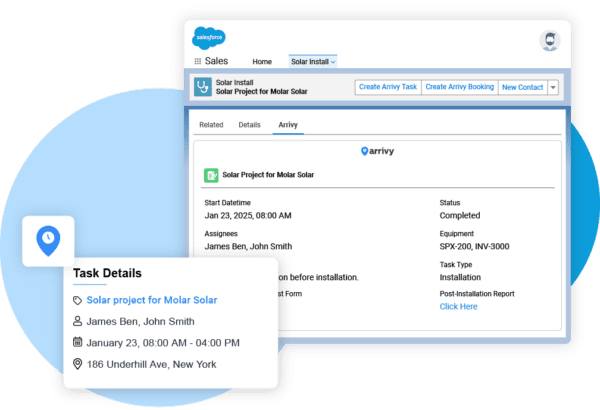
This CRM to field service integration shortens the time between approval and scheduling while reducing early-stage errors that often lead to delays. It helps in the following ways:
Faster transition from opportunity approval to scheduling
Fewer mistakes caused by manual re-entry
Clear job ownership from the start
Smarter Scheduling and Crew Assignment
Scheduling inefficiencies directly affect technician productivity. Industry studies show that ineffective job scheduling can consume nearly 50% of a service technician’s working time, limiting how many jobs can realistically be completed in a day.
Execution quality depends heavily on scheduling accuracy. With Sales force integration in place, dispatchers assign work based on technician skills, availability, and location using information already captured during the sales process.
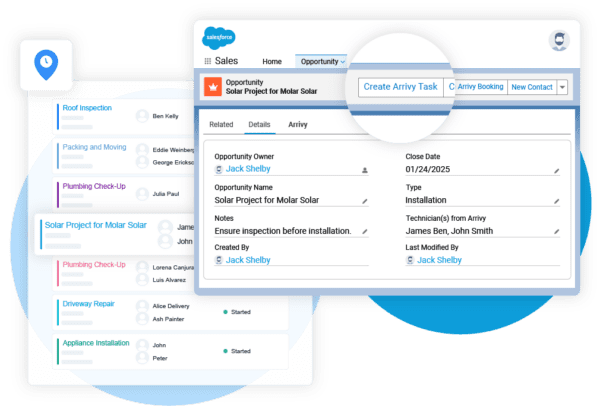
Better crew management leads to better decisions. Crews arrive prepared, daily schedules remain stable, and mid-day changes drop significantly. It impacts as follows:
Improved technician utilization
Fewer schedule changes during job day
Stronger alignment between job scope and crew capability
Real-Time Visibility During Job Execution
As work moves into the field, execution updates stay connected to Salesforce. Job progress reflects actual field activity, giving operations teams ongoing visibility throughout the day.
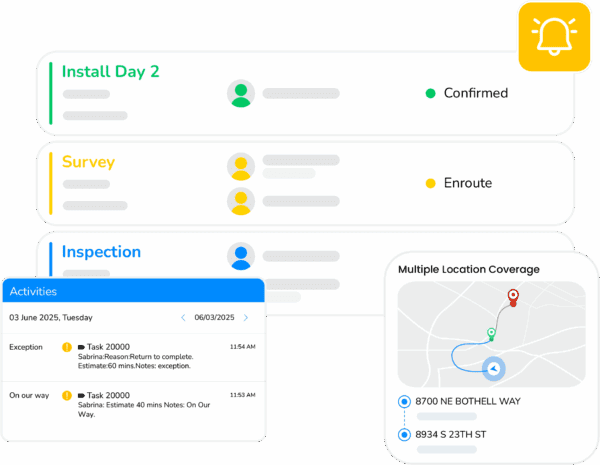
Managers can respond to delays early. Customer-facing teams reference the current job status. The execution helps with:
Faster response to issues or schedule changes
Reduced internal check-ins
More consistent customer communication
Closing the Loop After Job Completion
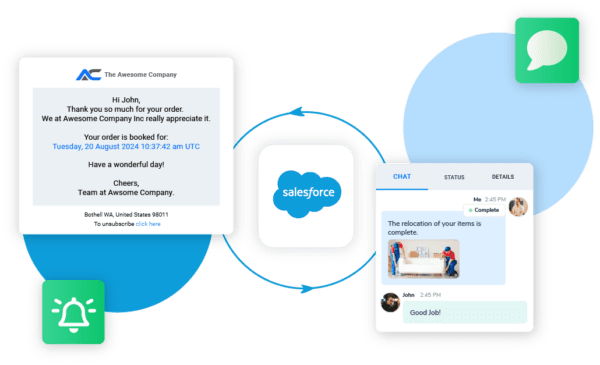
Job execution does not end when work is finished. Integration ensures completion details, such as notes, photos, and status updates, remain tied to the original opportunity in Salesforce.
This creates a complete operational record that supports billing accuracy, service reporting, and long-term performance analysis. It helps as:
Accurate job history linked to each opportunity
Better insight into execution quality
Stronger data for forecasting and service operations
See How Salesforce Data Powers Real Field Execution
Get a walkthrough focused on how your teams schedule, dispatch, and execute work today.
How Salesforce Data Moves From CRM to Field Execution
Salesforce field service integration follows a predictable execution workflow that begins once work is approved and continues through job completion. This workflow ensures Salesforce remains connected to field activity without slowing teams down or changing how they operate. It happens in 5 steps, as explained:
Step 1: Opportunity Data Moves into Execution
When an opportunity reaches the appropriate stage in Salesforce, customer details, job scope, and timelines become available to operations teams. This removes the need to recreate work manually before scheduling begins.
Step 2: Approved Work Converts into Field Jobs
Execution systems translate approved Salesforce data into jobs that can be scheduled and dispatched. Operations teams assign crews based on skills, availability, and location using existing Salesforce context.
Step 3: Scheduling and Dispatch Align with Job Requirements
Dispatchers plan work with accurate inputs, reducing last-minute changes and ensuring crews arrive prepared for the job.
Step 4: Job Execution Updates Stay Visible
As work progresses, job status updates reflect actual field activity. Operations teams maintain visibility throughout the day without relying on manual check-ins.
Step 5: Job Completion Data Flows Back to Salesforce
Once work is finished, execution details remain tied to the original opportunity. Salesforce reflects completed work, supporting billing accuracy and performance tracking.
This workflow keeps Salesforce central to planning while giving field teams the operational structure needed to deliver work consistently.
Operational Benefits of Connecting Salesforce to Field Service Software
When Salesforce is connected to field execution, the impact shows up quickly in day-to-day operations. The benefits extend beyond visibility and influence how efficiently teams deliver work.
Faster Job Scheduling and Dispatch
Powerful scheduling and dispatch help approved opportunities move into execution without delays caused by manual setup or missing information.
Improved Technician Productivity
Crews start jobs with clearer scope and fewer interruptions, reducing idle time and rework.
More Consistent Customer Communication
Job progress updates stay aligned with execution, allowing teams to set accurate expectations.
More Reliable Service Reporting and Forecasting
Completed work feeds back into Salesforce, improving the accuracy of performance reviews and planning.
Reduced Manual Effort and Execution Errors
Automation replaces repetitive handoffs, lowering the risk of scheduling conflicts and data gaps.
Together, these benefits help service businesses turn Salesforce data into measurable execution outcomes.
ROI Impact of Salesforce and FSM Integration
The operational impact of connected execution workflows is measurable. These gains highlight how integration improves service delivery once work moves beyond planning and into execution.
Analysis across thousands of service organizations shows that teams using automated field execution workflows achieved a 37% reduction in first response time and a 52% reduction in resolution time (Source).
In practice, this improvement shows up across daily operations. When Salesforce opportunity data flows directly into field execution, teams complete more jobs within the same operating hours. Dispatch coordination becomes faster, technicians spend less time waiting or reworking tasks, and job completion data reaches billing systems without delay.
More Jobs Completed without Adding Headcount
When opportunity data flows directly into field operations, teams spend less time coordinating schedules and correcting errors. Dispatchers work faster. Crews start jobs with clearer instructions. Ultimately, delays are caused by the missing information drop.
This allows teams to complete more work within the same operating hours, even as job volume increases.
Lower Cost per Job Through Better Execution Control
Execution gaps often lead to repeat visits, idle technician time, and rushed rescheduling. Integration reduces these inefficiencies by ensuring jobs are ready before crews arrive on site. Over time, this brings down the cost associated with each job.
Faster Billing and More Reliable Financial Tracking
When job completion updates flow back into Salesforce, finance and operations teams gain quicker access to accurate execution data. Completed work can move into billing without waiting for manual confirmation or missing documentation.
Shorter billing cycles improve cash flow and reduce disputes tied to incomplete job records.
Stronger Use of Salesforce Data Across Operations
Salesforce contains valuable information about customers, timelines, and service commitments. Integration ensures this data supports execution rather than sitting idle in reports.
Operations teams use it to plan work. Field teams rely on it for context. Managers use it to review performance. The CRM investment delivers value beyond forecasting.
Improved Customer Retention Through Reliable Service Delivery
Reliable execution builds trust. When customers receive accurate arrival windows, timely updates, and completed work as promised, satisfaction improves naturally.
How Different Service Industries Use Salesforce With FSM Platforms
Salesforce field service integration supports a wide range of service-based industries. While each industry operates differently, the underlying challenge is consistent. Approved opportunities in Salesforce must turn into controlled, visible execution in the field.
The table below highlights how integration supports common service workflows across industries.
Across these industries, Salesforce field service integration provides a consistent way to move approved work into execution while letting operations, field teams, and customer records align as complexity grows.
What to Look for in a Salesforce Field Service Integration Solution
Industry outlooks for 2024–2029 consistently rank CRM and ERP integration among the top three trends shaping field service management platforms. This makes integration depth a critical evaluation factor when selecting a solution intended to support long-term operational growth.
Although choosing a Salesforce field service integration solution is a technical decision, it directly affects how well opportunities turn into completed work. The checklist below highlights key areas service businesses should evaluate before selecting an integration.
Salesforce Field Service Integration Evaluation Checklist
Use this checklist to assess whether an integration will support real execution needs, not just data transfer.
Salesforce Connectivity
- ✓Native support for Salesforce objects such as opportunities, customers, and service records
- ✓Clear alignment with existing Salesforce workflows without forcing process changes
Data Sync Behaviour
- ✓Real-time data sync rather than delayed or batch updates
- ✓Two-way flow that reflects field progress back in Salesforce
- ✓Control over which fields sync to avoid clutter or confusion
Job-Day Execution Support
- ✓Ability to move beyond scheduling into live job coordination
- ✓Support for dispatch, job status updates, and completion tracking
- ✓Visibility into work while it is in progress
Field Team Adoption
- ✓Simple workflows for technicians to follow on job day
- ✓Mobile access to job details, notes, and updates
- ✓Minimal reliance on manual reporting from the field
Reporting and Operational Visibility
- ✓Clear job history tied back to Salesforce opportunities
- ✓Insight into execution performance and delays
- ✓Data that supports billing accuracy and future planning
Scalability and Flexibility
- ✓Ability to support growing job volumes without added overhead
- ✓Flexibility to adapt workflows as operations evolve
- ✓Integration that strengthens Salesforce rather than replacing it
Many integrations are limited to moving data into a schedule. A strong Salesforce field service integration supports execution before, during, and after the job day. It helps teams maintain control as operations grow and ensures Salesforce remains a reliable source of truth throughout the service lifecycle.
Install Arrivy from Salesforce AppExchange
Extend Salesforce with real-time scheduling, dispatch, and field execution.
Why Salesforce Users Need Execution-Focused Field Service Integration
As field service operations mature, technology adoption increasingly influences the quality of execution. Industry surveys report that 75% of field service companies saw improvements in first-time fix rates after integrating AI-driven and advanced operational technologies. It underscores the role of connected execution systems in reducing repeat visits.
Salesforce users already operate with a strong foundation. Customer data is structured. Opportunities are tracked. Forecasts are reliable. This level of maturity changes how integration decisions should be evaluated.
Knowing this, the question arises: how much value is the business extracting after opportunities move into execution? To answer this, the following points can be considered:
Salesforce Sets High Expectations for Execution
When teams rely on Salesforce, there is an assumption that downstream operations will reflect the same level of control and accuracy. In reality, many execution processes still rely on manual coordination outside the CRM.
This mismatch creates friction. Data that looks complete in Salesforce still needs interpretation before crews can act on it. FSM integration closes this gap by turning CRM-approved work into operationally ready jobs.
Execution Gaps Dilute the CRM Investment
Salesforce is a premium system. When field execution remains fragmented, part of that investment goes underutilized. The opportunities close on time, but jobs run late. Forecasts look solid, but actual delivery struggles to keep pace.
FSM integration ensures Salesforce data drives real outcomes in the field. Job progress, delays, and completion details feed back into the CRM, keeping leadership aligned with reality rather than assumptions.
How Salesforce Users Extend Field Execution without Replacing Their CRM
For many service businesses, replacing Salesforce workflows is not an option. FSM integration offers a more practical path forward. It extends Salesforce into daily operations without disrupting existing processes.
Operations teams gain execution control. Field teams gain clarity. Leadership gains confidence that CRM data reflects what is actually happening on the job day. This approach allows businesses to scale execution while preserving the systems they already trust.
Common Execution Gaps That Impact Profitability
Execution gaps rarely appear overnight. They develop gradually as job volume increases and teams rely on manual coordination to keep work moving. Over time, these gaps begin to affect margins, customer experience, and team efficiency.
Below are the most common execution issues service businesses encounter after opportunities move into the field.
Over-Reliance on Salesforce for Job Execution
Salesforce provides strong visibility into customers and opportunities, but it is not designed to manage job-day coordination. When teams attempt to handle scheduling, dispatch, and execution updates inside the CRM, work becomes harder to control.
Field teams operate outside Salesforce. Without an execution layer, updates lag behind reality, and decision-makers lose sight of what is actually happening on the ground.
Limited Visibility Once Jobs Are in Progress
Many businesses have clear schedules in place, but lack insight once crews leave for the day. Managers know when jobs are planned, but not how they are progressing.
This makes it difficult to respond to delays, reassign resources, or keep customers informed without constant manual check-ins.
Disconnected Field Adoption
Even when processes are well-defined in the office, execution depends on adoption in the field. Technicians often work with separate tools for notes, photos, and communication. This fragments job data and creates gaps in reporting.
When field teams do not have a single place to manage job activity, information reaches Salesforce late or not at all.
Integrations That Stop at Scheduling
Some integrations focus only on moving data into a schedule. They do not support job-day updates, documentation, or completion data flowing back into the CRM.
As a result, Salesforce reflects planned work rather than completed work. This limits its value for performance analysis, billing accuracy, and long-term planning.
These gaps emerge when execution depends on disconnected systems. Addressing them requires an execution layer that reflects job day realities.
How Arrivy Complements Salesforce for Field Execution
For service businesses using Salesforce, the goal is to make sure that approved opportunities translate into controlled, profitable execution in the field. This is where Arrivy fits. Arrivy operates as an execution layer that activates Salesforce data once work moves beyond planning and into the job day.
Turning Salesforce Opportunities into Executable Jobs
When an opportunity reaches the appropriate stage in Salesforce, Arrivy helps operations teams move quickly without recreating work. Job details flow into a structured execution environment where schedules, crews, and timelines can be managed with clarity.
This reduces the lag between approval and action. Dispatchers work with complete context. Field teams arrive prepared instead of filling gaps on site.
Real-Time Coordination During Job Day
Arrivy supports execution while work is in progress. Operations teams gain visibility into job status, crew location, and progress without relying on manual updates. Field teams can focus on completing work. As updates flow back, Salesforce reflects what is actually happening in the field. This alignment helps teams respond to changes earlier and manage expectations more accurately.
Clear Feedback from Field to CRM
Execution does not end when a job is completed. Arrivy captures job outcomes such as notes, photos, and status updates and connects them back to Salesforce. This creates a reliable operational record tied to each opportunity.
Teams use this data to support billing, performance reviews, and future planning. Salesforce remains current and useful beyond forecasting.
A Practical Extension for Growing Service Teams
Arrivy gives Salesforce users a way to strengthen execution without disrupting existing workflows. Operations teams gain control. Field teams gain clarity. Leadership gains confidence that CRM data reflects real execution.
Explore All Arrivy Integrations
Arrivy integrates with 50+ business tools across CRM, scheduling, communications, payments, and field operations. Explore how Arrivy fits into your current workflows.
Conclusion
As field operations grow more complex, execution systems also evolve. Research shows that AI-driven scheduling can reduce operational costs by approximately 12%, reinforcing the value of execution platforms that rely on real-time data rather than manual coordination. For Salesforce users, this shift supports more predictable execution as job volume increases.
Salesforce gives service businesses a strong foundation for managing customers, opportunities, and future demand. The real challenge begins when approved work moves into the field and execution takes over. Salesforce field service integration ensures this transition happens with control and clarity. It keeps Salesforce aligned with what is actually happening during job execution, giving teams confidence that plans match reality.
For businesses already using Salesforce, Arrivy provides a practical execution layer that extends Salesforce into daily field operations without disrupting existing workflows. As job volume grows and execution becomes more complex, this connection helps teams maintain control, stay aligned across departments, and scale with confidence.